
Join the Conversation
- Find Answers
- :
- Using Splunk
- :
- Splunk Search
- :
- Extracting new fields from data in another field
- Subscribe to RSS Feed
- Mark Topic as New
- Mark Topic as Read
- Float this Topic for Current User
- Bookmark Topic
- Subscribe to Topic
- Mute Topic
- Printer Friendly Page
- Mark as New
- Bookmark Message
- Subscribe to Message
- Mute Message
- Subscribe to RSS Feed
- Permalink
- Report Inappropriate Content

Hi gurus,
I am new to Splunk but have this task that I'm stumped on:
I have a query that looks like this:
index=pp_security_app_tenablenessus sourcetype="tenable:io:vuln" plugin.id="42981"
| table asset_fqdn, ipv4, port.port, port.protocol, plugin.synopsis, output
One of the resulting fields is a field named "output". Inside the output field I will have data that looks like this:
The SSL certificate will expire within 90 days, at
Jan 29 12:00:00 2021 GMT :

  Subject          : C=US, ST=California, L=San Jose, O=Jimmy's Bar & Grill, OU=Kitchen, CN=jimmysbarandgrill.com
  Issuer           : C=US, O=DigiCert Inc, CN=DigiCert Global CA G2
  Not valid before : Jan 29 00:00:00 2019 GMT
  Not valid after  : Jan 29 12:00:00 2021 GMT
Sometimes the Subject field only has the CN like this:
The SSL certificate will expire within 90 days, at
Jan 29 12:00:00 2021 GMT :

  Subject          : CN=jimmysbarandgrill.com
  Issuer           : C=US, O=DigiCert Inc, CN=DigiCert Global CA G2
  Not valid before : Jan 29 00:00:00 2019 GMT
  Not valid after  : Jan 29 12:00:00 2021 GMT
I need to extract the the Common Name (anything after CN= till end of line or next comma) from both the Subject and Issuer sections of the output field, then extract the 'Not valid before' and 'Not valid after' sections of the output field after the colon and put the extracted data into fields named CommonName, Issuer, Before and After.
Thanks in advance for your help.
- Mark as New
- Bookmark Message
- Subscribe to Message
- Mute Message
- Subscribe to RSS Feed
- Permalink
- Report Inappropriate Content

Hi,
I think this search could resolve what you need. It's important to analyze how this output field presents the data. Look at the end of each rex extraction, if the line ends after the value changes from \s to $ or from \s to \n .
| makeresults
| eval output="Subject          : C=US, ST=California, L=San Jose, O=Jimmy's Bar & Grill, OU=Kitchen, CN=jimmysbarandgrill.com
  Issuer           : C=US, O=DigiCert Inc, CN=DigiCert Global CA G2
  Not valid before : Jan 29 00:00:00 2019 GMT
  Not valid after  : Jan 29 12:00:00 2021 GMT"
| rex field=output "Subject.*CN\=(?<CommonName>.+?)\s"
| rex field=output "Issuer.*CN\=(?<Issuer>.+?)\n"
| rex field=output "before\s\:\s(?<Before>.+?)\n"
| rex field=output "after.*\:\s(?<After>.+?)$"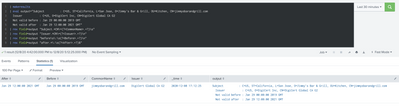
- Mark as New
- Bookmark Message
- Subscribe to Message
- Mute Message
- Subscribe to RSS Feed
- Permalink
- Report Inappropriate Content
Your solution works perfectly. Much appreciated!
- Mark as New
- Bookmark Message
- Subscribe to Message
- Mute Message
- Subscribe to RSS Feed
- Permalink
- Report Inappropriate Content
Hi,
I think this search could resolve what you need. It's important to analyze how this output field presents the data. Look at the end of each rex extraction, if the line ends after the value changes from \s to $ or from \s to \n .
| makeresults
| eval output="Subject          : C=US, ST=California, L=San Jose, O=Jimmy's Bar & Grill, OU=Kitchen, CN=jimmysbarandgrill.com
  Issuer           : C=US, O=DigiCert Inc, CN=DigiCert Global CA G2
  Not valid before : Jan 29 00:00:00 2019 GMT
  Not valid after  : Jan 29 12:00:00 2021 GMT"
| rex field=output "Subject.*CN\=(?<CommonName>.+?)\s"
| rex field=output "Issuer.*CN\=(?<Issuer>.+?)\n"
| rex field=output "before\s\:\s(?<Before>.+?)\n"
| rex field=output "after.*\:\s(?<After>.+?)$"


Join the Splunk Community Slack to learn, troubleshoot, and make connections with fellow Splunk practitioners in real time!
Join Splunk User Groups to connect and learn in-person by region or remotely by topic or industry.
Cisco Data Fabric from Architecture to Investigation, Better SOC Visibility, and More ...
The Trust Gap: Why a Data Foundation is Fundamental to an Agentic Enterprise
Data Management Digest – September 2026
