
Join the Conversation
- Find Answers
- :
- Using Splunk
- :
- Splunk Search
- :
- Re: Extract Multiple fields
- Subscribe to RSS Feed
- Mark Topic as New
- Mark Topic as Read
- Float this Topic for Current User
- Bookmark Topic
- Subscribe to Topic
- Mute Topic
- Printer Friendly Page
- Mark as New
- Bookmark Message
- Subscribe to Message
- Mute Message
- Subscribe to RSS Feed
- Permalink
- Report Inappropriate Content
Extract Multiple fields

Sample data
[A028 : 00]
[F037 : 928323177452]
[F038 : 456137]
[F039 : 0]
The query below is working but i wanted to merge, basically i wanted to use rex field=_raw just once. How to extract multiple fields
index=au_axs_common_log sourcetype=anz_axs_auth_core_log "[A028" |rex field=_raw "(\[F039\s*:(?.*?)\])"| rex field=_raw "\[A028\s*:(?.*?)\]" |stats count by axrc,vrc
- Mark as New
- Bookmark Message
- Subscribe to Message
- Mute Message
- Subscribe to RSS Feed
- Permalink
- Report Inappropriate Content
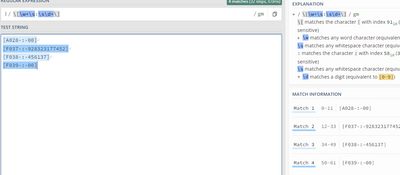
@venky1544 It fetches/matching all the four fields. I wanted to match only two fields. Can you please share your thoughts.
- Mark as New
- Bookmark Message
- Subscribe to Message
- Mute Message
- Subscribe to RSS Feed
- Permalink
- Report Inappropriate Content
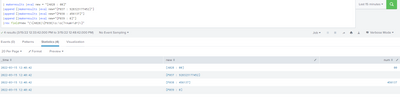
PFB screenshot hope this helps
| makeresults |eval new = "[A028 : 00]"
|append [|makeresults |eval new="[F037 : 928323177452]"]
|append [|makeresults |eval new="[F038 : 456137]"]
|append [|makeresults |eval new="[F039 : 0]"]
|rex field=new "(\[A028|\[F038)\s:\s(?<num>\d+)\]"
- Mark as New
- Bookmark Message
- Subscribe to Message
- Mute Message
- Subscribe to RSS Feed
- Permalink
- Report Inappropriate Content
try this regex \[\w+\s:\s\d+\]
just curious what are you doing with the regex coz there is no named group in the regex ??
is this a tweaked query you pasted here

Join the Splunk Community Slack to learn, troubleshoot, and make connections with fellow Splunk practitioners in real time!
Join Splunk User Groups to connect and learn in-person by region or remotely by topic or industry.
Make Your Machine Data AI-Ready in Splunk
Splunk Asynchronous Forwarding Explained
How to Monitor AI Agents with Splunk Agent Observability
