
Join the Conversation
- Find Answers
- :
- Using Splunk
- :
- Splunk Search
- :
- Expression for custom lookup table values
- Subscribe to RSS Feed
- Mark Topic as New
- Mark Topic as Read
- Float this Topic for Current User
- Bookmark Topic
- Subscribe to Topic
- Mute Topic
- Printer Friendly Page
- Mark as New
- Bookmark Message
- Subscribe to Message
- Mute Message
- Subscribe to RSS Feed
- Permalink
- Report Inappropriate Content

Hi All,
This may be a bit of a peculiar question, but I'm trying to figure out if there's a way to use a certain expression in a search query to pull a "maximum" value based upon a custom table (.csv import) that is pulled into the query via the "lookup" command.
The table has 4 possible "Attribute" values which range from "level-1-access" to "level-4-access". In the stats table, a given UserID may have activity that reflect 1 or more of these (thus, a maximum of 4 per UserID).
Below is a sample dataset. What I'm attempting to do is filter this data so that it's only showing the "maximum" (or, "highest") value for each UserID. The rows bolded in green is what I'd want to see, with everything else excluded; thus, there should only be 1 row per distinct UserID.
One possible thought that comes to mind is adding an numeric field to the .csv lookup, though still not 100% certain how to go about rendering the stats table to only include the highest value per UserID.
Any help would be appreciated. Thanks!
| UserID | Attribute |
| jdoe | level-1-access |
| jdoe | level-3-access |
| jdoe | level-4-access |
| asmith | level-1-access |
| asmith | level-2-access |
| ejones | level-3-access |
| ejones | level-4-access |
| pthomas | level-1-access |
| pthomas | level-2-access |
| pthomas | level-3-access |
| pthomas | level-4-access |
- Mark as New
- Bookmark Message
- Subscribe to Message
- Mute Message
- Subscribe to RSS Feed
- Permalink
- Report Inappropriate Content

I think doing something like this would work.
<base_search>
    | lookup <lookup_name> UserID OUTPUT Attribute
    | eval
        attribute_regex=".*\-(\d+)\-.*",
        max_attribute=case(
            isnull(Attribute), null(),
            mvcount(Attribute)==1, max(tonumber(replace(Attribute, attribute_regex, "\1"))),
            mvcount(Attribute)>1, max(mvmap(Attribute, tonumber(replace(Attribute, attribute_regex, "\1"))))
            ),
        max_attribute_full=mvdedup(
            case(
                isnull(Attribute), null(),
                mvcount(Attribute)==1, if(tonumber(replace(Attribute, attribute_regex, "\1"))=='max_attribute', 'Attribute', null()),
                mvcount(Attribute)>1, mvmap(Attribute, if(tonumber(replace(Attribute, attribute_regex, "\1"))=='max_attribute', 'Attribute', null()))
                )
            )
You can see in the screenshot below I used simulated data to do what I think you are asking for.
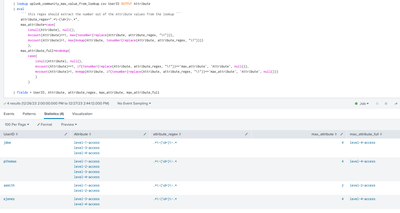
The regex used in the replace command can be adjusted to fit the pattern that is stored in the Attribute field value to just grab the number.
- Mark as New
- Bookmark Message
- Subscribe to Message
- Mute Message
- Subscribe to RSS Feed
- Permalink
- Report Inappropriate Content
Thank you very much!!!
- Mark as New
- Bookmark Message
- Subscribe to Message
- Mute Message
- Subscribe to RSS Feed
- Permalink
- Report Inappropriate Content
I think doing something like this would work.
<base_search>
    | lookup <lookup_name> UserID OUTPUT Attribute
    | eval
        attribute_regex=".*\-(\d+)\-.*",
        max_attribute=case(
            isnull(Attribute), null(),
            mvcount(Attribute)==1, max(tonumber(replace(Attribute, attribute_regex, "\1"))),
            mvcount(Attribute)>1, max(mvmap(Attribute, tonumber(replace(Attribute, attribute_regex, "\1"))))
            ),
        max_attribute_full=mvdedup(
            case(
                isnull(Attribute), null(),
                mvcount(Attribute)==1, if(tonumber(replace(Attribute, attribute_regex, "\1"))=='max_attribute', 'Attribute', null()),
                mvcount(Attribute)>1, mvmap(Attribute, if(tonumber(replace(Attribute, attribute_regex, "\1"))=='max_attribute', 'Attribute', null()))
                )
            )
You can see in the screenshot below I used simulated data to do what I think you are asking for.
The regex used in the replace command can be adjusted to fit the pattern that is stored in the Attribute field value to just grab the number.

Join the Splunk Community Slack to learn, troubleshoot, and make connections with fellow Splunk practitioners in real time!
Join Splunk User Groups to connect and learn in-person by region or remotely by topic or industry.
Persistent Queue at TcpOut — One of Splunk's Most Practical Features
Catalog Is Now Generally Available on Splunk Cloud Platform
Your Path to AgenticOps: AI Experiences for Every Splunk Practitioner
