
Join the Conversation
- Find Answers
- :
- Using Splunk
- :
- Splunk Search
- :
- Events return blank results
- Subscribe to RSS Feed
- Mark Topic as New
- Mark Topic as Read
- Float this Topic for Current User
- Bookmark Topic
- Subscribe to Topic
- Mute Topic
- Printer Friendly Page
- Mark as New
- Bookmark Message
- Subscribe to Message
- Mute Message
- Subscribe to RSS Feed
- Permalink
- Report Inappropriate Content
Events return blank results

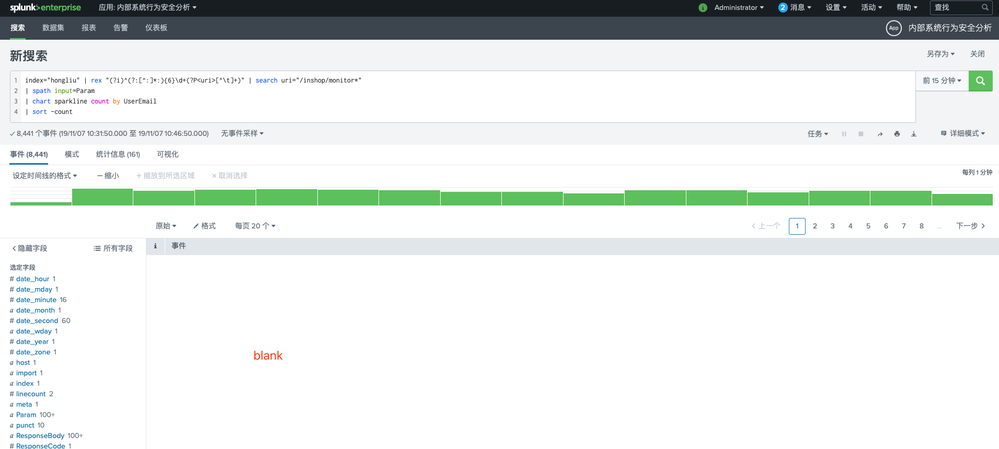
I don't know what happened,pls look the picture and help me!
thanks very much
- Mark as New
- Bookmark Message
- Subscribe to Message
- Mute Message
- Subscribe to RSS Feed
- Permalink
- Report Inappropriate Content

this old problem bit me today. Go to 'All Fields' and deselect all fields, then close that window. Once that was settled, I was able to reselect the 'All Fields' option and the Event Viewer repopulated. Not sure why it worked, but it did and thought I'd share.
- Mark as New
- Bookmark Message
- Subscribe to Message
- Mute Message
- Subscribe to RSS Feed
- Permalink
- Report Inappropriate Content

Hi,
sorry cant understand Chinese. but can say that the results will be shown 3rd(Statistics) and 4th(Visualisation) tabs.
If you are in "Fast mode" , then you cannot see events . If you want to see the events you have to change to "Verbose Mode".
Hope this helps.
Thanks
Anantha.
- Mark as New
- Bookmark Message
- Subscribe to Message
- Mute Message
- Subscribe to RSS Feed
- Permalink
- Report Inappropriate Content
blank in "Verbose Mode",other mode is OK
so I can't see the raw data in Verbose Mode
- Mark as New
- Bookmark Message
- Subscribe to Message
- Mute Message
- Subscribe to RSS Feed
- Permalink
- Report Inappropriate Content

I am having the same issue. In Verbose mode, I am only able to see events under 1 App, which changes randomly. Running the same query under other apps shows the fields on left, but events are blank.
Been having this issue for over a year now and my local Splunk admins cannot seem to help. They think it's a rendering issue with my browser, but I've tried multiple browsers and it behaves the same way on my iPhone as well. Seems to be more of an account-level issue or permissions setting.
- Mark as New
- Bookmark Message
- Subscribe to Message
- Mute Message
- Subscribe to RSS Feed
- Permalink
- Report Inappropriate Content

I know this is ancient, but I had the same issue with blank results because of this:
https://community.splunk.com/t5/Splunk-Search/What-would-intermittently-cause-less-events-to-return-...
- Mark as New
- Bookmark Message
- Subscribe to Message
- Mute Message
- Subscribe to RSS Feed
- Permalink
- Report Inappropriate Content


@kalilinux0011
It would be great if you share some sample event and search to help you.



Join the Splunk Community Slack to learn, troubleshoot, and make connections with fellow Splunk practitioners in real time!
Join Splunk User Groups to connect and learn in-person by region or remotely by topic or industry.
Persistent Queue at TcpOut — One of Splunk's Most Practical Features
Skip the Awkward Silence: Have a .conf-ersation at .conf26
Rethinking Zero Trust: From Product Purchases to Logical Control Evidence
