
Join the Conversation
- Find Answers
- :
- Using Splunk
- :
- Splunk Search
- :
- Re: Display all values (including duplicate values...
- Subscribe to RSS Feed
- Mark Topic as New
- Mark Topic as Read
- Float this Topic for Current User
- Bookmark Topic
- Subscribe to Topic
- Mute Topic
- Printer Friendly Page
- Mark as New
- Bookmark Message
- Subscribe to Message
- Mute Message
- Subscribe to RSS Feed
- Permalink
- Report Inappropriate Content
Display all values (including duplicate values) in timechart graph

Hello,
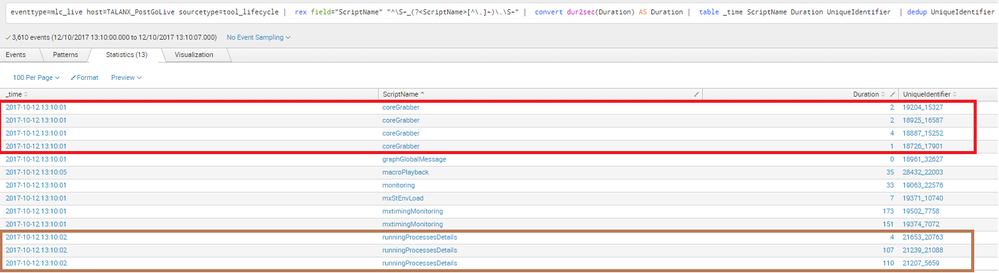
In my data, there could be multiple values(duration) for Scriptname. I am using Time Chart to display data and it should include all values including duplicates.
All Data
Time Chart
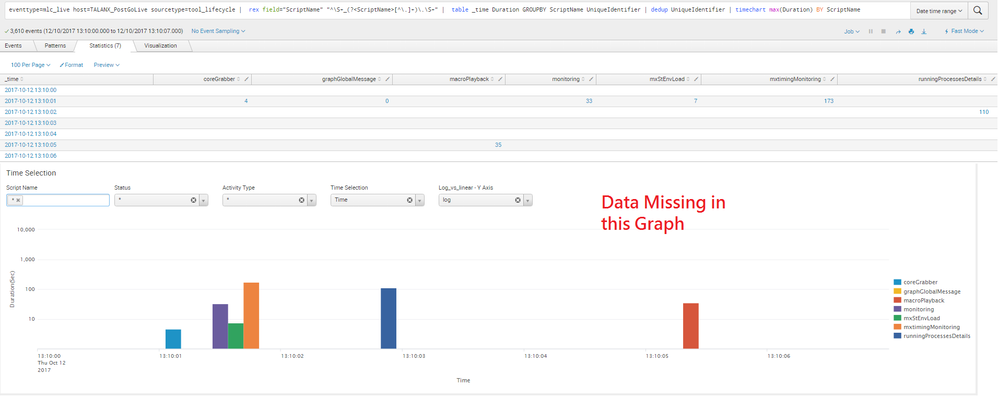
My Query:
eventtype=mlc_live host=TALANX_PostGoLive sourcetype=tool_lifecycle | rex field="ScriptName" "^\S+_(?<ScriptName>[^\.]+)\.\S+" | table _time Duration GROUPBY ScriptName UniqueIdentifier | dedup UniqueIdentifier | timechart max(Duration) BY ScriptName
Currently, I am using max function which include only one value. How can I display all events (including duplicates) in time chart graph.
- Mark as New
- Bookmark Message
- Subscribe to Message
- Mute Message
- Subscribe to RSS Feed
- Permalink
- Report Inappropriate Content

try this instead of timechart, but i'm not sure if the visualization is going to like it or not.
|eval {ScriptName}=Duration
|fields - ScriptName Duration UniqueIdentifier
- Mark as New
- Bookmark Message
- Subscribe to Message
- Mute Message
- Subscribe to RSS Feed
- Permalink
- Report Inappropriate Content
trick worked for fetching all data but unfortunately not working visually. 😞
- Mark as New
- Bookmark Message
- Subscribe to Message
- Mute Message
- Subscribe to RSS Feed
- Permalink
- Report Inappropriate Content

I think you're looking for list() or values() instead of max(). Check out this documentation to help you decide which of those will work better for your use case:
http://docs.splunk.com/Documentation/Splunk/7.0.0/SearchReference/Multivaluefunctions
- Mark as New
- Bookmark Message
- Subscribe to Message
- Mute Message
- Subscribe to RSS Feed
- Permalink
- Report Inappropriate Content
Thanks for reply. I tried both list() and values() but these function will include all duplicate values in same row which wont be displayed on Graph.




Join the Splunk Community Slack to learn, troubleshoot, and make connections with fellow Splunk practitioners in real time!
Join Splunk User Groups to connect and learn in-person by region or remotely by topic or industry.
Where Innovation Takes Flight: The Splunk4Aviation Flight Sim Lands at .conf26
Turn Cisco Telemetry Into Action with Cisco Data Fabric, powered by the Splunk ...
Persistent Queue at TcpOut — One of Splunk's Most Practical Features
