
Join the Conversation
- Find Answers
- :
- Using Splunk
- :
- Splunk Search
- :
- Re: Different search results in Different systems
- Subscribe to RSS Feed
- Mark Topic as New
- Mark Topic as Read
- Float this Topic for Current User
- Bookmark Topic
- Subscribe to Topic
- Mute Topic
- Printer Friendly Page
- Mark as New
- Bookmark Message
- Subscribe to Message
- Mute Message
- Subscribe to RSS Feed
- Permalink
- Report Inappropriate Content
Different search results in Different systems

Hello All,
I have a search query which gives the below results:
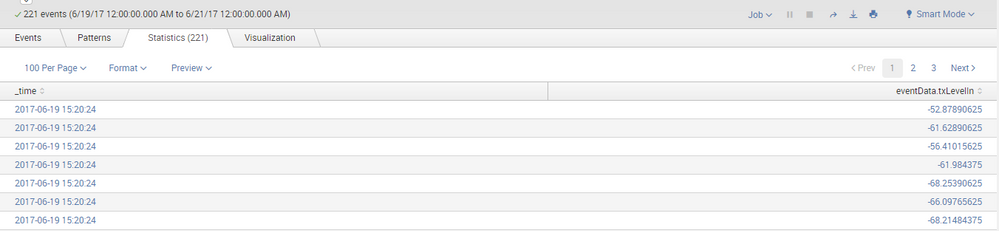
Now the same query when my friend runs in his system, the number of events is same, but the events are not in same order:
Like in my system the first entry is as shown above : eventData.txLevelIn =-52
But in my friends system the first entry is eventData.txLevelIn =-56
Can someone tell me what is the issue.
We have not changed any setting, we both are on same Server.
Regards
Shailendra Patil

- Mark as New
- Bookmark Message
- Subscribe to Message
- Mute Message
- Subscribe to RSS Feed
- Permalink
- Report Inappropriate Content

Other than latest event first, based on _time, order is not guaranteed in splunk unless you use commands that set it. Sort, or any of the various "by" options, will establish a required order. Two records that have identical keys as per the sort order, are not guaranteed to be in any particular order.
This is because the search is distributed out to the indexes, which each return the data to the search head whenever they are finished collecting the data they own. The search head then processes what it gets, when it gets it.
The same search, run later on the same search head, is not even guaranteed the same order, as I understand it, because some indexers may be faster or slower one time than they were on a prior time, and when collating the data back together, splunk has no reason to re-sort the data unless you told it to.
- Mark as New
- Bookmark Message
- Subscribe to Message
- Mute Message
- Subscribe to RSS Feed
- Permalink
- Report Inappropriate Content

There is no issue. All events seem to be having the same time, and unless you sort based on both _time and eventData.txLevelIn, it might come out of sync.
Can you please provide more details of your search query? Have you create bin on _time field or modified _time in your query? What is the time range for which the query runs? Are you using any transforming command or just using table to print the data? Finally what is your use case? What does eventData.txLevelIn represent?
Although this might be irrelevant but are you and your colleague have different ids setup with different time zones?
| makeresults | eval message= "Happy Splunking!!!"
- Mark as New
- Bookmark Message
- Subscribe to Message
- Mute Message
- Subscribe to RSS Feed
- Permalink
- Report Inappropriate Content
index="*******" userId="****" callId="****"|table _time eventData.txLevelIn
This is my query and have not modified anything separately
- Mark as New
- Bookmark Message
- Subscribe to Message
- Mute Message
- Subscribe to RSS Feed
- Permalink
- Report Inappropriate Content
While your intent is still not clear. You can try something like following:
<YourBaseSearch>
| table _time eventData.txLevelIn
| head 1000
| sort - _time eventData.txLevelIn
| makeresults | eval message= "Happy Splunking!!!"

Join the Splunk Community Slack to learn, troubleshoot, and make connections with fellow Splunk practitioners in real time!
Join Splunk User Groups to connect and learn in-person by region or remotely by topic or industry.
Index This | What travels the world but is also stuck in place?
Discover New Use Cases: Unlock Greater Value from Your Existing Splunk Data
Continue Your Journey: Join Session 2 of the Data Management and Federation Bootcamp ...
