
Join the Conversation
- Find Answers
- :
- Using Splunk
- :
- Splunk Search
- :
- Data Visualization Collision
- Subscribe to RSS Feed
- Mark Topic as New
- Mark Topic as Read
- Float this Topic for Current User
- Bookmark Topic
- Subscribe to Topic
- Mute Topic
- Printer Friendly Page
- Mark as New
- Bookmark Message
- Subscribe to Message
- Mute Message
- Subscribe to RSS Feed
- Permalink
- Report Inappropriate Content
Data Visualization Collision

Hi all,
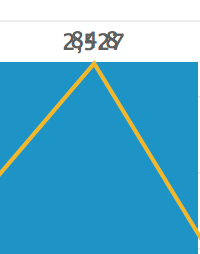
I am having trouble with data visualizations. Two of my data points are layered on top of each other. I have tried adjusting the scale and size of the visualization and can't figure it out. Does anyone know how to fix this collision?
Thanks in advance

- Mark as New
- Bookmark Message
- Subscribe to Message
- Mute Message
- Subscribe to RSS Feed
- Permalink
- Report Inappropriate Content

@zgoda, since there are multiple data values present at the same point in chart they will overlay each other. So, your options would be to
1) Split the series using Multi-Series mode from UI > Edit > Format Visualization > General tab. Refer to documentation:
https://docs.splunk.com/Documentation/Splunk/latest/Viz/ColumnBarCharts#Multiple_series_options
https://docs.splunk.com/Documentation/Splunk/latest/Viz/LineAreaCharts#Multiple_series_options
This way series will be plotted in two separate areas within the same chart with their own x-axis.
2) Use CSS to hide the series for either Columns or Overlaid Line series as per your need.
| makeresults | eval message= "Happy Splunking!!!"
- Mark as New
- Bookmark Message
- Subscribe to Message
- Mute Message
- Subscribe to RSS Feed
- Permalink
- Report Inappropriate Content
Hey nikenilay,
I am new to making dashboards. Do you happen to have some sample css to hide the columns?
Thanks in advance
- Mark as New
- Bookmark Message
- Subscribe to Message
- Mute Message
- Subscribe to RSS Feed
- Permalink
- Report Inappropriate Content
@zgoda, refer to this old answer of mine: https://answers.splunk.com/answers/610389/how-to-display-values-only-for-chart-overlay-field.html
If you are new to CSS you can refer to another answer of mine as to how to begin your CSS Journey within Splunk Dashboards: https://answers.splunk.com/answers/590387/how-do-i-update-panel-color-in-splunk-using-css-1.html
Do try out split to Multi-Series Option as well as suggested in above comment.
| makeresults | eval message= "Happy Splunking!!!"
- Mark as New
- Bookmark Message
- Subscribe to Message
- Mute Message
- Subscribe to RSS Feed
- Permalink
- Report Inappropriate Content
Hi,
Try using the Chart option and in Y-Axis you can change the scale from Log to Linear and add some visualizations to it.
Put 0 in Min Value and 800 for the Max Value.
Let me know if this helps.
- Mark as New
- Bookmark Message
- Subscribe to Message
- Mute Message
- Subscribe to RSS Feed
- Permalink
- Report Inappropriate Content
Hi,
Thank you for the suggestions. I tried your suggestions and was unable to correct my problem.

Join the Splunk Community Slack to learn, troubleshoot, and make connections with fellow Splunk practitioners in real time!
Join Splunk User Groups to connect and learn in-person by region or remotely by topic or industry.
Accelerate Splunk App Development with AI
Meet the .conf26 AI Agent Buildathon Winners
Trusted Autonomy in the SOC: A Maturity Journey
