
Join the Conversation
- Find Answers
- :
- Using Splunk
- :
- Splunk Search
- :
- Re: Chart Multiple (4) Fields
- Subscribe to RSS Feed
- Mark Topic as New
- Mark Topic as Read
- Float this Topic for Current User
- Bookmark Topic
- Subscribe to Topic
- Mute Topic
- Printer Friendly Page
- Mark as New
- Bookmark Message
- Subscribe to Message
- Mute Message
- Subscribe to RSS Feed
- Permalink
- Report Inappropriate Content
Chart Multiple (4) Fields

Is it possible to create a chart out of 4 fields in Splunk?
I am trying to create a chart shown below but I was only able to using 3 fields (without the status). My given data have 4 fields. Any suggestions to this? Thanks in advance.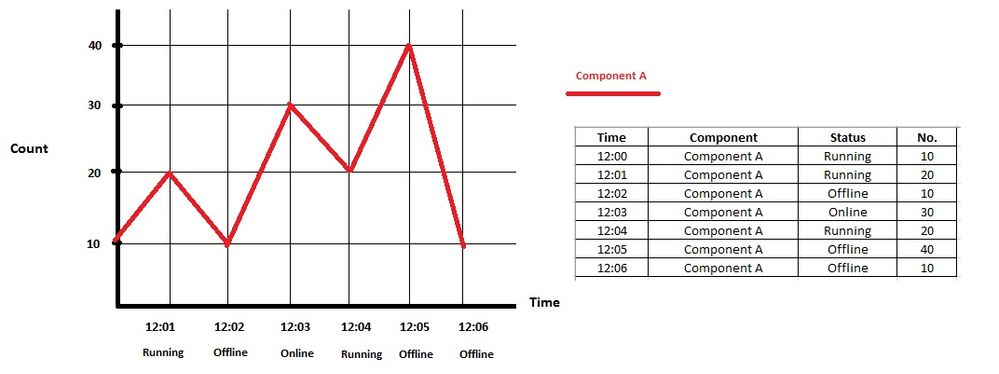
- Mark as New
- Bookmark Message
- Subscribe to Message
- Mute Message
- Subscribe to RSS Feed
- Permalink
- Report Inappropriate Content

what version of splunk are you currently running? if you are on 6.6, i would recommend the new Trellis feature for this.
| makeresults |eval data="_time=1498217650,component=A,status=running,no=10 _time=1498217651,component=A,status=running,no=20 _time=1498217652,component=A,status=offline,no=10 _time=1498217653,component=A,status=online,no=30 _time=1498217650,component=B,status=running,no=20 _time=1498217651,component=B,status=offline,no=40 _time=1498217652,component=B,status=offline,no=10 _time=1498217653,component=B,status=running,no=40"|makemv data |mvexpand data|eval _raw=data|kv|eval _time=time|stats values(no) as no by _time component status|eval{status}=no|fields - status - no
you can split each component into its own chart with the same query. Splunk does not currently have a way, that I know of, to allow for multi-level x-axis, like Excel does, and the trellis feature is a close second.
- Mark as New
- Bookmark Message
- Subscribe to Message
- Mute Message
- Subscribe to RSS Feed
- Permalink
- Report Inappropriate Content
What about something like:
index=component_server
| timechart span=1m sum(No.), values(status) AS status by component
| fillnull value=0
- Mark as New
- Bookmark Message
- Subscribe to Message
- Mute Message
- Subscribe to RSS Feed
- Permalink
- Report Inappropriate Content
Thank you for this suggestion @HeinzWaescher. This however does not show the 'Status'.
- Mark as New
- Bookmark Message
- Subscribe to Message
- Mute Message
- Subscribe to RSS Feed
- Permalink
- Report Inappropriate Content




- Mark as New
- Bookmark Message
- Subscribe to Message
- Mute Message
- Subscribe to RSS Feed
- Permalink
- Report Inappropriate Content
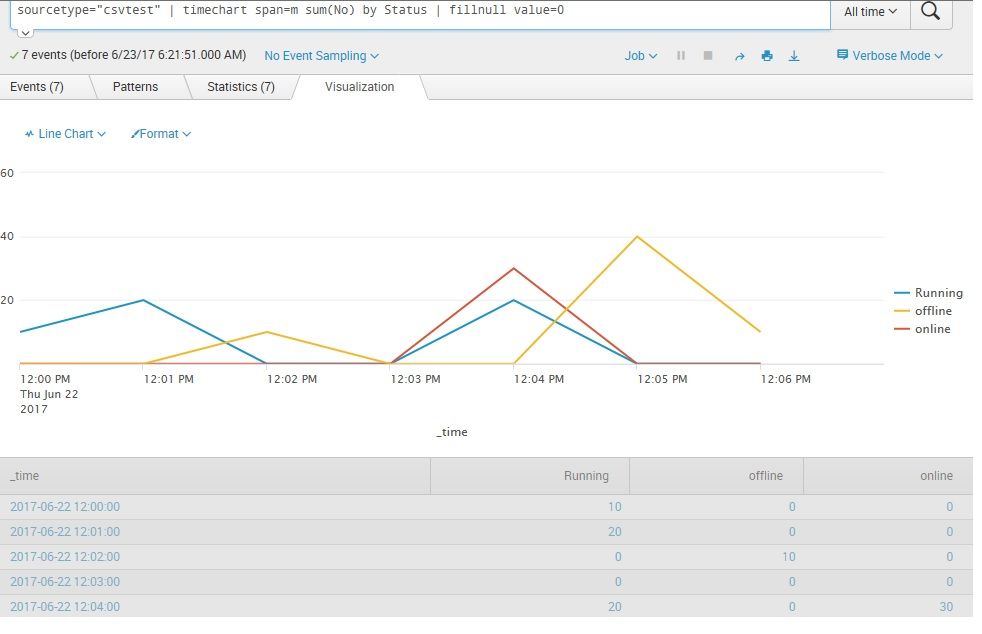
Thank you for this, @inventsekar. However, i'd need a chart (based on component and status) close to the screenshot i've sent above.
- Mark as New
- Bookmark Message
- Subscribe to Message
- Mute Message
- Subscribe to RSS Feed
- Permalink
- Report Inappropriate Content
may we know your current splunk search query..
you can do some split by or layered/multi-stack options I think.
one question - how status can be embedded on this chart - is a tricky issue.
- Mark as New
- Bookmark Message
- Subscribe to Message
- Mute Message
- Subscribe to RSS Feed
- Permalink
- Report Inappropriate Content
Thank you for your response @inventsekar.
My query is as simple as below.
index=component_server
| timechart span=1m sum(No.) by Component
| fillnull value=0
Yes. I am having troubles incorporating the 'Status'. Can you advise on this?

Join the Splunk Community Slack to learn, troubleshoot, and make connections with fellow Splunk practitioners in real time!
Join Splunk User Groups to connect and learn in-person by region or remotely by topic or industry.
Index This | What travels the world but is also stuck in place?
Discover New Use Cases: Unlock Greater Value from Your Existing Splunk Data
Continue Your Journey: Join Session 2 of the Data Management and Federation Bootcamp ...
