
Join the Conversation
- Find Answers
- :
- Using Splunk
- :
- Splunk Search
- :
- Re: Changing an ID to a name
- Subscribe to RSS Feed
- Mark Topic as New
- Mark Topic as Read
- Float this Topic for Current User
- Bookmark Topic
- Subscribe to Topic
- Mute Topic
- Printer Friendly Page
- Mark as New
- Bookmark Message
- Subscribe to Message
- Mute Message
- Subscribe to RSS Feed
- Permalink
- Report Inappropriate Content
Changing an ID to a name

Hi,
My search result brings back a GUID in the ID field. The GUID refers to a customer. I would like it to reflect the customers name. Can I make a Splunk search do this every time?
Best wishes
Michael
- Mark as New
- Bookmark Message
- Subscribe to Message
- Mute Message
- Subscribe to RSS Feed
- Permalink
- Report Inappropriate Content
I have made some progress. I have setup an Automatic Lookup and this works on a search that I table, but not on a raw search. Is that the best I will get?
- Mark as New
- Bookmark Message
- Subscribe to Message
- Mute Message
- Subscribe to RSS Feed
- Permalink
- Report Inappropriate Content


Using an automatic lookup was a good idea. I don't understand what you mean by "raw search", however.
If this reply helps you, Karma would be appreciated.
- Mark as New
- Bookmark Message
- Subscribe to Message
- Mute Message
- Subscribe to RSS Feed
- Permalink
- Report Inappropriate Content
If I make a Table the Automatic Lookup works. If I do a search for index="sophos_central" I see what I would call the raw data and that field is still the GUI.
- Mark as New
- Bookmark Message
- Subscribe to Message
- Mute Message
- Subscribe to RSS Feed
- Permalink
- Report Inappropriate Content
Have you tried adding commands other than table after "index=sophos_central"? Do any of them trigger the automatic lookup? Do you see any error messages in the search log or in splunkd.log?
If this reply helps you, Karma would be appreciated.
- Mark as New
- Bookmark Message
- Subscribe to Message
- Mute Message
- Subscribe to RSS Feed
- Permalink
- Report Inappropriate Content
Have you tried additional SPL commands (following a |)?
Are you searching in Verbose Mode?
If this reply helps you, Karma would be appreciated.
- Mark as New
- Bookmark Message
- Subscribe to Message
- Mute Message
- Subscribe to RSS Feed
- Permalink
- Report Inappropriate Content
I think I have made some progress.
index="sophos_central" "Event::Endpoint::Application::Detected" | table name, endpoint_type, location, when, customer_id, sub_estate, group
That search gives me this which is correct.
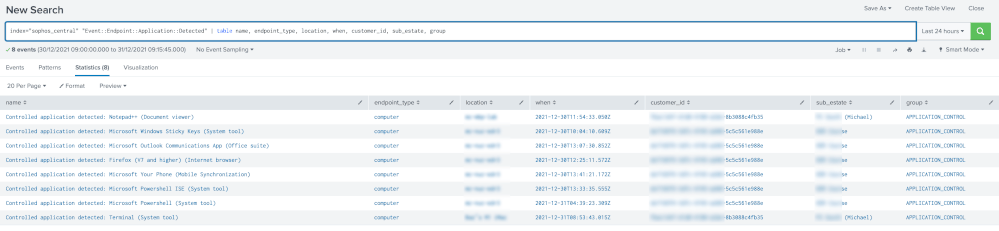
I have now realised that I can add the sub_estate field from the Interesting Fields to the Selected Fields and that does what I want it to do. I can now see the sub_estate in every search.
Thanks for the help.
- Mark as New
- Bookmark Message
- Subscribe to Message
- Mute Message
- Subscribe to RSS Feed
- Permalink
- Report Inappropriate Content
I ran this search
index="sophos_central" "Event::Endpoint::Application::Detected"
and got the following result. This is the customer_id I wanted to change
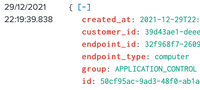
index=_internal sourcetype=splunkd didn't seem to show any errors
- Mark as New
- Bookmark Message
- Subscribe to Message
- Mute Message
- Subscribe to RSS Feed
- Permalink
- Report Inappropriate Content
Thanks for the reply. That has worked well. I was hoping it would replace the field in all searches, but I have managed to get it to work with this search
index="sophos_central" "Event::Endpoint::Application::Detected" | lookup sub_estate_lookups.csv customer_id OUTPUT Name | table name, endpoint_type, location, when, customer_id sub_estate, group
Is it possible to replace the field by default whenever it is found?
- Mark as New
- Bookmark Message
- Subscribe to Message
- Mute Message
- Subscribe to RSS Feed
- Permalink
- Report Inappropriate Content
Assuming the customer name is not available in another field, create a lookup table that maps GUID to name then make the lookup in your query.
If the lookup (I'll all it "guid2name.csv") looks like this:
GUID     Name
8a400b04-51f0-4c70-9340-cc7b9964e5ed  Foo
bab2f4c4-5278-4a52-a65c-8c8a287a7726  Bar
A query might look like this:
<your search for ID>
| lookup guid2name.csv GUID as ID OUTPUT Name
...
If this reply helps you, Karma would be appreciated.


Join the Splunk Community Slack to learn, troubleshoot, and make connections with fellow Splunk practitioners in real time!
Join Splunk User Groups to connect and learn in-person by region or remotely by topic or industry.
Thanks for the Memories: .conf26 Took Learning to New Heights
Best Practices: Splunk auto adjust pipeline queue
Splunk Auto Ingestion Parallel Pipeline Scaling
