
Join the Conversation
- Find Answers
- :
- Using Splunk
- :
- Splunk Search
- :
- Re: Calculate total continuous duration when value...
- Subscribe to RSS Feed
- Mark Topic as New
- Mark Topic as Read
- Float this Topic for Current User
- Bookmark Topic
- Subscribe to Topic
- Mute Topic
- Printer Friendly Page
- Mark as New
- Bookmark Message
- Subscribe to Message
- Mute Message
- Subscribe to RSS Feed
- Permalink
- Report Inappropriate Content

I have a log that contains numerical value which is logged irregularly:
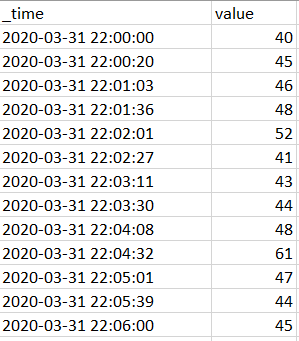
I would like to calculate (and show on timechart) total continuous duration when value is equal or above static threshold. But I'd like to reset this calculation when it goes below that threshold.
For threshold == 45 it should like this:
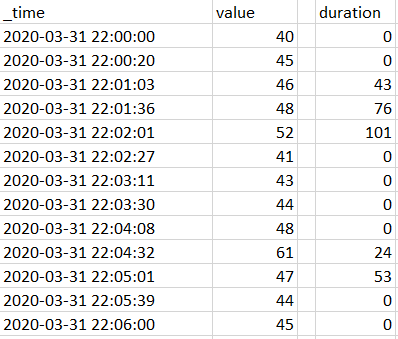
How can I get this? Thanks for your help.


- Mark as New
- Bookmark Message
- Subscribe to Message
- Mute Message
- Subscribe to RSS Feed
- Permalink
- Report Inappropriate Content

| makeresults
| eval _raw="time,value
2020-03-31 22:00:00,40
2020-03-31 22:00:20,45
2020-03-31 22:01:03,46
2020-03-31 22:01:36,48
2020-03-31 22:02:01,52
2020-03-31 22:02:27,41
2020-03-31 22:03:11,43
2020-03-31 22:03:30,44
2020-03-31 22:04:08,48
2020-03-31 22:04:32,44
2020-03-31 22:05:01,46
2020-03-31 22:05:39,48
2020-03-31 22:06:00,52"
| multikv forceheader=1
| eval _time=strptime(time,"%F %T")
| autoregress value as p_1
| eval flag=if(value > 45 AND p_1 >= 45, 1, 0)
| streamstats window=2 range(_time) as duration
| streamstats reset_on_change=t sum(duration) as duration by flag
| eval duration=if(flag=="0", "0", round(duration))
| table _time value duration
value are changed from original question.
flag is the key. Please modify as you like.
- Mark as New
- Bookmark Message
- Subscribe to Message
- Mute Message
- Subscribe to RSS Feed
- Permalink
- Report Inappropriate Content
| makeresults
| eval _raw="time,value
2020-03-31 22:00:00,40
2020-03-31 22:00:20,45
2020-03-31 22:01:03,46
2020-03-31 22:01:36,48
2020-03-31 22:02:01,52
2020-03-31 22:02:27,41
2020-03-31 22:03:11,43
2020-03-31 22:03:30,44
2020-03-31 22:04:08,48
2020-03-31 22:04:32,44
2020-03-31 22:05:01,46
2020-03-31 22:05:39,48
2020-03-31 22:06:00,52"
| multikv forceheader=1
| eval _time=strptime(time,"%F %T")
| autoregress value as p_1
| eval flag=if(value > 45 AND p_1 >= 45, 1, 0)
| streamstats window=2 range(_time) as duration
| streamstats reset_on_change=t sum(duration) as duration by flag
| eval duration=if(flag=="0", "0", round(duration))
| table _time value duration
value are changed from original question.
flag is the key. Please modify as you like.
- Mark as New
- Bookmark Message
- Subscribe to Message
- Mute Message
- Subscribe to RSS Feed
- Permalink
- Report Inappropriate Content
WOW! That was fast! Thank you!
I only corrected value>45 to value>=45 and it is almost what I wanted to get.
In you version duration is started to being calculated since the first value which crossed threshold (increasing direction). For that value I'd like to have 0 and duration should be started to being calculated for next value (of course only if that next value is still equal or above threshold).
Modified example:

Result of your search:

Is this even possible?
- Mark as New
- Bookmark Message
- Subscribe to Message
- Mute Message
- Subscribe to RSS Feed
- Permalink
- Report Inappropriate Content
yes, check my answer.
- Mark as New
- Bookmark Message
- Subscribe to Message
- Mute Message
- Subscribe to RSS Feed
- Permalink
- Report Inappropriate Content
This is exactly what I needed!
Thank you very much!

Join the Splunk Community Slack to learn, troubleshoot, and make connections with fellow Splunk practitioners in real time!
Join Splunk User Groups to connect and learn in-person by region or remotely by topic or industry.
Why Splunk Customers Should Attend Cisco Live 2026 Las Vegas
What Is the Name of the USB Key Inserted by Bob Smith? (BOTS Hint, Not the Answer)
Automating Threat Operations and Threat Hunting with Recorded Future
