
Join the Conversation
- Find Answers
- :
- Using Splunk
- :
- Splunk Search
- :
- Re: Accessing Splunk pre-calculated fields
- Subscribe to RSS Feed
- Mark Topic as New
- Mark Topic as Read
- Float this Topic for Current User
- Bookmark Topic
- Subscribe to Topic
- Mute Topic
- Printer Friendly Page
- Mark as New
- Bookmark Message
- Subscribe to Message
- Mute Message
- Subscribe to RSS Feed
- Permalink
- Report Inappropriate Content

- Mark as New
- Bookmark Message
- Subscribe to Message
- Mute Message
- Subscribe to RSS Feed
- Permalink
- Report Inappropriate Content
Hello,
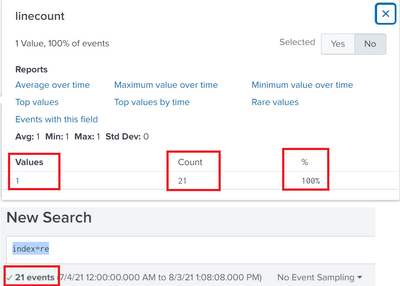
I solved it by accident. I used the "top" command, which automatically adds the count and the percentage to the table. So, solved.
- Mark as New
- Bookmark Message
- Subscribe to Message
- Mute Message
- Subscribe to RSS Feed
- Permalink
- Report Inappropriate Content
Hello,
I solved it by accident. I used the "top" command, which automatically adds the count and the percentage to the table. So, solved.
- Mark as New
- Bookmark Message
- Subscribe to Message
- Mute Message
- Subscribe to RSS Feed
- Permalink
- Report Inappropriate Content


Hi @a_vobard
That's nothing but top command, you can try this
index=re | top linecount
--
an upvote would be appreciated and Accept solution if this reply helps!
- Mark as New
- Bookmark Message
- Subscribe to Message
- Mute Message
- Subscribe to RSS Feed
- Permalink
- Report Inappropriate Content
Hello,
the linecount is one of the numbers I need. What I need is actually such table:
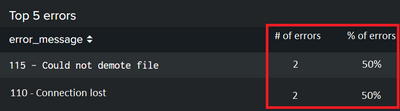
The Numbers in red I am missing. So I need these numbers:
- Total errors
- Number of specific errors
- Percentage of specific errors
I searched in the internet for this because it seamed for me as something basic, but unfortunately didn't find the answers.
Another question: How do you save the linecount in an column, so that I can use it in a table. Something like
| top linecount as Linecount...but this doesn't work....


Join the Splunk Community Slack to learn, troubleshoot, and make connections with fellow Splunk practitioners in real time!
Join Splunk User Groups to connect and learn in-person by region or remotely by topic or industry.
Agentic SOC Triage: Investigating Splunk ES Notables with MCP Server and a Local LLM
All Work and No Play? Not at .conf26! Unwind at These Evening Events
Join the Hackathon at .conf26 and build a No-Code AI agent
