
Join the Conversation
- Find Answers
- :
- Splunk Products
- :
- Splunk SOAR
- :
- How to update an artifact field?
- Subscribe to RSS Feed
- Mark Topic as New
- Mark Topic as Read
- Float this Topic for Current User
- Bookmark Topic
- Subscribe to Topic
- Mute Topic
- Printer Friendly Page
- Mark as New
- Bookmark Message
- Subscribe to Message
- Mute Message
- Subscribe to RSS Feed
- Permalink
- Report Inappropriate Content

is there an option to update the value of a specific field within a specific artifact? I was able to update using phantom update_artifact action or with a REST call, but when the field is updated it also delete the other existent fields in that artifact.
- Mark as New
- Bookmark Message
- Subscribe to Message
- Mute Message
- Subscribe to RSS Feed
- Permalink
- Report Inappropriate Content
Thanks @Dave_Burns and @phanTom. that exact what I did, I've created a new CF that get all the data from the artifact first, after that changes the fields I want and then I can use this CF payload result in the update artifact action. it seems the interface always replace the whole artifact data with whatever you post, this is not very clear on the documentation of the app
- Mark as New
- Bookmark Message
- Subscribe to Message
- Mute Message
- Subscribe to RSS Feed
- Permalink
- Report Inappropriate Content


@scorsatto @Dave_Burns I am not sure what version you may be on but the update_artifact action on the Phantom Phantom app does update and doesn't overwrite, unless you tick the box.
I simply put the JSON of the field I wanted to update in the 'cef_json' field and it updated and didn't overwrite.
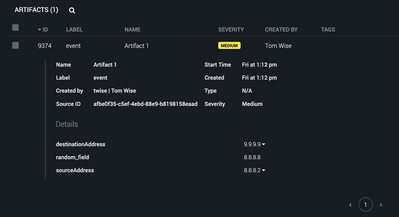
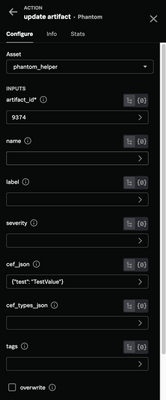
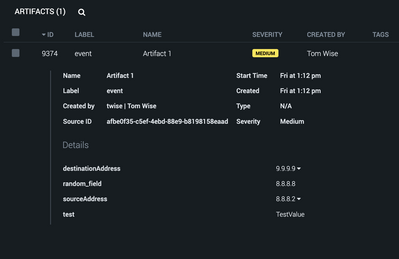
Bear in mind if you are trying to add the same CEF field to an existing artifact, it won't work as you would need a new artifact. If you use update artifact to ADD the same field with a different value, then it will overwrite due to the above.
- Mark as New
- Bookmark Message
- Subscribe to Message
- Mute Message
- Subscribe to RSS Feed
- Permalink
- Report Inappropriate Content
Hi, saw the answers and they are very close to what I also need but I would additionally want to place new key:value pair under the already existing key.
E.g. Add new key "test" under existing "test_header"
"cef": {
"test_header": {
"test": "value"
- Mark as New
- Bookmark Message
- Subscribe to Message
- Mute Message
- Subscribe to RSS Feed
- Permalink
- Report Inappropriate Content

Good to know. When I was trying to do that before, that was back in 4.6.X something. It's been awhile.
@scorsatto Listen to him! He's got the evidence.
- Mark as New
- Bookmark Message
- Subscribe to Message
- Mute Message
- Subscribe to RSS Feed
- Permalink
- Report Inappropriate Content
The interfaces only seem to update the entire artifact.
You could create a custom function where you provide the artifact id, field to change, and new value.
It fetches the entire artifact first, change the field value, and then "re-save" that artifact.
That way you have something modular if you need to do it again in the future.
- Mark as New
- Bookmark Message
- Subscribe to Message
- Mute Message
- Subscribe to RSS Feed
- Permalink
- Report Inappropriate Content
Thanks @Dave_Burns and @phanTom. that exact what I did, I've created a new CF that get all the data from the artifact first, after that changes the fields I want and then I can use this CF payload result in the update artifact action. it seems the interface always replace the whole artifact data with whatever you post, this is not very clear on the documentation of the app

Join the Splunk Community Slack to learn, troubleshoot, and make connections with fellow Splunk practitioners in real time!
Join Splunk User Groups to connect and learn in-person by region or remotely by topic or industry.
May 2026 Splunk Expert Sessions: Security & Observability
Network to App: Observability Unlocked [May & June Series]
SPL2 Deep Dives, AppDynamics Integrations, SAML Made Simple and Much More on Splunk ...
