
Join the Conversation
- Find Answers
- :
- Splunk Products
- :
- Splunk SOAR
- :
- How do I pass a dictionary into a Format Code Bloc...
- Subscribe to RSS Feed
- Mark Topic as New
- Mark Topic as Read
- Float this Topic for Current User
- Bookmark Topic
- Subscribe to Topic
- Mute Topic
- Printer Friendly Page
- Mark as New
- Bookmark Message
- Subscribe to Message
- Mute Message
- Subscribe to RSS Feed
- Permalink
- Report Inappropriate Content

Hello - I'm trying to pass a dictionary into a format code block:
for example:
my_dict = {"hello":"world", "foo":"bar"}
and in the format code block i have:
Contents of dictionary:
{0}
where 0 is mycodeblockname:custom_function:my_dict.hello
and I receive a "error in expanding mycodeblockname:custom_function:my_dict.hello" message. I also tried using :, 0.hello, etc and it hasnt worked. Any suggestions are appreciated. i know that if I pass a dictionary or list from an action block then this works but a custom function doesnt work from what i can see
- Mark as New
- Bookmark Message
- Subscribe to Message
- Mute Message
- Subscribe to RSS Feed
- Permalink
- Report Inappropriate Content


@nongingerale there are a few possibilities why this might not be working. I tested it and it worked as expected for me so here is how i tested it:
Created a CF with a dict output:
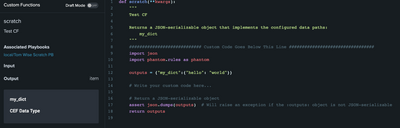
Built a scratch playbook to use the CF:
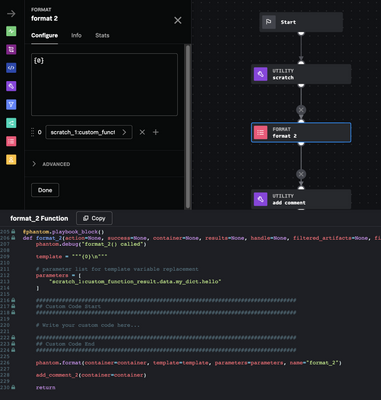
Then outputted the value to a comment:

Hopefully something in there may help point out the issue.
-- If this solved your issue please mark as a solution for others. Happy SOARing --
- Mark as New
- Bookmark Message
- Subscribe to Message
- Mute Message
- Subscribe to RSS Feed
- Permalink
- Report Inappropriate Content
@nongingerale yeah the Code Blocks have never been able to have nested JSON understood downstream. Only the new Custom Functions can as it can be a way to get around the limit of 10 outputs.
Thanks for marking as a solution!
- Mark as New
- Bookmark Message
- Subscribe to Message
- Mute Message
- Subscribe to RSS Feed
- Permalink
- Report Inappropriate Content
@nongingerale there are a few possibilities why this might not be working. I tested it and it worked as expected for me so here is how i tested it:
Created a CF with a dict output:
Built a scratch playbook to use the CF:
Then outputted the value to a comment:
Hopefully something in there may help point out the issue.
-- If this solved your issue please mark as a solution for others. Happy SOARing --
- Mark as New
- Bookmark Message
- Subscribe to Message
- Mute Message
- Subscribe to RSS Feed
- Permalink
- Report Inappropriate Content
thanks! that worked once i created a custom function (as opposed to passing the dictionary from a custom code block).

Join the Splunk Community Slack to learn, troubleshoot, and make connections with fellow Splunk practitioners in real time!
Join Splunk User Groups to connect and learn in-person by region or remotely by topic or industry.
Make your Splunk investment work harder with Optimization Advisor
How Splunk AI Assistant Is Transforming Investigations: Insights from .conf26
Make Your Machine Data AI-Ready in Splunk
