
Join the Conversation
- Find Answers
- :
- Splunk Products
- :
- Splunk SOAR
- :
- Error adding External Splunk Enterprise Instance t...
- Subscribe to RSS Feed
- Mark Topic as New
- Mark Topic as Read
- Float this Topic for Current User
- Bookmark Topic
- Subscribe to Topic
- Mute Topic
- Printer Friendly Page
- Mark as New
- Bookmark Message
- Subscribe to Message
- Mute Message
- Subscribe to RSS Feed
- Permalink
- Report Inappropriate Content

Hello,
I am attempting to add an External Splunk Enterprise Instance to SOAR and receive the following error when I click "Test connection":
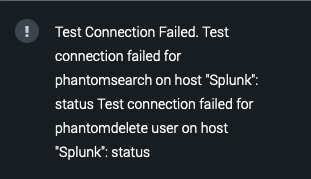
I am running Splunk Enterprise On-Prem v8.2.9, Splunk App for SOAR 1.0.41, and SOAR (Unprivileged, On-prem) v6.0.0.114895. What's interesting is I can see the events be created in Splunk Enterprise in the phantom_action_run index:
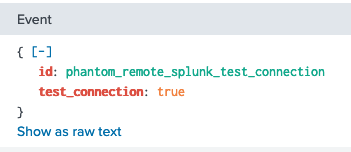
Does anyone happen to know what the (not very descriptive) error "status" means? Whats also interesting is none of my hosts are named "Splunk", so wondering where the error is pulling that hostname from?
Thanks ahead of time for your help!
~J
- Mark as New
- Bookmark Message
- Subscribe to Message
- Mute Message
- Subscribe to RSS Feed
- Permalink
- Report Inappropriate Content
Thanks @phanTom for the quick reply!
Your response made perfect sense to me; however I have validated:
- I was able to log into Splunk Enterprise as phantomdelete
- As phantomdelete, I was able to "delete" events (using "| delete" in a search) - is there another way I should be testing to delete events?
- Validate the events are no longer shown in the search
- Logged back into SOAR and after pressing "Test Connection", the same error as noted above is shown.
Thinking there was something wrong with the phantomdelete user, I removed the account from Splunk Enterprise and recreated it (using a different name). Oddly enough, after recreating it, and testing it again in SOAR, I am greeted with "Test Successful"! So weird, but now my SOAR and Splunk Enterprise appear connected.
Thanks for your help!
- Mark as New
- Bookmark Message
- Subscribe to Message
- Mute Message
- Subscribe to RSS Feed
- Permalink
- Report Inappropriate Content


@JAvnaim this error usually relates to the phantomdelete user you need to create, not having the correct permissions OR the "must reset password on 1st login" is still ticked on the account.
Test you can log into the account using the same password you put in the config and also check it can delete events.
If you don't want the delete capability you can remove from the phantomdelete user once this has been setup and linked.
-- Hope this helps! If so please mark as the solution to future viewers! Happy SOARing! --
- Mark as New
- Bookmark Message
- Subscribe to Message
- Mute Message
- Subscribe to RSS Feed
- Permalink
- Report Inappropriate Content
Thanks @phanTom for the quick reply!
Your response made perfect sense to me; however I have validated:
- I was able to log into Splunk Enterprise as phantomdelete
- As phantomdelete, I was able to "delete" events (using "| delete" in a search) - is there another way I should be testing to delete events?
- Validate the events are no longer shown in the search
- Logged back into SOAR and after pressing "Test Connection", the same error as noted above is shown.
Thinking there was something wrong with the phantomdelete user, I removed the account from Splunk Enterprise and recreated it (using a different name). Oddly enough, after recreating it, and testing it again in SOAR, I am greeted with "Test Successful"! So weird, but now my SOAR and Splunk Enterprise appear connected.
Thanks for your help!


Join the Splunk Community Slack to learn, troubleshoot, and make connections with fellow Splunk practitioners in real time!
Join Splunk User Groups to connect and learn in-person by region or remotely by topic or industry.
Agentic SOC Triage: Investigating Splunk ES Notables with MCP Server and a Local LLM
All Work and No Play? Not at .conf26! Unwind at These Evening Events
Join the Hackathon at .conf26 and build a No-Code AI agent
