
Join the Conversation
- Find Answers
- :
- Premium Solutions
- :
- Splunk ITSI
- :
- Re: Timechart after Stats
- Subscribe to RSS Feed
- Mark Topic as New
- Mark Topic as Read
- Float this Topic for Current User
- Bookmark Topic
- Subscribe to Topic
- Mute Topic
- Printer Friendly Page
- Mark as New
- Bookmark Message
- Subscribe to Message
- Mute Message
- Subscribe to RSS Feed
- Permalink
- Report Inappropriate Content

Hi everyone,
I am trying to create a timechart showing distribution of accesses in last 24h filtered through stats command. More precisely I am sorting services with low accesses number but higher than 2 and considerating only 4 less accessed services using this:
index =
|bin _time span=1h
| stats count by Service _time
| where count>2
| sort 4 count
| rename count as "Access number"
| timechart span=1h count by Service
Results would show services with number of accesses of 1 or 2 in a day despite the where clause. Thank you in advance for your help.
- Mark as New
- Bookmark Message
- Subscribe to Message
- Mute Message
- Subscribe to RSS Feed
- Permalink
- Report Inappropriate Content


Something like this?
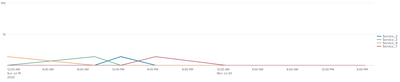
Here's the search that produced it.
| gentimes start=07/19/2020 end=07/20/2020 increment=10m | eval Service="Service_".random()%10, _time=starttime
``` Above just sets up test data```
| bin _time span=1h
| stats count by Service _time
| where count>2
| sort 4 count
| timechart span=1h count by ServiceIf this reply helps you, Karma would be appreciated.
- Mark as New
- Bookmark Message
- Subscribe to Message
- Mute Message
- Subscribe to RSS Feed
- Permalink
- Report Inappropriate Content
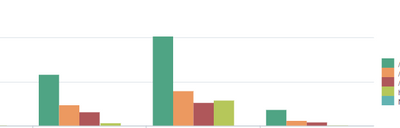
Yeah something like this is what I'm looking for, but first I need to consider only 4 services with lowest daily count
- Mark as New
- Bookmark Message
- Subscribe to Message
- Mute Message
- Subscribe to RSS Feed
- Permalink
- Report Inappropriate Content
If this reply helps you, Karma would be appreciated.
- Mark as New
- Bookmark Message
- Subscribe to Message
- Mute Message
- Subscribe to RSS Feed
- Permalink
- Report Inappropriate Content
Don't know why but in this way it only shows 1 service which reached 4 accesses in 1 hour, instead I would like to have a hour by hour timechart of the last 4 services by sum of daily events and having sum > 2 .
- Mark as New
- Bookmark Message
- Subscribe to Message
- Mute Message
- Subscribe to RSS Feed
- Permalink
- Report Inappropriate Content
Something like this?
Here's the search that produced it.
| gentimes start=07/19/2020 end=07/20/2020 increment=10m | eval Service="Service_".random()%10, _time=starttime
``` Above just sets up test data```
| bin _time span=1h
| stats count by Service _time
| where count>2
| sort 4 count
| timechart span=1h count by ServiceIf this reply helps you, Karma would be appreciated.
- Mark as New
- Bookmark Message
- Subscribe to Message
- Mute Message
- Subscribe to RSS Feed
- Permalink
- Report Inappropriate Content
But if I remove the sort how can I choose the 4 less accessed services?
This search gives me a list of data :
| stats count by Service _time
| where count>2
| sort 4 count
for instance in last 24h
Service | Accesses
A | 3
B | 5
How can I reproduce a chart that would show me how this services are distributed hour per hour in last 24h?
- Mark as New
- Bookmark Message
- Subscribe to Message
- Mute Message
- Subscribe to RSS Feed
- Permalink
- Report Inappropriate Content
Re-sort the results by time.
index =
| bin _time span=1h
| stats count by Service _time
| where count>2
| sort 4 count
| sort _time
| timechart span=1h count by Service
If this reply helps you, Karma would be appreciated.
- Mark as New
- Bookmark Message
- Subscribe to Message
- Mute Message
- Subscribe to RSS Feed
- Permalink
- Report Inappropriate Content
The timechart command requires events to be in time order, but the query uses sort to put them in a different order. Try removing the sort.
If this reply helps you, Karma would be appreciated.


Join the Splunk Community Slack to learn, troubleshoot, and make connections with fellow Splunk practitioners in real time!
Join Splunk User Groups to connect and learn in-person by region or remotely by topic or industry.
Self-Healing Pipeline Is Now Generally Available: AI-Powered CIM Compliance
Meet Splunk Observability Studio: AI-Assisted OpenTelemetry Instrumentation Without ...
Federated Search for Cisco Security and Analytics Logging (SAL) is now GA on Splunk ...
