
Join the Conversation
- Find Answers
- :
- Premium Solutions
- :
- Splunk ITSI
- :
- Re: Splunk ITSI and ServiceNow - Auto populate fie...
- Subscribe to RSS Feed
- Mark Topic as New
- Mark Topic as Read
- Float this Topic for Current User
- Bookmark Topic
- Subscribe to Topic
- Mute Topic
- Printer Friendly Page
- Mark as New
- Bookmark Message
- Subscribe to Message
- Mute Message
- Subscribe to RSS Feed
- Permalink
- Report Inappropriate Content

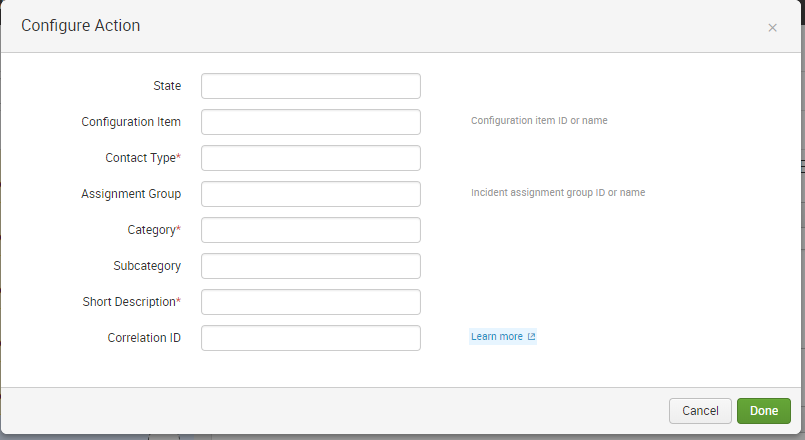
Hi, I have installed and configured the Add-on for ServiceNow. Integration with notable events are working, incidents are created in Service Now. But I would like to have the fields auto populated from the notable event. See screenshot.
Is it possible to have a two-way communication? close the Notable Event when ServiceNow ticket is closed i.e.
Any tip?

- Mark as New
- Bookmark Message
- Subscribe to Message
- Mute Message
- Subscribe to RSS Feed
- Permalink
- Report Inappropriate Content
Splunk_TA_snow/local/local/alert_actions.conf is the config file for populating the fields. But havent found any way to use use token variables such as %orig_description%, %orig_owner%, %orig_severity%, %orig_status%, and so on.
- Mark as New
- Bookmark Message
- Subscribe to Message
- Mute Message
- Subscribe to RSS Feed
- Permalink
- Report Inappropriate Content

Could not run the action. Status: 500 (Internal Server Error) Details: Splunkd daemon is not responding: ("Error connecting to /servicesNS/nobody/-/service_now_incident/snow_incident: ('The read operation timed out',)",)
I'm getting this error, After Clicking Done on the same above screenshot
- Mark as New
- Bookmark Message
- Subscribe to Message
- Mute Message
- Subscribe to RSS Feed
- Permalink
- Report Inappropriate Content
Splunk_TA_snow/local/local/alert_actions.conf is the config file for populating the fields. But havent found any way to use use token variables such as %orig_description%, %orig_owner%, %orig_severity%, %orig_status%, and so on.
- Mark as New
- Bookmark Message
- Subscribe to Message
- Mute Message
- Subscribe to RSS Feed
- Permalink
- Report Inappropriate Content

have you tried to use $result.orig_description$. That format was used for other alerting methods.
- Mark as New
- Bookmark Message
- Subscribe to Message
- Mute Message
- Subscribe to RSS Feed
- Permalink
- Report Inappropriate Content
thanks for your reply. I've tried what you suggest - dont work any better. A workaround is to use Alerts instead of the ServiceNow integration in ITSI. Then tokens are working as expected. Rumors as it that a new integration with servicenow is coming Q1 2019. Fingers crossed

Join the Splunk Community Slack to learn, troubleshoot, and make connections with fellow Splunk practitioners in real time!
Join Splunk User Groups to connect and learn in-person by region or remotely by topic or industry.
Manage Edge Processor pipelines end to end with APIs
Splunk Brings Proof of Control to Digital Asset Transfers
Manage Ingest Processor pipelines end to end with APIs
