
Join the Conversation
- Find Answers
- :
- Premium Solutions
- :
- Splunk ITSI
- :
- Re: Splunk Health Check Inquiry
- Subscribe to RSS Feed
- Mark Topic as New
- Mark Topic as Read
- Float this Topic for Current User
- Bookmark Topic
- Subscribe to Topic
- Mute Topic
- Printer Friendly Page
- Mark as New
- Bookmark Message
- Subscribe to Message
- Mute Message
- Subscribe to RSS Feed
- Permalink
- Report Inappropriate Content

Hello,
So we ran a health check on our Splunk Search Head (w/ Splunk ITSI) and indexers. Though the results were pretty straightforward, would still like to know your inputs, assessments, and if possible, recommendation on this.
Current Situation:
Our Splunk ITSI is experiencing some frequent N/A KPIs which in my assessment would be the skipped searches due to 1000+ KPIs were already created (that's 1000+ saved searches every 5 minutes) and some Forwarders are not following the interval on the inputs.conf (from Add-On Apps, enabled scripted inputs especially on Windows)
Architecture:
3 Indexers
2 Search Heads (not clustered)
Search Head Statuses:
Search Head 1 is for miscellaneous reporting
- 5-10 concurrent users and some are viewing dashboards with expensive searches - (some searches are using summary data, but most are raw data)
Search Head 2 is dedicated for Splunk ITSI
- with 1200+ KPIs defined (scheduled searches) and Jobs are averaging from 700-1000+
- occasional warnings on dispatch directory and as observed, if many users are using, Searches are queuing which is to be expected.
Health Checks result:
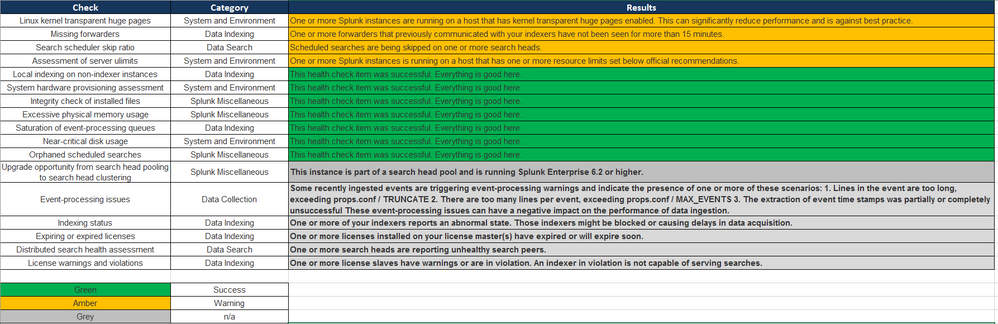
Search Head w/ ITSI
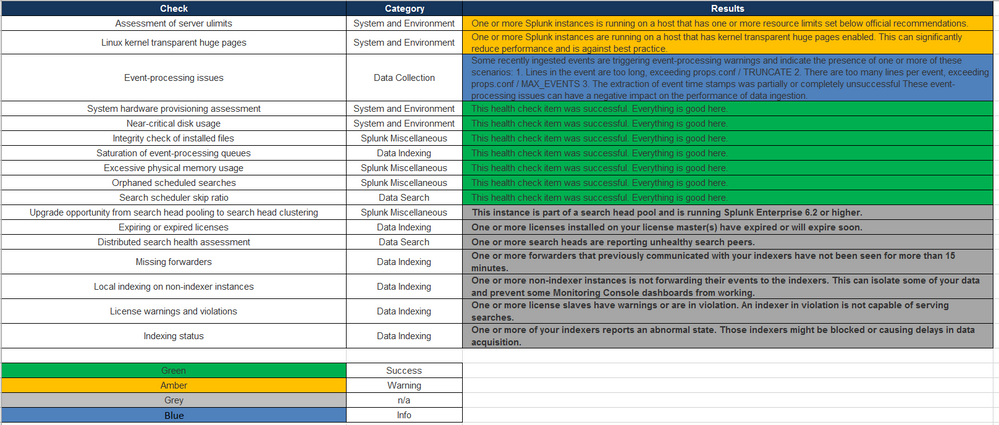
Indexers
Thoughts?
Much appreciated!
- Mark as New
- Bookmark Message
- Subscribe to Message
- Mute Message
- Subscribe to RSS Feed
- Permalink
- Report Inappropriate Content


Thank you for such a complete, well done question!
While there may be may be a variety of answers to this question, I'd start in on the THP. Transparent Huge Pages are a memory optimization that's for workloads other than the workloads Splunk tends to impose on its servers. The most excellent docs outline the THP situation fairly well.
As to how to turn it off, you'll have to look at the documentation for whichever linux you are using. Each distribution is different and in fact, the version is important because that's a moving target as well. We can probably give some help if you can't find the right docs (or if follow them but it still shows THP turned on), but I'd give that a shot first.
Second, if there's still a problem after turning off THP, we can look into those "resource limits set below recommendations". Or maybe we should do that anyway, but you'd have to just dig into that search and find out WHICH resource is set below recommendation and fix it.
Hope this helps!
-Rich
- Mark as New
- Bookmark Message
- Subscribe to Message
- Mute Message
- Subscribe to RSS Feed
- Permalink
- Report Inappropriate Content
Thank you for such a complete, well done question!
While there may be may be a variety of answers to this question, I'd start in on the THP. Transparent Huge Pages are a memory optimization that's for workloads other than the workloads Splunk tends to impose on its servers. The most excellent docs outline the THP situation fairly well.
As to how to turn it off, you'll have to look at the documentation for whichever linux you are using. Each distribution is different and in fact, the version is important because that's a moving target as well. We can probably give some help if you can't find the right docs (or if follow them but it still shows THP turned on), but I'd give that a shot first.
Second, if there's still a problem after turning off THP, we can look into those "resource limits set below recommendations". Or maybe we should do that anyway, but you'd have to just dig into that search and find out WHICH resource is set below recommendation and fix it.
Hope this helps!
-Rich




Join the Splunk Community Slack to learn, troubleshoot, and make connections with fellow Splunk practitioners in real time!
Join Splunk User Groups to connect and learn in-person by region or remotely by topic or industry.
Meet Splunk Observability Studio: AI-Assisted OpenTelemetry Instrumentation Without ...
Federated Search for Cisco Security and Analytics Logging (SAL) is now GA on Splunk ...
Your Path to AgenticOps: AI Experiences for Every Splunk Practitioner
