
Join the Conversation
- Find Answers
- :
- Splunk Products
- :
- Splunk Enterprise
- :
- splitting panels into half
- Subscribe to RSS Feed
- Mark Topic as New
- Mark Topic as Read
- Float this Topic for Current User
- Bookmark Topic
- Subscribe to Topic
- Mute Topic
- Printer Friendly Page
- Mark as New
- Bookmark Message
- Subscribe to Message
- Mute Message
- Subscribe to RSS Feed
- Permalink
- Report Inappropriate Content

Hi all,
Need your help in splitting the panels into 2 halfs. ataching 2 pitcures.
1. first one is the current panel structure am using.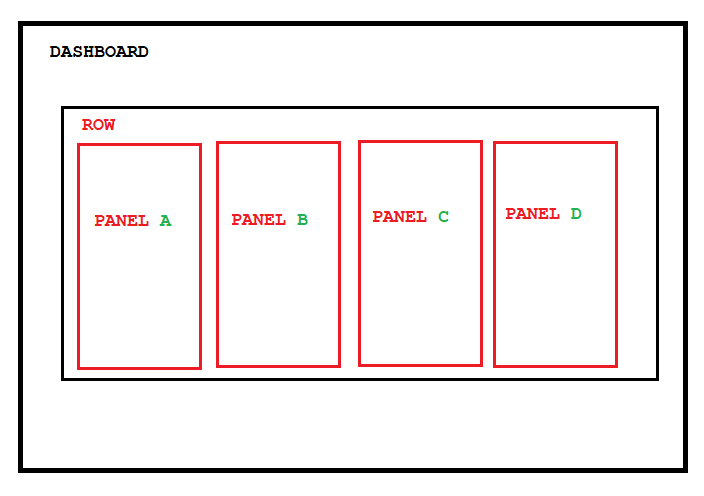
2. second once is what we are looking for.
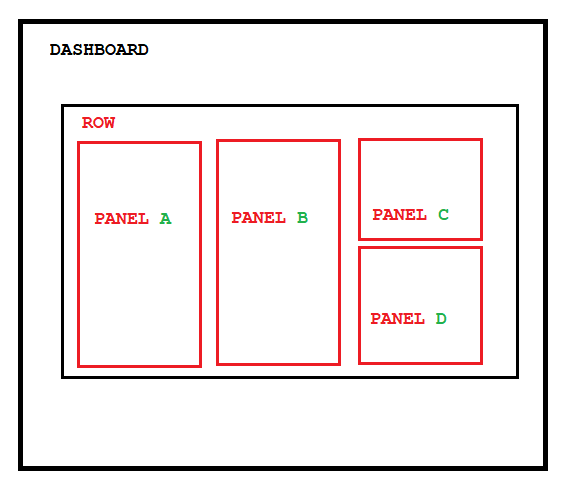
- Mark as New
- Bookmark Message
- Subscribe to Message
- Mute Message
- Subscribe to RSS Feed
- Permalink
- Report Inappropriate Content


@jerinvarghese Note that in principle, @scelikok reply will not put <single> visualisations on top of each other inside a single panel. Generally <single> entries will be tiles horizontally within a panel, whereas other visualisations in that panel will be stacked vertically.
However, you can change that simply by adding the following empty html visualisation between singles so that it will then force them to stack vertically, so add
<single>
...
</single>
<html/>
<single>
...
</single>
Naturally within that html you can do anything to adjust spacing between the other visualisations and the height of an individual visualisation can be adjusted with the
<option name="height">214</option>to whatever height you want.
- Mark as New
- Bookmark Message
- Subscribe to Message
- Mute Message
- Subscribe to RSS Feed
- Permalink
- Report Inappropriate Content

You're welcome, this is what simple xml supports. To do more you can use custom js or css.
- Mark as New
- Bookmark Message
- Subscribe to Message
- Mute Message
- Subscribe to RSS Feed
- Permalink
- Report Inappropriate Content
Hi @jerinvarghese,
You can achieve this by putting C and D components into the same panel using dashboard sourc like below sample.
<dashboard>
  <label>test1</label>
  <row>
    <panel>
      <single>
        <search>
          <query>|makeresults | eval Panel="A"</query>
          <earliest>-24h@h</earliest>
          <latest>now</latest>
        </search>
        <option name="drilldown">none</option>
      </single>
    </panel>
    <panel>
      <single>
        <search>
          <query>|makeresults | eval Panel="B"</query>
          <earliest>-24h@h</earliest>
          <latest>now</latest>
        </search>
        <option name="drilldown">none</option>
      </single>
    </panel>
    <panel>
      <single>
        <search>
          <query>|makeresults | eval Panel="C"</query>
          <earliest>-24h@h</earliest>
          <latest>now</latest>
        </search>
        <option name="drilldown">none</option>
      </single>
      <single>
        <search>
          <query>|makeresults | eval Panel="D"</query>
          <earliest>-24h@h</earliest>
          <latest>now</latest>
        </search>
        <option name="drilldown">none</option>
      </single>
    </panel>
  </row>
</dashboard>
If this reply helps you an upvote is appreciated.
- Mark as New
- Bookmark Message
- Subscribe to Message
- Mute Message
- Subscribe to RSS Feed
- Permalink
- Report Inappropriate Content
Thanks so much for that, is it possible separate with a height too..
- Mark as New
- Bookmark Message
- Subscribe to Message
- Mute Message
- Subscribe to RSS Feed
- Permalink
- Report Inappropriate Content
@jerinvarghese Note that in principle, @scelikok reply will not put <single> visualisations on top of each other inside a single panel. Generally <single> entries will be tiles horizontally within a panel, whereas other visualisations in that panel will be stacked vertically.
However, you can change that simply by adding the following empty html visualisation between singles so that it will then force them to stack vertically, so add
<single>
...
</single>
<html/>
<single>
...
</single>
Naturally within that html you can do anything to adjust spacing between the other visualisations and the height of an individual visualisation can be adjusted with the
<option name="height">214</option>to whatever height you want.

Join the Splunk Community Slack to learn, troubleshoot, and make connections with fellow Splunk practitioners in real time!
Join Splunk User Groups to connect and learn in-person by region or remotely by topic or industry.
[Puzzles] Solve, Learn, Repeat: Matching cron expressions
Design, Compete, Win: Submit Your Best Splunk Dashboards for a .conf26 Pass
May 2026 Splunk Expert Sessions: Security & Observability
