
Join the Conversation
- Find Answers
- :
- Splunk Products
- :
- Splunk Enterprise
- :
- Re: help on tag
- Subscribe to RSS Feed
- Mark Topic as New
- Mark Topic as Read
- Float this Topic for Current User
- Bookmark Topic
- Subscribe to Topic
- Mute Topic
- Printer Friendly Page
- Mark as New
- Bookmark Message
- Subscribe to Message
- Mute Message
- Subscribe to RSS Feed
- Permalink
- Report Inappropriate Content

hi
I have created a tag for the field "counter" called "a"
But when I run a search with tag=a or with tag::counter="a", there is no results
what is the problem please?
- Mark as New
- Bookmark Message
- Subscribe to Message
- Mute Message
- Subscribe to RSS Feed
- Permalink
- Report Inappropriate Content


Hi @jip31,
which search did you run:
tag="a"or
index=your_index tag="a"?
if you didn't inserted the index in the eventtype, you don't have it in the tag search and probably your index isn't in the default search path.
Try to add the index in the eventtype (also index=* if you don't want to associate the tag to a specific index) and try again.
Ciao.
Giuseppe
- Mark as New
- Bookmark Message
- Subscribe to Message
- Mute Message
- Subscribe to RSS Feed
- Permalink
- Report Inappropriate Content
Hi @jip31,
let me understand:
you created an eventtype like the following
counter="a"and you associated to this eventtype a tag called "a" then, when you run a search where this field is present, you don't see the value "a" in the tag field, or the search tag="a" hasn't any result, is it correct?
did you check if in the results of the search that you're analyzing the counter field is present?
then, are you sure about the exact value of tag? tag field is case sensitive.
Ciao.
Giuseppe
- Mark as New
- Bookmark Message
- Subscribe to Message
- Mute Message
- Subscribe to RSS Feed
- Permalink
- Report Inappropriate Content
hi
I can see the tag
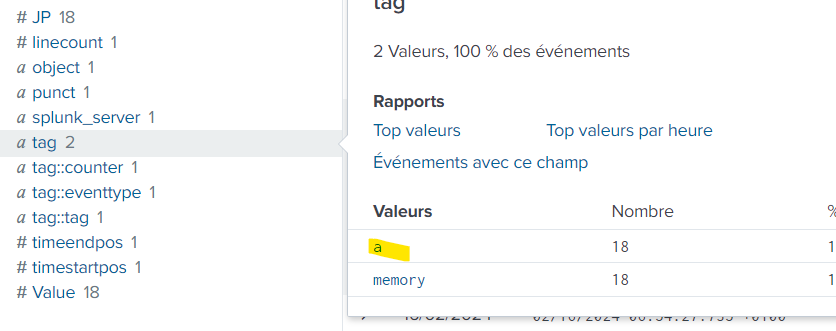
But when I am doing tag="a", i have no results
- Mark as New
- Bookmark Message
- Subscribe to Message
- Mute Message
- Subscribe to RSS Feed
- Permalink
- Report Inappropriate Content
Hi @jip31,
which search did you run:
tag="a"or
index=your_index tag="a"?
if you didn't inserted the index in the eventtype, you don't have it in the tag search and probably your index isn't in the default search path.
Try to add the index in the eventtype (also index=* if you don't want to associate the tag to a specific index) and try again.
Ciao.
Giuseppe
- Mark as New
- Bookmark Message
- Subscribe to Message
- Mute Message
- Subscribe to RSS Feed
- Permalink
- Report Inappropriate Content
index=mem tag=a return results but not tag=a
you are right, when I add the tage add the index level tag=a works
- Mark as New
- Bookmark Message
- Subscribe to Message
- Mute Message
- Subscribe to RSS Feed
- Permalink
- Report Inappropriate Content
Hi @jip31,
good for you, see next time!
Ciao and happy splunking
Giuseppe
P.S.: Karma Points are appreciated 😉


Join the Splunk Community Slack to learn, troubleshoot, and make connections with fellow Splunk practitioners in real time!
Join Splunk User Groups to connect and learn in-person by region or remotely by topic or industry.
Vibe-coding, AI, and Splunkcraft: Highlights from the .conf26 Builder Bar
Thanks for the Memories: .conf26 Took Learning to New Heights
Best Practices: Splunk auto adjust pipeline queue
