
Join the Conversation
- Find Answers
- :
- Splunk Products
- :
- Splunk Enterprise
- :
- Why file encoding is not supported, only utf-8 enc...
- Subscribe to RSS Feed
- Mark Topic as New
- Mark Topic as Read
- Float this Topic for Current User
- Bookmark Topic
- Subscribe to Topic
- Mute Topic
- Printer Friendly Page
- Mark as New
- Bookmark Message
- Subscribe to Message
- Mute Message
- Subscribe to RSS Feed
- Permalink
- Report Inappropriate Content

Hello,
I have installed the splunk enterprise free version on my pc and i have installed the app Splunk app for lookup file edting but unfortunatly doesn't works.
When i try to upload a file .csv i have the following error "File is binary or file encoding is not supported, only utf-8 encoded files are supported splunk".
I tried to change the permission on the app's folder on windows but i did not resolve the problem.
I tested with a very easy csv, and this one is the result:
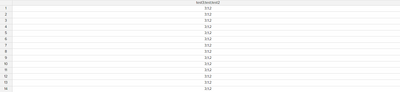
In the csv the column test3,test,test2 were divided. I saved the .csv in all format.
Thanks for the support!
- Mark as New
- Bookmark Message
- Subscribe to Message
- Mute Message
- Subscribe to RSS Feed
- Permalink
- Report Inappropriate Content


Open the file with notepad++ to confirm it's truly in CSV format. If the values are not separated by commas then it's not a CSV file.
If this reply helps you, Karma would be appreciated.
- Mark as New
- Bookmark Message
- Subscribe to Message
- Mute Message
- Subscribe to RSS Feed
- Permalink
- Report Inappropriate Content
The file's encoding has nothing to do with its permissions. If Splunk finds binary or non-UTF-8 data then the *content* needs to change rather than the access rights.
Similarly, putting ".csv" on the end of a file name does not make the file a CSV file. It's the *content* that matters. A CSV file needs to have each column separated from other columns by a comma. If you create the file using a spreadsheet program like Excel, be sure to save the file in CSV format. "All" is not a format.
If this reply helps you, Karma would be appreciated.
- Mark as New
- Bookmark Message
- Subscribe to Message
- Mute Message
- Subscribe to RSS Feed
- Permalink
- Report Inappropriate Content
Thanks for the answer.
"All" format means that i tried CSV (MS-Dos), CSV (Macintosh), CSV (comma delimited), etc.
My csv is not separate by comma, it's a simple .csv:
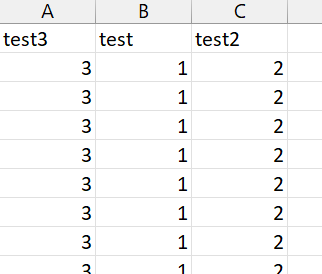
I changed the permission after read this topic: https://community.splunk.com/t5/Getting-Data-In/once-more-about-quot-File-is-binary-or-file-encoding...
- Mark as New
- Bookmark Message
- Subscribe to Message
- Mute Message
- Subscribe to RSS Feed
- Permalink
- Report Inappropriate Content
Open the file with notepad++ to confirm it's truly in CSV format. If the values are not separated by commas then it's not a CSV file.
If this reply helps you, Karma would be appreciated.
- Mark as New
- Bookmark Message
- Subscribe to Message
- Mute Message
- Subscribe to RSS Feed
- Permalink
- Report Inappropriate Content
You are right!
i change the configuration on my pc.
Thanks for the support 🙂
- Mark as New
- Bookmark Message
- Subscribe to Message
- Mute Message
- Subscribe to RSS Feed
- Permalink
- Report Inappropriate Content
Hello, im really lost here and NEED help. What exactly did you configure and where? because no matter what u try i can't get it to save

Join the Splunk Community Slack to learn, troubleshoot, and make connections with fellow Splunk practitioners in real time!
Join Splunk User Groups to connect and learn in-person by region or remotely by topic or industry.
Design, Compete, Win: Submit Your Best Splunk Dashboards for a .conf26 Pass
May 2026 Splunk Expert Sessions: Security & Observability
Network to App: Observability Unlocked [May & June Series]
