
Join the Conversation
- Find Answers
- :
- Splunk Products
- :
- Splunk Enterprise
- :
- Re: TRANSFORMS-null = setnull
- Subscribe to RSS Feed
- Mark Topic as New
- Mark Topic as Read
- Float this Topic for Current User
- Bookmark Topic
- Subscribe to Topic
- Mute Topic
- Printer Friendly Page
- Mark as New
- Bookmark Message
- Subscribe to Message
- Mute Message
- Subscribe to RSS Feed
- Permalink
- Report Inappropriate Content
TRANSFORMS-null = setnull

- In props.conf, set the TRANSFORMS-null attribute:
[ActiveDirectory]
TRANSFORMS-null= setnull
- Create a corresponding stanza in transforms.conf. Set DEST_KEY to "queue" and FORMAT to "nullQueue":
[setnull]
REGEX = \[ms_Mcs_AdmPwdExpirationTime\]
DEST_KEY = queue
FORMAT = nullQueue
- Restart Splunk Enterprise.
field = ms_Mcs_AdmPwdExpirationTime
the values are still in the index
Not working. what did I indicate wrong?
- Mark as New
- Bookmark Message
- Subscribe to Message
- Mute Message
- Subscribe to RSS Feed
- Permalink
- Report Inappropriate Content


There likely is an error in the regex, but to know that for sure we'll need to see some example data.
If this reply helps you, Karma would be appreciated.
- Mark as New
- Bookmark Message
- Subscribe to Message
- Mute Message
- Subscribe to RSS Feed
- Permalink
- Report Inappropriate Content
- Mark as New
- Bookmark Message
- Subscribe to Message
- Mute Message
- Subscribe to RSS Feed
- Permalink
- Report Inappropriate Content
There's the problem. The example data does not match the regex since none of them contain the string "ms_Mcs_AdmPwdExpirationTime". You'll have to find a regular expression that matches all expected strings you wish to send to the null queue.
If this reply helps you, Karma would be appreciated.
- Mark as New
- Bookmark Message
- Subscribe to Message
- Mute Message
- Subscribe to RSS Feed
- Permalink
- Report Inappropriate Content
I was wrong. given string. "ms_Mcs_AdmPwd" there are random symbols of the unit and letters
- Mark as New
- Bookmark Message
- Subscribe to Message
- Mute Message
- Subscribe to RSS Feed
- Permalink
- Report Inappropriate Content
props.conf
[ActiveDirectory]
TRANSFORMS-null = setnull
transforms.conf
[setnull]
REGEX = ms-Mcs-AdmPwd\s*=(.*)
DEST_KEY = queue
FORMAT = nullQueue
not working
- Mark as New
- Bookmark Message
- Subscribe to Message
- Mute Message
- Subscribe to RSS Feed
- Permalink
- Report Inappropriate Content
Again, to properly diagnose a regex problem we need to see the events that are to be matched. Not just a tiny snippet, either. Feel free to anonymize sensitive data.
Have you tested your regular expressions on a site like regex101.com?
If this reply helps you, Karma would be appreciated.
- Mark as New
- Bookmark Message
- Subscribe to Message
- Mute Message
- Subscribe to RSS Feed
- Permalink
- Report Inappropriate Content
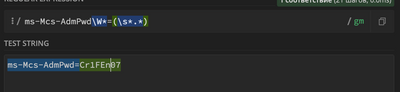
yes. check in regex101. enable.
tried different regex methods working. now standing which is in the picture above


Join the Splunk Community Slack to learn, troubleshoot, and make connections with fellow Splunk practitioners in real time!
Join Splunk User Groups to connect and learn in-person by region or remotely by topic or industry.
SOC4Kafka - New Kafka Connector Powered by OpenTelemetry
Rounding off the Splunk Dashboard Contest
A Four Part Event Series: AI + Observability: AI Agents, LLMs, Apps, & Infrastructure
