
Join the Conversation
- Find Answers
- :
- Splunk Platform
- :
- Splunk Enterprise
- :
- Re: Stats and chart command output response showin...
- Subscribe to RSS Feed
- Mark Topic as New
- Mark Topic as Read
- Float this Topic for Current User
- Bookmark Topic
- Subscribe to Topic
- Mute Topic
- Printer Friendly Page
- Mark as New
- Bookmark Message
- Subscribe to Message
- Mute Message
- Subscribe to RSS Feed
- Permalink
- Report Inappropriate Content
Stats and chart command output response showing differently for date column

Hello Splunkers,
I want your help to understand different responses of stats and chart command output. In First output with STATS command, date and time showing correctly in the last column.
index=index1*|.....
| search issueType = "Bug" AND (Status = "In QA" OR Status = "In Dev") AND (priority = P1 OR priority = P2 OR priority= P3) AND (key = "CORE-26985" OR key = "CORE-37789")
| stats min(update) as qaStatusDateMin by key,Status

But when I use chart command then only year is showing instead of date and time under newly generated columns named "In QA" and "In Dev"
| fillnull value="None" labels
| search issueType = "Bug" AND (Status = "In QA" OR Status = "In Dev") AND (priority = P1 OR priority = P2 OR priority= P3) AND (key = "CORE-26985" OR key = "CORE-37789")
| chart min(update) as qaStatusDateMin by key,Status
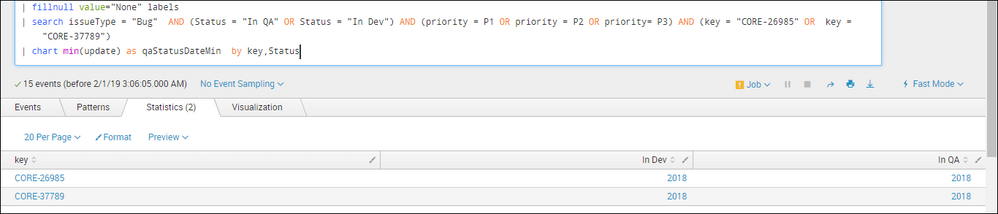
I hope, I have explained my question here in detail. Please help me to understand the logic behind this output response.
Your help will be appreciated!


- Mark as New
- Bookmark Message
- Subscribe to Message
- Mute Message
- Subscribe to RSS Feed
- Permalink
- Report Inappropriate Content
Hello @vikas_baranwal
The difference start comes in pictures when you mention two or more fields in by clause in Splunk.
When you use stats count by a,b , it will created status based on the a & b which is visible easily in your search results.
But when it comes to chart command it doesn't follow the same process. Because you need to create a graph. the command will be identical to chart over a by b
in your case: | chart min(update) as qaStatusDateMin over key by Status
- Mark as New
- Bookmark Message
- Subscribe to Message
- Mute Message
- Subscribe to RSS Feed
- Permalink
- Report Inappropriate Content
Hi Vishal,
Thanks for your reply but still I have not got answer for my question.
With regards,
Vikas baranwal
- Mark as New
- Bookmark Message
- Subscribe to Message
- Mute Message
- Subscribe to RSS Feed
- Permalink
- Report Inappropriate Content
@vikas_baranwal
There is No logic behind it. As chart command need three axis for data showing. It will convert the command in different logic , so that the data can be visible better in any visualisation.

Index This | What is broken 80% of the time by February?
Unlock Faster Time-to-Value on Edge and Ingest Processor with New SPL2 Pipeline ...
Splunk MCP & Agentic AI: Machine Data Without Limits
