
Join the Conversation
- Find Answers
- :
- Splunk Platform
- :
- Splunk Enterprise
- :
- Re: Stats and chart command output response showin...
- Subscribe to RSS Feed
- Mark Topic as New
- Mark Topic as Read
- Float this Topic for Current User
- Bookmark Topic
- Subscribe to Topic
- Mute Topic
- Printer Friendly Page
- Mark as New
- Bookmark Message
- Subscribe to Message
- Mute Message
- Subscribe to RSS Feed
- Permalink
- Report Inappropriate Content
Stats and chart command output response showing differently for date column

Hello Splunkers,
I want your help to understand different responses of stats and chart command output. In First output with STATS command, date and time showing correctly in the last column.
index=index1*|.....
| search issueType = "Bug" AND (Status = "In QA" OR Status = "In Dev") AND (priority = P1 OR priority = P2 OR priority= P3) AND (key = "CORE-26985" OR key = "CORE-37789")
| stats min(update) as qaStatusDateMin by key,Status

But when I use chart command then only year is showing instead of date and time under newly generated columns named "In QA" and "In Dev"
| fillnull value="None" labels
| search issueType = "Bug" AND (Status = "In QA" OR Status = "In Dev") AND (priority = P1 OR priority = P2 OR priority= P3) AND (key = "CORE-26985" OR key = "CORE-37789")
| chart min(update) as qaStatusDateMin by key,Status
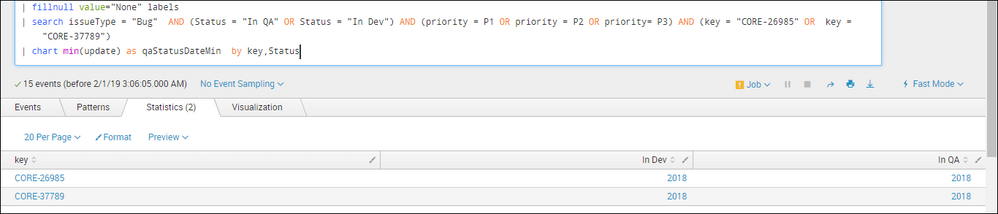
I hope, I have explained my question here in detail. Please help me to understand the logic behind this output response.
Your help will be appreciated!


- Mark as New
- Bookmark Message
- Subscribe to Message
- Mute Message
- Subscribe to RSS Feed
- Permalink
- Report Inappropriate Content
Hello @vikas_baranwal
The difference start comes in pictures when you mention two or more fields in by clause in Splunk.
When you use stats count by a,b , it will created status based on the a & b which is visible easily in your search results.
But when it comes to chart command it doesn't follow the same process. Because you need to create a graph. the command will be identical to chart over a by b
in your case: | chart min(update) as qaStatusDateMin over key by Status
- Mark as New
- Bookmark Message
- Subscribe to Message
- Mute Message
- Subscribe to RSS Feed
- Permalink
- Report Inappropriate Content
Hi Vishal,
Thanks for your reply but still I have not got answer for my question.
With regards,
Vikas baranwal
- Mark as New
- Bookmark Message
- Subscribe to Message
- Mute Message
- Subscribe to RSS Feed
- Permalink
- Report Inappropriate Content
@vikas_baranwal
There is No logic behind it. As chart command need three axis for data showing. It will convert the command in different logic , so that the data can be visible better in any visualisation.

Accelerating Observability as Code with the Splunk AI Assistant
Integrating Splunk Search API and Quarto to Create Reproducible Investigation ...
Congratulations to the 2025-2026 SplunkTrust!
