
Join the Conversation
- Find Answers
- :
- Splunk Products
- :
- Splunk Enterprise
- :
- Re: Splunk password issue
- Subscribe to RSS Feed
- Mark Topic as New
- Mark Topic as Read
- Float this Topic for Current User
- Bookmark Topic
- Subscribe to Topic
- Mute Topic
- Printer Friendly Page
- Mark as New
- Bookmark Message
- Subscribe to Message
- Mute Message
- Subscribe to RSS Feed
- Permalink
- Report Inappropriate Content
Splunk password issue

I am getting below error. Although I have changed my password & user name from user-seed.conf. But still it is showing below error.
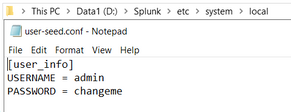
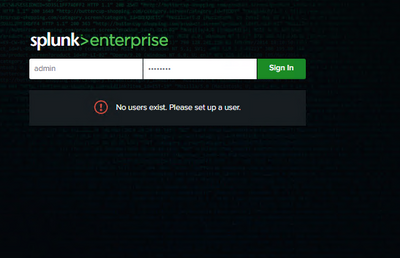
But when I am login to UI, below are the error I am getting. Please help me how to fix this error.
- Mark as New
- Bookmark Message
- Subscribe to Message
- Mute Message
- Subscribe to RSS Feed
- Permalink
- Report Inappropriate Content

If no users exist that means that the $SPLUNK_HOME/etc/passwd file is missing. To create a new admin user, you can use user-seed.conf and it is very easy. Just double check your steps here:
https://docs.splunk.com/Documentation/Splunk/latest/Security/Secureyouradminaccount
- Mark as New
- Bookmark Message
- Subscribe to Message
- Mute Message
- Subscribe to RSS Feed
- Permalink
- Report Inappropriate Content


# If the $SPLUNK_HOME/etc/passwd file is present,
the settings in this file (user-seed.conf) are not used
- Mark as New
- Bookmark Message
- Subscribe to Message
- Mute Message
- Subscribe to RSS Feed
- Permalink
- Report Inappropriate Content
@PickleRick
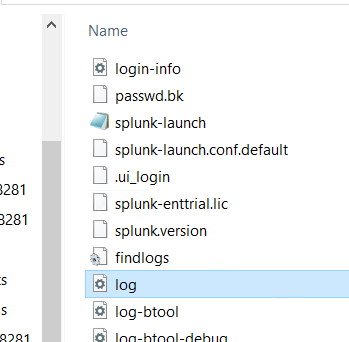
No passwd file is generating after restarting of the Splunk.
- Mark as New
- Bookmark Message
- Subscribe to Message
- Mute Message
- Subscribe to RSS Feed
- Permalink
- Report Inappropriate Content

As @PickleRick said you cannot have .../<SPLUNK_HOME>/etc/passwd file. If you have then you could use e.g.
Create admin credentials for automated installations with the 'hash-passwd' CLI command
to generate hashed password and add/change it into passwd file as already proposed.
r. Ismo
- Mark as New
- Bookmark Message
- Subscribe to Message
- Mute Message
- Subscribe to RSS Feed
- Permalink
- Report Inappropriate Content
Did you restart your splunk instance?
- Mark as New
- Bookmark Message
- Subscribe to Message
- Mute Message
- Subscribe to RSS Feed
- Permalink
- Report Inappropriate Content
@PickleRick Yes I have restarted
- Mark as New
- Bookmark Message
- Subscribe to Message
- Mute Message
- Subscribe to RSS Feed
- Permalink
- Report Inappropriate Content
To be fully honest, if you already have a working installation, I would just edit etc/passwd manually and insert a hashed password there.
But if you don't have etc/passwd and it's not getting created from user-seed.conf - there must be something wrong. Check the splunkd.log for errors. Permission issues?
- Mark as New
- Bookmark Message
- Subscribe to Message
- Mute Message
- Subscribe to RSS Feed
- Permalink
- Report Inappropriate Content
@PickleRick & @isoutamo It has been fixed. I was used to save the seed file as user-seed.conf. So when I restarted the Splunk it saved as user-seed.conf.conf. So I corrected and saved the file only as user-seed and gives the results as user-seed.conf and generated the passwd file also.


Join the Splunk Community Slack to learn, troubleshoot, and make connections with fellow Splunk practitioners in real time!
Join Splunk User Groups to connect and learn in-person by region or remotely by topic or industry.
Where Innovation Takes Flight: The Splunk4Aviation Flight Sim Lands at .conf26
Turn Cisco Telemetry Into Action with Cisco Data Fabric, powered by the Splunk ...
Persistent Queue at TcpOut — One of Splunk's Most Practical Features
