
Turn on suggestions
Auto-suggest helps you quickly narrow down your search results by suggesting possible matches as you type.
Splunk Enterprise
×
Join the Conversation
Without signing in, you're just watching from the sidelines. Sign in or Register to connect, share, and be part of the Splunk Community.
- Find Answers
- :
- Splunk Products
- :
- Splunk Enterprise
- :
- Re: Rex field
Options
- Subscribe to RSS Feed
- Mark Topic as New
- Mark Topic as Read
- Float this Topic for Current User
- Bookmark Topic
- Subscribe to Topic
- Mute Topic
- Printer Friendly Page
- Mark as New
- Bookmark Message
- Subscribe to Message
- Mute Message
- Subscribe to RSS Feed
- Permalink
- Report Inappropriate Content

Azwaliyana
Path Finder
11-15-2021
06:01 AM
I want to extract the Country and the Node. When I use the rex in regex101, it works fine. But when I put it on Splunk search, it did not extract the Country and the Node. Do you guys know where is my mistake?
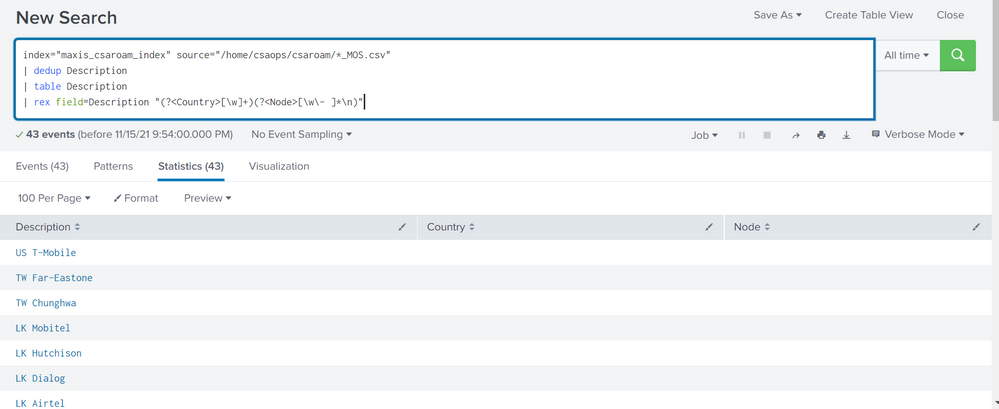
This is my search query.
index="maxis_csaroam_index" source="/home/csaops/csaroam/*_MOS.csv"
| dedup Description
| table Description
| rex field=Description "(?<Country>[\w]+)(?<Node>[\w\- ]*\n)"
1 Solution
- Mark as New
- Bookmark Message
- Subscribe to Message
- Mute Message
- Subscribe to RSS Feed
- Permalink
- Report Inappropriate Content

ITWhisperer

SplunkTrust
11-15-2021
06:46 AM
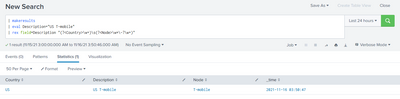
Try without the newline in the match
| rex field=Description "(?<Country>[\w]+)(?<Node>[\w\- ]+)"- Mark as New
- Bookmark Message
- Subscribe to Message
- Mute Message
- Subscribe to RSS Feed
- Permalink
- Report Inappropriate Content

somesoni2
Revered Legend
11-16-2021
06:16 AM
Give this a try (avoided using dedup command as well, best practice)
index="maxis_csaroam_index" source="/home/csaops/csaroam/*_MOS.csv"
| stats count by Description
| table Description
| rex field=Description "(?<Country>\S+)\s+(?<Node>\S+)"- Mark as New
- Bookmark Message
- Subscribe to Message
- Mute Message
- Subscribe to RSS Feed
- Permalink
- Report Inappropriate Content
bhargavi
Path Finder
11-15-2021
08:54 AM
- Mark as New
- Bookmark Message
- Subscribe to Message
- Mute Message
- Subscribe to RSS Feed
- Permalink
- Report Inappropriate Content
ITWhisperer
SplunkTrust
11-15-2021
06:46 AM
Try without the newline in the match
| rex field=Description "(?<Country>[\w]+)(?<Node>[\w\- ]+)"

Got questions? Get answers!
Join the Splunk Community Slack to learn, troubleshoot, and make connections with fellow Splunk practitioners in real time!
Meet up IRL or virtually!
Join Splunk User Groups to connect and learn in-person by region or remotely by topic or industry.
Get Updates on the Splunk Community!
Think Like an Architect: Introducing the Splunk Certified Cybersecurity Defense ...
In cybersecurity, defenders respond to threats. Architects design the systems that stop them.
As ...
Best Practices: Splunk auto adjust pipeline queue
When you enable autoAdjustQueue in Splunk, maxSize should be understood as the queue size Splunk starts with ...
Announcing Modern Navigation: A New Era of Splunk User Experience
We are excited to introduce the Modern Navigation feature in the Splunk Platform, available to both cloud and ...
