
Join the Conversation
- Find Answers
- :
- Splunk Products
- :
- Splunk Enterprise
- :
- Indexing
- Subscribe to RSS Feed
- Mark Topic as New
- Mark Topic as Read
- Float this Topic for Current User
- Bookmark Topic
- Subscribe to Topic
- Mute Topic
- Printer Friendly Page
- Mark as New
- Bookmark Message
- Subscribe to Message
- Mute Message
- Subscribe to RSS Feed
- Permalink
- Report Inappropriate Content

I have indexed a file on Splunk but when I start searching, the file cannot be found. Do you know why it happened? For my last problem, it has been solved. Currently I am having a problem where the indexed file cannot be found.
As you can see, I have indexed the /home/csaops/csasec/*.txt
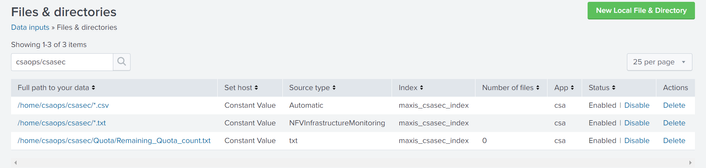
But when I searched for it, no result
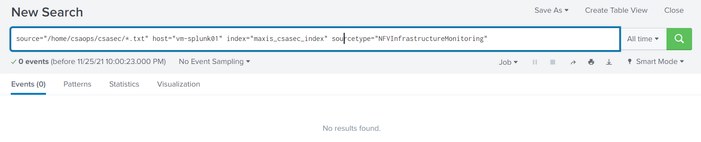
Do you guys know why this happened? It is not a binary data. It is a health check data
- Mark as New
- Bookmark Message
- Subscribe to Message
- Mute Message
- Subscribe to RSS Feed
- Permalink
- Report Inappropriate Content


Hi
have you check that this file is readable by UF/Splunk user on filesystem level?
Have you check that this file haven't been splunk in some "wrong" place?
You can check status of this file on cmd line with command
splunk list inputstatusr. Ismo
- Mark as New
- Bookmark Message
- Subscribe to Message
- Mute Message
- Subscribe to RSS Feed
- Permalink
- Report Inappropriate Content
Hi
have you check that this file is readable by UF/Splunk user on filesystem level?
Have you check that this file haven't been splunk in some "wrong" place?
You can check status of this file on cmd line with command
splunk list inputstatusr. Ismo

Join the Splunk Community Slack to learn, troubleshoot, and make connections with fellow Splunk practitioners in real time!
Join Splunk User Groups to connect and learn in-person by region or remotely by topic or industry.
Make Your Machine Data AI-Ready in Splunk
Splunk Asynchronous Forwarding Explained
How to Monitor AI Agents with Splunk Agent Observability
