
Join the Conversation
- Find Answers
- :
- Splunk Products
- :
- Splunk Enterprise
- :
- How to remove highlighted value in pie chart?
- Subscribe to RSS Feed
- Mark Topic as New
- Mark Topic as Read
- Float this Topic for Current User
- Bookmark Topic
- Subscribe to Topic
- Mute Topic
- Printer Friendly Page
- Mark as New
- Bookmark Message
- Subscribe to Message
- Mute Message
- Subscribe to RSS Feed
- Permalink
- Report Inappropriate Content

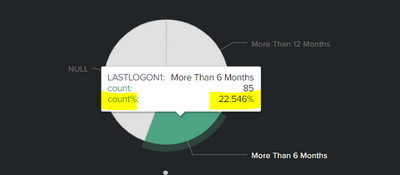
Hi, How do i remove the highlighted value shown above. i dont want to show them in my pie chart
- Mark as New
- Bookmark Message
- Subscribe to Message
- Mute Message
- Subscribe to RSS Feed
- Permalink
- Report Inappropriate Content


<row>
<panel depends="$stayhidden$">
<html>
<style>
#piechart table.highcharts-tooltip tbody tr:nth-child(3) td{
display:none !important;
}
</style>
</html>
</panel>
<panel>
<title>LastLogon-New</title>
<chart id="piechart">
<search>
<query>| savedsearch XYZ
| where $apps$ and $bscode$ and $function$ and $dept$ and $country$ and $emp_type$
| eval current_date = now()
| eval six_months_ago = relative_time(current_date,"-6mon@d")
| eval Twelve_months_ago = relative_time(current_date,"-12mon@d")
| eval converted_date = strftime(six_months_ago, "%Y-%m-%d %H:%M:%S")
| eval converted_date12 = strftime(Twelve_months_ago, "%Y-%m-%d %H:%M:%S")
| eval LASTLOGON1= IF(isnull(LASTLOGON),"NULL", (if (LASTLOGON < converted_date and LASTLOGON >converted_date12 ,"More Than 6 Months",(if(LASTLOGON < converted_date12,"More Than 12 Months","Less than 6")))))
| eval CURRENT_date = strftime(current_date, "%Y-%m-%d %H:%M:%S")
| where LASTLOGON1!="Less than 6"
| table LASTLOGON,converted_date,CURRENT_date,LASTLOGON1
| stats count by LASTLOGON1</query>
<earliest>0</earliest>
<latest></latest>
<sampleRatio>1</sampleRatio>
</search>
<option name="charting.axisLabelsX.majorLabelStyle.overflowMode">ellipsisNone</option>
<option name="charting.axisLabelsX.majorLabelStyle.rotation">0</option>
<option name="charting.axisTitleX.visibility">visible</option>
<option name="charting.axisTitleY.visibility">visible</option>
<option name="charting.axisTitleY2.visibility">visible</option>
<option name="charting.axisX.abbreviation">none</option>
<option name="charting.axisX.scale">linear</option>
<option name="charting.axisY.abbreviation">none</option>
<option name="charting.axisY.scale">linear</option>
<option name="charting.axisY2.abbreviation">none</option>
<option name="charting.axisY2.enabled">0</option>
<option name="charting.axisY2.scale">inherit</option>
<option name="charting.chart">pie</option>
<option name="charting.chart.bubbleMaximumSize">50</option>
<option name="charting.chart.bubbleMinimumSize">10</option>
<option name="charting.chart.bubbleSizeBy">area</option>
<option name="charting.chart.nullValueMode">gaps</option>
<option name="charting.chart.showDataLabels">none</option>
<option name="charting.chart.sliceCollapsingThreshold">0.01</option>
<option name="charting.chart.stackMode">default</option>
<option name="charting.chart.style">shiny</option>
<option name="charting.drilldown">none</option>
<option name="charting.layout.splitSeries">0</option>
<option name="charting.layout.splitSeries.allowIndependentYRanges">0</option>
<option name="charting.legend.labelStyle.overflowMode">ellipsisMiddle</option>
<option name="charting.legend.mode">standard</option>
<option name="charting.legend.placement">right</option>
<option name="charting.lineWidth">2</option>
<option name="refresh.display">progressbar</option>
<option name="trellis.enabled">0</option>
<option name="trellis.scales.shared">1</option>
<option name="trellis.size">medium</option>
</chart>
</panel>
</row>
</form>- Mark as New
- Bookmark Message
- Subscribe to Message
- Mute Message
- Subscribe to RSS Feed
- Permalink
- Report Inappropriate Content
Assuming SimpleXML/Classic dashboard, give your chart an id and use a hidden html panel with CSS
    <panel depends="$stayhidden$">
      <html>
        <style>
          #piechart table.highcharts-tooltip tbody tr:nth-child(3) td{
            display:none !important;
          }
        </style>
      </html>
    </panel>
    <panel>
<chart id="piechart">- Mark as New
- Bookmark Message
- Subscribe to Message
- Mute Message
- Subscribe to RSS Feed
- Permalink
- Report Inappropriate Content

This is my xml code looks. where to use the above query you have mentioned?
- Mark as New
- Bookmark Message
- Subscribe to Message
- Mute Message
- Subscribe to RSS Feed
- Permalink
- Report Inappropriate Content
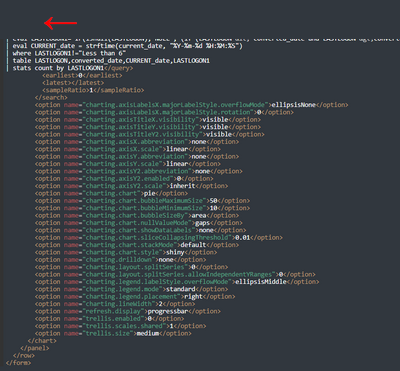
It looks like it needs to go in the same row as the panel probably above it. If you share your code in a code block </> I can be more precise
- Mark as New
- Bookmark Message
- Subscribe to Message
- Mute Message
- Subscribe to RSS Feed
- Permalink
- Report Inappropriate Content
<panel>
<title>LastLogon-New</title>
<chart>
<search>
<query>| savedsearch XYZ
| where $apps$ and $bscode$ and $function$ and $dept$ and $country$ and $emp_type$
| eval current_date = now()
| eval six_months_ago = relative_time(current_date,"-6mon@d")
| eval Twelve_months_ago = relative_time(current_date,"-12mon@d")
| eval converted_date = strftime(six_months_ago, "%Y-%m-%d %H:%M:%S")
| eval converted_date12 = strftime(Twelve_months_ago, "%Y-%m-%d %H:%M:%S")
| eval LASTLOGON1= IF(isnull(LASTLOGON),"NULL", (if (LASTLOGON < converted_date and LASTLOGON >converted_date12 ,"More Than 6 Months",(if(LASTLOGON < converted_date12,"More Than 12 Months","Less than 6")))))
| eval CURRENT_date = strftime(current_date, "%Y-%m-%d %H:%M:%S")
| where LASTLOGON1!="Less than 6"
| table LASTLOGON,converted_date,CURRENT_date,LASTLOGON1
| stats count by LASTLOGON1</query>
<earliest>0</earliest>
<latest></latest>
<sampleRatio>1</sampleRatio>
</search>
<option name="charting.axisLabelsX.majorLabelStyle.overflowMode">ellipsisNone</option>
<option name="charting.axisLabelsX.majorLabelStyle.rotation">0</option>
<option name="charting.axisTitleX.visibility">visible</option>
<option name="charting.axisTitleY.visibility">visible</option>
<option name="charting.axisTitleY2.visibility">visible</option>
<option name="charting.axisX.abbreviation">none</option>
<option name="charting.axisX.scale">linear</option>
<option name="charting.axisY.abbreviation">none</option>
<option name="charting.axisY.scale">linear</option>
<option name="charting.axisY2.abbreviation">none</option>
<option name="charting.axisY2.enabled">0</option>
<option name="charting.axisY2.scale">inherit</option>
<option name="charting.chart">pie</option>
<option name="charting.chart.bubbleMaximumSize">50</option>
<option name="charting.chart.bubbleMinimumSize">10</option>
<option name="charting.chart.bubbleSizeBy">area</option>
<option name="charting.chart.nullValueMode">gaps</option>
<option name="charting.chart.showDataLabels">none</option>
<option name="charting.chart.sliceCollapsingThreshold">0.01</option>
<option name="charting.chart.stackMode">default</option>
<option name="charting.chart.style">shiny</option>
<option name="charting.drilldown">none</option>
<option name="charting.layout.splitSeries">0</option>
<option name="charting.layout.splitSeries.allowIndependentYRanges">0</option>
<option name="charting.legend.labelStyle.overflowMode">ellipsisMiddle</option>
<option name="charting.legend.mode">standard</option>
<option name="charting.legend.placement">right</option>
<option name="charting.lineWidth">2</option>
<option name="refresh.display">progressbar</option>
<option name="trellis.enabled">0</option>
<option name="trellis.scales.shared">1</option>
<option name="trellis.size">medium</option>
</chart>
</panel>
</row>
</form>
This is the query sir
- Mark as New
- Bookmark Message
- Subscribe to Message
- Mute Message
- Subscribe to RSS Feed
- Permalink
- Report Inappropriate Content
<row>
<panel depends="$stayhidden$">
<html>
<style>
#piechart table.highcharts-tooltip tbody tr:nth-child(3) td{
display:none !important;
}
</style>
</html>
</panel>
<panel>
<title>LastLogon-New</title>
<chart id="piechart">
<search>
<query>| savedsearch XYZ
| where $apps$ and $bscode$ and $function$ and $dept$ and $country$ and $emp_type$
| eval current_date = now()
| eval six_months_ago = relative_time(current_date,"-6mon@d")
| eval Twelve_months_ago = relative_time(current_date,"-12mon@d")
| eval converted_date = strftime(six_months_ago, "%Y-%m-%d %H:%M:%S")
| eval converted_date12 = strftime(Twelve_months_ago, "%Y-%m-%d %H:%M:%S")
| eval LASTLOGON1= IF(isnull(LASTLOGON),"NULL", (if (LASTLOGON < converted_date and LASTLOGON >converted_date12 ,"More Than 6 Months",(if(LASTLOGON < converted_date12,"More Than 12 Months","Less than 6")))))
| eval CURRENT_date = strftime(current_date, "%Y-%m-%d %H:%M:%S")
| where LASTLOGON1!="Less than 6"
| table LASTLOGON,converted_date,CURRENT_date,LASTLOGON1
| stats count by LASTLOGON1</query>
<earliest>0</earliest>
<latest></latest>
<sampleRatio>1</sampleRatio>
</search>
<option name="charting.axisLabelsX.majorLabelStyle.overflowMode">ellipsisNone</option>
<option name="charting.axisLabelsX.majorLabelStyle.rotation">0</option>
<option name="charting.axisTitleX.visibility">visible</option>
<option name="charting.axisTitleY.visibility">visible</option>
<option name="charting.axisTitleY2.visibility">visible</option>
<option name="charting.axisX.abbreviation">none</option>
<option name="charting.axisX.scale">linear</option>
<option name="charting.axisY.abbreviation">none</option>
<option name="charting.axisY.scale">linear</option>
<option name="charting.axisY2.abbreviation">none</option>
<option name="charting.axisY2.enabled">0</option>
<option name="charting.axisY2.scale">inherit</option>
<option name="charting.chart">pie</option>
<option name="charting.chart.bubbleMaximumSize">50</option>
<option name="charting.chart.bubbleMinimumSize">10</option>
<option name="charting.chart.bubbleSizeBy">area</option>
<option name="charting.chart.nullValueMode">gaps</option>
<option name="charting.chart.showDataLabels">none</option>
<option name="charting.chart.sliceCollapsingThreshold">0.01</option>
<option name="charting.chart.stackMode">default</option>
<option name="charting.chart.style">shiny</option>
<option name="charting.drilldown">none</option>
<option name="charting.layout.splitSeries">0</option>
<option name="charting.layout.splitSeries.allowIndependentYRanges">0</option>
<option name="charting.legend.labelStyle.overflowMode">ellipsisMiddle</option>
<option name="charting.legend.mode">standard</option>
<option name="charting.legend.placement">right</option>
<option name="charting.lineWidth">2</option>
<option name="refresh.display">progressbar</option>
<option name="trellis.enabled">0</option>
<option name="trellis.scales.shared">1</option>
<option name="trellis.size">medium</option>
</chart>
</panel>
</row>
</form>
Join the Splunk Community Slack to learn, troubleshoot, and make connections with fellow Splunk practitioners in real time!
Join Splunk User Groups to connect and learn in-person by region or remotely by topic or industry.
Why Splunk Customers Should Attend Cisco Live 2026 Las Vegas
What Is the Name of the USB Key Inserted by Bob Smith? (BOTS Hint, Not the Answer)
Automating Threat Operations and Threat Hunting with Recorded Future
