
Join the Conversation
- Find Answers
- :
- Splunk Products
- :
- Splunk Enterprise
- :
- Re: How to remove highlighted value in pie chart?
- Subscribe to RSS Feed
- Mark Topic as New
- Mark Topic as Read
- Float this Topic for Current User
- Bookmark Topic
- Subscribe to Topic
- Mute Topic
- Printer Friendly Page
- Mark as New
- Bookmark Message
- Subscribe to Message
- Mute Message
- Subscribe to RSS Feed
- Permalink
- Report Inappropriate Content

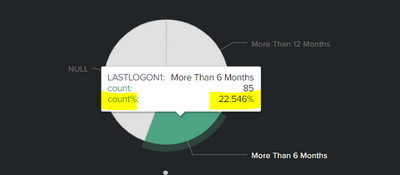
Hi, How do i remove the highlighted value shown above. i dont want to show them in my pie chart
- Mark as New
- Bookmark Message
- Subscribe to Message
- Mute Message
- Subscribe to RSS Feed
- Permalink
- Report Inappropriate Content


<row>
<panel depends="$stayhidden$">
<html>
<style>
#piechart table.highcharts-tooltip tbody tr:nth-child(3) td{
display:none !important;
}
</style>
</html>
</panel>
<panel>
<title>LastLogon-New</title>
<chart id="piechart">
<search>
<query>| savedsearch XYZ
| where $apps$ and $bscode$ and $function$ and $dept$ and $country$ and $emp_type$
| eval current_date = now()
| eval six_months_ago = relative_time(current_date,"-6mon@d")
| eval Twelve_months_ago = relative_time(current_date,"-12mon@d")
| eval converted_date = strftime(six_months_ago, "%Y-%m-%d %H:%M:%S")
| eval converted_date12 = strftime(Twelve_months_ago, "%Y-%m-%d %H:%M:%S")
| eval LASTLOGON1= IF(isnull(LASTLOGON),"NULL", (if (LASTLOGON < converted_date and LASTLOGON >converted_date12 ,"More Than 6 Months",(if(LASTLOGON < converted_date12,"More Than 12 Months","Less than 6")))))
| eval CURRENT_date = strftime(current_date, "%Y-%m-%d %H:%M:%S")
| where LASTLOGON1!="Less than 6"
| table LASTLOGON,converted_date,CURRENT_date,LASTLOGON1
| stats count by LASTLOGON1</query>
<earliest>0</earliest>
<latest></latest>
<sampleRatio>1</sampleRatio>
</search>
<option name="charting.axisLabelsX.majorLabelStyle.overflowMode">ellipsisNone</option>
<option name="charting.axisLabelsX.majorLabelStyle.rotation">0</option>
<option name="charting.axisTitleX.visibility">visible</option>
<option name="charting.axisTitleY.visibility">visible</option>
<option name="charting.axisTitleY2.visibility">visible</option>
<option name="charting.axisX.abbreviation">none</option>
<option name="charting.axisX.scale">linear</option>
<option name="charting.axisY.abbreviation">none</option>
<option name="charting.axisY.scale">linear</option>
<option name="charting.axisY2.abbreviation">none</option>
<option name="charting.axisY2.enabled">0</option>
<option name="charting.axisY2.scale">inherit</option>
<option name="charting.chart">pie</option>
<option name="charting.chart.bubbleMaximumSize">50</option>
<option name="charting.chart.bubbleMinimumSize">10</option>
<option name="charting.chart.bubbleSizeBy">area</option>
<option name="charting.chart.nullValueMode">gaps</option>
<option name="charting.chart.showDataLabels">none</option>
<option name="charting.chart.sliceCollapsingThreshold">0.01</option>
<option name="charting.chart.stackMode">default</option>
<option name="charting.chart.style">shiny</option>
<option name="charting.drilldown">none</option>
<option name="charting.layout.splitSeries">0</option>
<option name="charting.layout.splitSeries.allowIndependentYRanges">0</option>
<option name="charting.legend.labelStyle.overflowMode">ellipsisMiddle</option>
<option name="charting.legend.mode">standard</option>
<option name="charting.legend.placement">right</option>
<option name="charting.lineWidth">2</option>
<option name="refresh.display">progressbar</option>
<option name="trellis.enabled">0</option>
<option name="trellis.scales.shared">1</option>
<option name="trellis.size">medium</option>
</chart>
</panel>
</row>
</form>- Mark as New
- Bookmark Message
- Subscribe to Message
- Mute Message
- Subscribe to RSS Feed
- Permalink
- Report Inappropriate Content
Assuming SimpleXML/Classic dashboard, give your chart an id and use a hidden html panel with CSS
    <panel depends="$stayhidden$">
      <html>
        <style>
          #piechart table.highcharts-tooltip tbody tr:nth-child(3) td{
            display:none !important;
          }
        </style>
      </html>
    </panel>
    <panel>
<chart id="piechart">- Mark as New
- Bookmark Message
- Subscribe to Message
- Mute Message
- Subscribe to RSS Feed
- Permalink
- Report Inappropriate Content

This is my xml code looks. where to use the above query you have mentioned?
- Mark as New
- Bookmark Message
- Subscribe to Message
- Mute Message
- Subscribe to RSS Feed
- Permalink
- Report Inappropriate Content
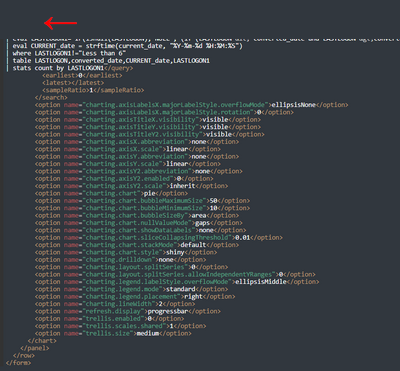
It looks like it needs to go in the same row as the panel probably above it. If you share your code in a code block </> I can be more precise
- Mark as New
- Bookmark Message
- Subscribe to Message
- Mute Message
- Subscribe to RSS Feed
- Permalink
- Report Inappropriate Content
<panel>
<title>LastLogon-New</title>
<chart>
<search>
<query>| savedsearch XYZ
| where $apps$ and $bscode$ and $function$ and $dept$ and $country$ and $emp_type$
| eval current_date = now()
| eval six_months_ago = relative_time(current_date,"-6mon@d")
| eval Twelve_months_ago = relative_time(current_date,"-12mon@d")
| eval converted_date = strftime(six_months_ago, "%Y-%m-%d %H:%M:%S")
| eval converted_date12 = strftime(Twelve_months_ago, "%Y-%m-%d %H:%M:%S")
| eval LASTLOGON1= IF(isnull(LASTLOGON),"NULL", (if (LASTLOGON < converted_date and LASTLOGON >converted_date12 ,"More Than 6 Months",(if(LASTLOGON < converted_date12,"More Than 12 Months","Less than 6")))))
| eval CURRENT_date = strftime(current_date, "%Y-%m-%d %H:%M:%S")
| where LASTLOGON1!="Less than 6"
| table LASTLOGON,converted_date,CURRENT_date,LASTLOGON1
| stats count by LASTLOGON1</query>
<earliest>0</earliest>
<latest></latest>
<sampleRatio>1</sampleRatio>
</search>
<option name="charting.axisLabelsX.majorLabelStyle.overflowMode">ellipsisNone</option>
<option name="charting.axisLabelsX.majorLabelStyle.rotation">0</option>
<option name="charting.axisTitleX.visibility">visible</option>
<option name="charting.axisTitleY.visibility">visible</option>
<option name="charting.axisTitleY2.visibility">visible</option>
<option name="charting.axisX.abbreviation">none</option>
<option name="charting.axisX.scale">linear</option>
<option name="charting.axisY.abbreviation">none</option>
<option name="charting.axisY.scale">linear</option>
<option name="charting.axisY2.abbreviation">none</option>
<option name="charting.axisY2.enabled">0</option>
<option name="charting.axisY2.scale">inherit</option>
<option name="charting.chart">pie</option>
<option name="charting.chart.bubbleMaximumSize">50</option>
<option name="charting.chart.bubbleMinimumSize">10</option>
<option name="charting.chart.bubbleSizeBy">area</option>
<option name="charting.chart.nullValueMode">gaps</option>
<option name="charting.chart.showDataLabels">none</option>
<option name="charting.chart.sliceCollapsingThreshold">0.01</option>
<option name="charting.chart.stackMode">default</option>
<option name="charting.chart.style">shiny</option>
<option name="charting.drilldown">none</option>
<option name="charting.layout.splitSeries">0</option>
<option name="charting.layout.splitSeries.allowIndependentYRanges">0</option>
<option name="charting.legend.labelStyle.overflowMode">ellipsisMiddle</option>
<option name="charting.legend.mode">standard</option>
<option name="charting.legend.placement">right</option>
<option name="charting.lineWidth">2</option>
<option name="refresh.display">progressbar</option>
<option name="trellis.enabled">0</option>
<option name="trellis.scales.shared">1</option>
<option name="trellis.size">medium</option>
</chart>
</panel>
</row>
</form>
This is the query sir
- Mark as New
- Bookmark Message
- Subscribe to Message
- Mute Message
- Subscribe to RSS Feed
- Permalink
- Report Inappropriate Content
<row>
<panel depends="$stayhidden$">
<html>
<style>
#piechart table.highcharts-tooltip tbody tr:nth-child(3) td{
display:none !important;
}
</style>
</html>
</panel>
<panel>
<title>LastLogon-New</title>
<chart id="piechart">
<search>
<query>| savedsearch XYZ
| where $apps$ and $bscode$ and $function$ and $dept$ and $country$ and $emp_type$
| eval current_date = now()
| eval six_months_ago = relative_time(current_date,"-6mon@d")
| eval Twelve_months_ago = relative_time(current_date,"-12mon@d")
| eval converted_date = strftime(six_months_ago, "%Y-%m-%d %H:%M:%S")
| eval converted_date12 = strftime(Twelve_months_ago, "%Y-%m-%d %H:%M:%S")
| eval LASTLOGON1= IF(isnull(LASTLOGON),"NULL", (if (LASTLOGON < converted_date and LASTLOGON >converted_date12 ,"More Than 6 Months",(if(LASTLOGON < converted_date12,"More Than 12 Months","Less than 6")))))
| eval CURRENT_date = strftime(current_date, "%Y-%m-%d %H:%M:%S")
| where LASTLOGON1!="Less than 6"
| table LASTLOGON,converted_date,CURRENT_date,LASTLOGON1
| stats count by LASTLOGON1</query>
<earliest>0</earliest>
<latest></latest>
<sampleRatio>1</sampleRatio>
</search>
<option name="charting.axisLabelsX.majorLabelStyle.overflowMode">ellipsisNone</option>
<option name="charting.axisLabelsX.majorLabelStyle.rotation">0</option>
<option name="charting.axisTitleX.visibility">visible</option>
<option name="charting.axisTitleY.visibility">visible</option>
<option name="charting.axisTitleY2.visibility">visible</option>
<option name="charting.axisX.abbreviation">none</option>
<option name="charting.axisX.scale">linear</option>
<option name="charting.axisY.abbreviation">none</option>
<option name="charting.axisY.scale">linear</option>
<option name="charting.axisY2.abbreviation">none</option>
<option name="charting.axisY2.enabled">0</option>
<option name="charting.axisY2.scale">inherit</option>
<option name="charting.chart">pie</option>
<option name="charting.chart.bubbleMaximumSize">50</option>
<option name="charting.chart.bubbleMinimumSize">10</option>
<option name="charting.chart.bubbleSizeBy">area</option>
<option name="charting.chart.nullValueMode">gaps</option>
<option name="charting.chart.showDataLabels">none</option>
<option name="charting.chart.sliceCollapsingThreshold">0.01</option>
<option name="charting.chart.stackMode">default</option>
<option name="charting.chart.style">shiny</option>
<option name="charting.drilldown">none</option>
<option name="charting.layout.splitSeries">0</option>
<option name="charting.layout.splitSeries.allowIndependentYRanges">0</option>
<option name="charting.legend.labelStyle.overflowMode">ellipsisMiddle</option>
<option name="charting.legend.mode">standard</option>
<option name="charting.legend.placement">right</option>
<option name="charting.lineWidth">2</option>
<option name="refresh.display">progressbar</option>
<option name="trellis.enabled">0</option>
<option name="trellis.scales.shared">1</option>
<option name="trellis.size">medium</option>
</chart>
</panel>
</row>
</form>
Join the Splunk Community Slack to learn, troubleshoot, and make connections with fellow Splunk practitioners in real time!
Join Splunk User Groups to connect and learn in-person by region or remotely by topic or industry.
Announcing Modern Navigation: A New Era of Splunk User Experience
Modernize your Splunk Apps – Introducing Python 3.13 in Splunk
Step into “Hunt the Insider: An Splunk ES Premier Mystery” to catch a cybercriminal ...
