
Join the Conversation
- Find Answers
- :
- Splunk Products
- :
- Splunk Enterprise
- :
- Re: How to hold the table header, when using splun...
- Subscribe to RSS Feed
- Mark Topic as New
- Mark Topic as Read
- Float this Topic for Current User
- Bookmark Topic
- Subscribe to Topic
- Mute Topic
- Printer Friendly Page
- Mark as New
- Bookmark Message
- Subscribe to Message
- Mute Message
- Subscribe to RSS Feed
- Permalink
- Report Inappropriate Content

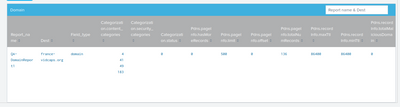
We are working on a table creation, where in we are just passing the SPL query to the splunk JS, which populates the table in the UI.
>My problem is that im not able to hold the table headers ,when scrolled it ,it does not stay.
>Also if I scroll horizontally I have to go all the way to the end of the table layout to scroll horizontally.
Any help or suggestion will help greatly.
Thanks,
Jabez.

- Mark as New
- Bookmark Message
- Subscribe to Message
- Mute Message
- Subscribe to RSS Feed
- Permalink
- Report Inappropriate Content
Thanks,
we tried various approaches, but this one worked for us.
-->Override the splunk table CSS , with the below code change. Make sure to change the data view path according to your table
#incidents_hash div [data-view="YOUR_DATA_VIEW_PATH"]{
overflow-y: auto !important;
height: 300px !important;
}
#incidents_hash div [data-view="YOUR_DATA_VIEW_PATH"] table{
border-collapse: collapse !important;
width: 10px !important;
}
#incidents_hash div [data-view="YOUR_DATA_VIEW_PATH"] th {
position: sticky !important;
text-align: left !important;
top: 0 !important;
}
- Mark as New
- Bookmark Message
- Subscribe to Message
- Mute Message
- Subscribe to RSS Feed
- Permalink
- Report Inappropriate Content

Can I ask what app this is for? Much like @sloshburch mentioned, I would recommend looking into the Splunk UI Toolkit. As part of that Toolkit, we have actively developed React Components that can be used inside of a React app in Splunk.
Here is a link to our Table Component: https://splunkui.splunk.com/Packages/react-ui/Table
Here is a Code Sandbox showing how you would set a table header to "fixed"
- Mark as New
- Bookmark Message
- Subscribe to Message
- Mute Message
- Subscribe to RSS Feed
- Permalink
- Report Inappropriate Content

Have you tried utilizing sticky positioning with some CSS?
https://stackoverflow.com/questions/8423768/freeze-the-top-row-for-an-html-table-only-fixed-table-he...
https://developer.mozilla.org/en-US/docs/Web/CSS/position#sticky_positioning
- Mark as New
- Bookmark Message
- Subscribe to Message
- Mute Message
- Subscribe to RSS Feed
- Permalink
- Report Inappropriate Content

To be honest, I haven't played with Splunk JS and am not experienced in javascript either. I'm no help lol. Nonetheless, I've reposted this in the #appdev channel for Splunk User Groups and have asked some other folks internally to look at this.
It sounds like when the page scrolls the header scrolls as well and you want it to stay fixed on the screen. I'm no javascript developer but maybe there is a general (not Splunk) javascript way of doing that? As in, is this a Splunk question or a general javascript question for which more javascript forums could also yield help?
I also wonder if the solution is now recommended through SplunkUI rather than Splunk JS.
- Mark as New
- Bookmark Message
- Subscribe to Message
- Mute Message
- Subscribe to RSS Feed
- Permalink
- Report Inappropriate Content
Thanks,
we tried various approaches, but this one worked for us.
-->Override the splunk table CSS , with the below code change. Make sure to change the data view path according to your table
#incidents_hash div [data-view="YOUR_DATA_VIEW_PATH"]{
overflow-y: auto !important;
height: 300px !important;
}
#incidents_hash div [data-view="YOUR_DATA_VIEW_PATH"] table{
border-collapse: collapse !important;
width: 10px !important;
}
#incidents_hash div [data-view="YOUR_DATA_VIEW_PATH"] th {
position: sticky !important;
text-align: left !important;
top: 0 !important;
}
- Mark as New
- Bookmark Message
- Subscribe to Message
- Mute Message
- Subscribe to RSS Feed
- Permalink
- Report Inappropriate Content
Make sure to "Accept as Solution" (button) so others can learn from your experience. Yay!


Join the Splunk Community Slack to learn, troubleshoot, and make connections with fellow Splunk practitioners in real time!
Join Splunk User Groups to connect and learn in-person by region or remotely by topic or industry.
Supercharging Windows Security Detection Performance: Introducing Hybrid Field ...
Enriching Signals with the OTel Lookup Processor
Meet the .conf26 AI Agent Buildathon Winners
