
Join the Conversation
- Find Answers
- :
- Splunk Products
- :
- Splunk Enterprise
- :
- How to color code column using expression(without ...
- Subscribe to RSS Feed
- Mark Topic as New
- Mark Topic as Read
- Float this Topic for Current User
- Bookmark Topic
- Subscribe to Topic
- Mute Topic
- Printer Friendly Page
- Mark as New
- Bookmark Message
- Subscribe to Message
- Mute Message
- Subscribe to RSS Feed
- Permalink
- Report Inappropriate Content
How to color code column using expression(without JS) ?

Hi
I have a table which displays duration for each category. I would like color code fields based on its duration.
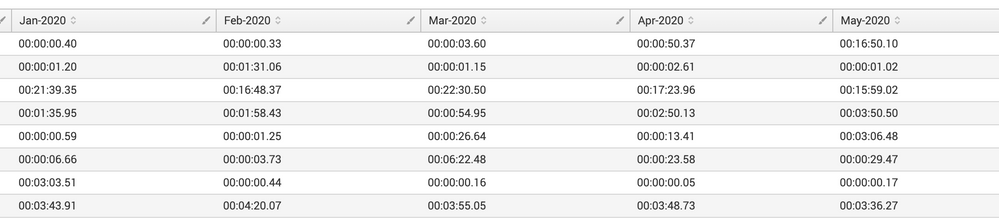
In the above screenshot, how do I write an expression to color code which are exceeding 1min.
I would prefer using the color coding from the source rather than creating JSS because we dont have the permission to splunk servers as such to update config/put the JS scripts. Could someone please help me out here
- Mark as New
- Bookmark Message
- Subscribe to Message
- Mute Message
- Subscribe to RSS Feed
- Permalink
- Report Inappropriate Content

You can edit the table in the UI editor and select the column header for some coloration options.
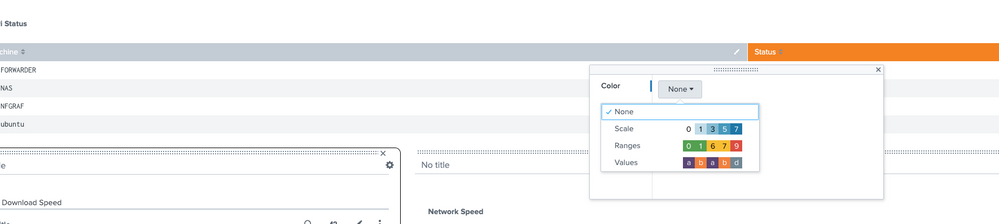
They are a little on the limited side but as far as I know, thats the best option there is. When you have selected a coloration, I would check the xml in the back to see whether there's further control within the table for extra params.
The docs here may also be of use: https://docs.splunk.com/Documentation/Splunk/latest/Viz/ChartConfigurationReference

Join the Splunk Community Slack to learn, troubleshoot, and make connections with fellow Splunk practitioners in real time!
Join Splunk User Groups to connect and learn in-person by region or remotely by topic or industry.
Make your Splunk investment work harder with Optimization Advisor
How Splunk AI Assistant Is Transforming Investigations: Insights from .conf26
Make Your Machine Data AI-Ready in Splunk
