
Join the Conversation
- Find Answers
- :
- Splunk Platform
- :
- Splunk Enterprise
- :
- Re: How do i delete an instance and data in splunk...
- Subscribe to RSS Feed
- Mark Topic as New
- Mark Topic as Read
- Float this Topic for Current User
- Bookmark Topic
- Subscribe to Topic
- Mute Topic
- Printer Friendly Page
- Mark as New
- Bookmark Message
- Subscribe to Message
- Mute Message
- Subscribe to RSS Feed
- Permalink
- Report Inappropriate Content
How do i delete an instance and data in splunk light?

I've just created a splunk light instance and put some data in for a trial now I want to delete the contents. I've been trying to follow the instructions found here https://answers.splunk.com/answers/72301/how-to-delete.html in the answer to how to delete, but i don't see the required settings menu. When looking at my own profile i cannot add permission to delete.
What do i need to do do clear the data from the instance?
For reference my instance looks like this
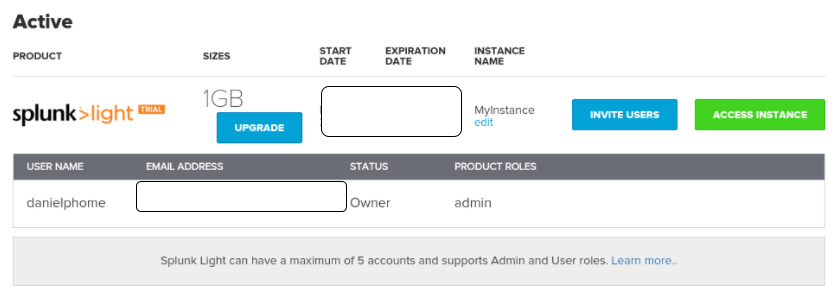
I'm unable to add delete settings


- Mark as New
- Bookmark Message
- Subscribe to Message
- Mute Message
- Subscribe to RSS Feed
- Permalink
- Report Inappropriate Content


Hello danielphome,
Assuming you are using a download trial of Splunk Light (and not Splunk Light cloud service), see http://docs.splunk.com/Documentation/SplunkLight/latest/GettingStarted/Editaccountsettings to give yourself permission to delete the data.
If you are using Splunk Light Cloud service, let us know, since the process is different.
-DJay
- Mark as New
- Bookmark Message
- Subscribe to Message
- Mute Message
- Subscribe to RSS Feed
- Permalink
- Report Inappropriate Content
I'm unable to add the delete permission to my profile event through im the admin as per this screenshot. Also i put an image of the instace in the original question.


[Puzzles] Solve, Learn, Repeat: Dynamic formatting from XML events
Enter the Agentic Era with Splunk AI Assistant for SPL 1.4
Stronger Security with Federated Search for S3, GCP SQL & Australian Threat ...
