
Turn on suggestions
Auto-suggest helps you quickly narrow down your search results by suggesting possible matches as you type.
Splunk Enterprise
×
Join the Conversation
Without signing in, you're just watching from the sidelines. Sign in or Register to connect, share, and be part of the Splunk Community.
- Find Answers
- :
- Splunk Products
- :
- Splunk Enterprise
- :
- Add data to CVE Lookup
Options
- Subscribe to RSS Feed
- Mark Topic as New
- Mark Topic as Read
- Float this Topic for Current User
- Bookmark Topic
- Subscribe to Topic
- Mute Topic
- Printer Friendly Page
- Mark as New
- Bookmark Message
- Subscribe to Message
- Mute Message
- Subscribe to RSS Feed
- Permalink
- Report Inappropriate Content
Add data to CVE Lookup

franciscof
Explorer
07-29-2020
08:34 AM
Hi guys, can somebody help me to add data to this app, I get into the input configuration, but then I don't know how to fill those fields. Below you'll see the fields I need to fill:
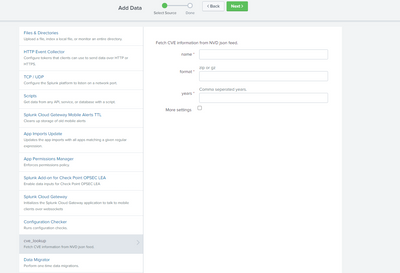
As you can see there are only three, so this is a simple configuration page, but I don't know the info I need to do this. I've looked for documentation but haven't found any.
Can somebody give me a hand on this?
Many thanks
- Mark as New
- Bookmark Message
- Subscribe to Message
- Mute Message
- Subscribe to RSS Feed
- Permalink
- Report Inappropriate Content

richgalloway

SplunkTrust
07-29-2020
10:55 AM
I suggest you contact the developer via the link on the app's page in splunkbase.
---
If this reply helps you, Karma would be appreciated.
If this reply helps you, Karma would be appreciated.
- Mark as New
- Bookmark Message
- Subscribe to Message
- Mute Message
- Subscribe to RSS Feed
- Permalink
- Report Inappropriate Content
franciscof
Explorer
07-29-2020
11:51 AM
Are you sure there isn't a more simple way of populating this app? It seems weird to go talk to the developer on this matter. However I'm sending him an email, but want to make sure that there isn't other way to do this.
- Mark as New
- Bookmark Message
- Subscribe to Message
- Mute Message
- Subscribe to RSS Feed
- Permalink
- Report Inappropriate Content
richgalloway
SplunkTrust
07-29-2020
12:01 PM
Someone with experience with the app may eventually chime in with an answer. The developer may respond by then. Plus, he should know his documentation is lacking.
---
If this reply helps you, Karma would be appreciated.
If this reply helps you, Karma would be appreciated.

Got questions? Get answers!
Join the Splunk Community Slack to learn, troubleshoot, and make connections with fellow Splunk practitioners in real time!
Meet up IRL or virtually!
Join Splunk User Groups to connect and learn in-person by region or remotely by topic or industry.
Get Updates on the Splunk Community!
Your Path to AgenticOps: AI Experiences for Every Splunk Practitioner
Your Path to AgenticOps: AI Experiences for Every Splunk Practitioner
Watch on demand us for a demo-driven ...
The Data Connection - October 2026
We all have data. Lots of it. But that’s not the problem – it’s understanding what we should we do with it, ...
Beyond the Acceleration Zone: Maximizing Your Success with Splunk Customer Experience ...
Customer success is built on tailored guidance and accessible resources. As a Splunk user, you are encouraged ...
