
Turn on suggestions
Auto-suggest helps you quickly narrow down your search results by suggesting possible matches as you type.
Splunk Enterprise Security
×
Join the Conversation
Without signing in, you're just watching from the sidelines. Sign in or Register to connect, share, and be part of the Splunk Community.
Turn on suggestions
Auto-suggest helps you quickly narrow down your search results by suggesting possible matches as you type.
- Find Answers
- :
- Premium Solutions
- :
- Splunk Enterprise Security
- :
- Why is ES changing Investigation Timeline Timestam...
Options
- Subscribe to RSS Feed
- Mark Topic as New
- Mark Topic as Read
- Float this Topic for Current User
- Bookmark Topic
- Subscribe to Topic
- Mute Topic
- Printer Friendly Page
- Mark as New
- Bookmark Message
- Subscribe to Message
- Mute Message
- Subscribe to RSS Feed
- Permalink
- Report Inappropriate Content
Why is ES changing Investigation Timeline Timestamp When Printing?

edwardrose
Contributor
08-31-2018
02:32 PM
Hello All,
We have just completed an upgrade to Splunk Base 7.1.2 and ES 5.1. We have a couple of ongoing investigations in ES and when we look at the details of these investigations in list mode.
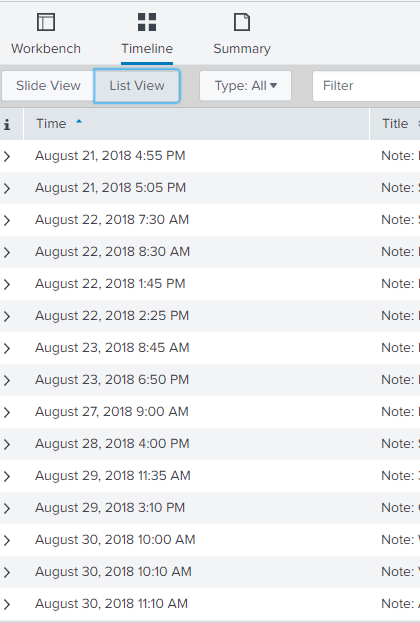
We see the correct time and date that the event was logged into ES Investigations. But when we print the document, the time and date change to January 18, 1970

What could cause this issue?
Thanks
ed


- Mark as New
- Bookmark Message
- Subscribe to Message
- Mute Message
- Subscribe to RSS Feed
- Permalink
- Report Inappropriate Content

smoir_splunk

Splunk Employee
08-31-2018
03:54 PM
It's a known bug that is fixed in version 5.0.0 of Splunk Enterprise Security. Maybe it was regressed? I'd suggest you follow up with your support contact.

Get Updates on the Splunk Community!
Upcoming Webinar: Unmasking Insider Threats with Slunk Enterprise Security’s UEBA
Join us on Wed, Dec 10. at 10AM PST / 1PM EST for a live webinar and demo with Splunk experts! Discover how ...
.conf25 technical session recap of Observability for Gen AI: Monitoring LLM ...
If you’re unfamiliar, .conf is Splunk’s premier event where the Splunk community, customers, partners, and ...
A Season of Skills: New Splunk Courses to Light Up Your Learning Journey
There’s something special about this time of year—maybe it’s the glow of the holidays, maybe it’s the ...
