
Turn on suggestions
Auto-suggest helps you quickly narrow down your search results by suggesting possible matches as you type.
Splunk Enterprise Security
×
Are you a member of the Splunk Community?
Sign in or Register with your Splunk account to get your questions answered, access valuable resources and connect with experts!
Turn on suggestions
Auto-suggest helps you quickly narrow down your search results by suggesting possible matches as you type.
- Find Answers
- :
- Premium Solutions
- :
- Splunk Enterprise Security
- :
- Why is ES changing Investigation Timeline Timestam...
Options
- Subscribe to RSS Feed
- Mark Topic as New
- Mark Topic as Read
- Float this Topic for Current User
- Bookmark Topic
- Subscribe to Topic
- Mute Topic
- Printer Friendly Page
- Mark as New
- Bookmark Message
- Subscribe to Message
- Mute Message
- Subscribe to RSS Feed
- Permalink
- Report Inappropriate Content
Why is ES changing Investigation Timeline Timestamp When Printing?

edwardrose
Contributor
08-31-2018
02:32 PM
Hello All,
We have just completed an upgrade to Splunk Base 7.1.2 and ES 5.1. We have a couple of ongoing investigations in ES and when we look at the details of these investigations in list mode.
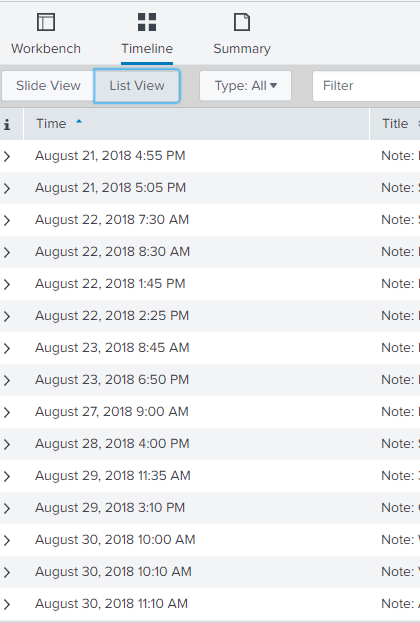
We see the correct time and date that the event was logged into ES Investigations. But when we print the document, the time and date change to January 18, 1970
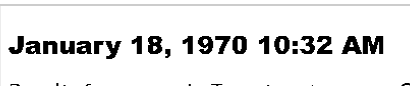
What could cause this issue?
Thanks
ed


- Mark as New
- Bookmark Message
- Subscribe to Message
- Mute Message
- Subscribe to RSS Feed
- Permalink
- Report Inappropriate Content
smoir_splunk

Splunk Employee
08-31-2018
03:54 PM
It's a known bug that is fixed in version 5.0.0 of Splunk Enterprise Security. Maybe it was regressed? I'd suggest you follow up with your support contact.

Get Updates on the Splunk Community!
Splunk Observability for AI
Don’t miss out on an exciting Tech Talk on Splunk Observability for AI!
Discover how Splunk’s agentic AI ...
[Puzzles] Solve, Learn, Repeat: Dereferencing XML to Fixed-length events
This challenge was first posted on Slack #puzzles channelFor a previous puzzle, I needed a set of fixed-length ...
Stay Connected: Your Guide to December Tech Talks, Office Hours, and Webinars!
What are Community Office Hours?
Community Office Hours is an interactive 60-minute Zoom series where ...
