
Join the Conversation
- Find Answers
- :
- Splunk Products
- :
- Splunk Enterprise Security
- :
- Re: Splunk Enterprise Security: Why does Inputlook...
- Subscribe to RSS Feed
- Mark Topic as New
- Mark Topic as Read
- Float this Topic for Current User
- Bookmark Topic
- Subscribe to Topic
- Mute Topic
- Printer Friendly Page
- Mark as New
- Bookmark Message
- Subscribe to Message
- Mute Message
- Subscribe to RSS Feed
- Permalink
- Report Inappropriate Content

Splunk Enterprise version is 6.5.2
kvstore correlationsearches_lookup is defined in app SA-ThreatIntelligence (version 4.5.0) which is part of Enterprise Security (version 4.5.0).
The definition of correlationsearches_lookup is as below in :
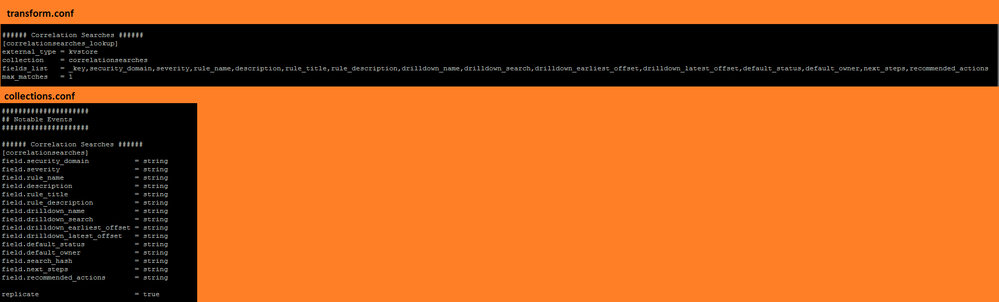
But the command | inputlookup correlationsearches_lookup and | inputlookup correlationsearches_lookup | transpose | table column only shows 10 of 15 available fields.
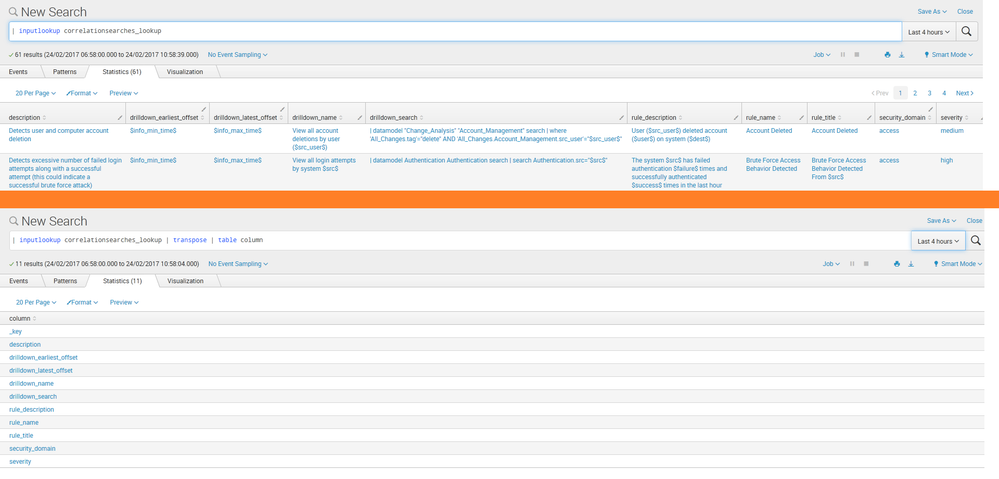
May I know why the remaining 5 fields does not show in the result?
Is it possible to show all 15 fields in the result?
Thanks!


- Mark as New
- Bookmark Message
- Subscribe to Message
- Mute Message
- Subscribe to RSS Feed
- Permalink
- Report Inappropriate Content


If fields do not return any values in the search, the field will not show on the search results screen by default. I suspect the fields you mention are be default null so that is why they are not showing. If you issue a |table rule_name default_status default_owner, you will see those fields forced out as columns, but I suspect they are null. Looking in correlation_searches.conf in the SA-ThreatIntelligence, you will see by default the default_status and default_owner are null fields.
- Mark as New
- Bookmark Message
- Subscribe to Message
- Mute Message
- Subscribe to RSS Feed
- Permalink
- Report Inappropriate Content
If fields do not return any values in the search, the field will not show on the search results screen by default. I suspect the fields you mention are be default null so that is why they are not showing. If you issue a |table rule_name default_status default_owner, you will see those fields forced out as columns, but I suspect they are null. Looking in correlation_searches.conf in the SA-ThreatIntelligence, you will see by default the default_status and default_owner are null fields.
- Mark as New
- Bookmark Message
- Subscribe to Message
- Mute Message
- Subscribe to RSS Feed
- Permalink
- Report Inappropriate Content
That's the case.
Thanks a lot!

Join the Splunk Community Slack to learn, troubleshoot, and make connections with fellow Splunk practitioners in real time!
Join Splunk User Groups to connect and learn in-person by region or remotely by topic or industry.
Announcing Modern Navigation: A New Era of Splunk User Experience
Observability Simplified: Combining User Experience, Application Performance & ...
Event Series May & June: From Network Visibility to Service Intelligence
