
Join the Conversation
- Find Answers
- :
- Splunk Products
- :
- Splunk Enterprise Security
- :
- Re: Importation and visualisation of CSV issue
- Subscribe to RSS Feed
- Mark Topic as New
- Mark Topic as Read
- Float this Topic for Current User
- Bookmark Topic
- Subscribe to Topic
- Mute Topic
- Printer Friendly Page
- Mark as New
- Bookmark Message
- Subscribe to Message
- Mute Message
- Subscribe to RSS Feed
- Permalink
- Report Inappropriate Content
Importation and visualisation of CSV issue

Hello,
I have a CSV dataset with 2 colomns (_time , temperature) but when i import the dataset in Splunk to do a visualization of the dataset, Splunk plot the dataset with the temperature as the X value and the time as a Y value. How can I change the two columns?
I tried to modify directly the CSV file but doesn't change anything.
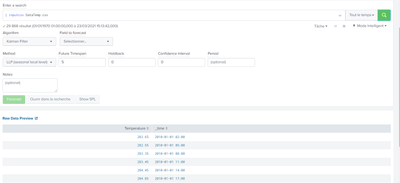

Thanks
- Mark as New
- Bookmark Message
- Subscribe to Message
- Mute Message
- Subscribe to RSS Feed
- Permalink
- Report Inappropriate Content


Just select time range as All time on top right. It is now showing last 24 hour. That is why you don't see events.
- Mark as New
- Bookmark Message
- Subscribe to Message
- Mute Message
- Subscribe to RSS Feed
- Permalink
- Report Inappropriate Content
Please try with "All time". Because your dataset has timestamps with year 2010.
- Mark as New
- Bookmark Message
- Subscribe to Message
- Mute Message
- Subscribe to RSS Feed
- Permalink
- Report Inappropriate Content
Sorry i'm new with Splunk and i don't where i have to type "all time"
- Mark as New
- Bookmark Message
- Subscribe to Message
- Mute Message
- Subscribe to RSS Feed
- Permalink
- Report Inappropriate Content
Hi @nathanboon,
I see a warning on your screenshot top-left stating that _time should be UNIX time. I think your CSV timestamps are not epoc. Can you please change the search like below;
| inputcsv dataset.csv
| eval _time=strptime(_time,"%Y-%m-%d %H:%M")
| table _time temperature
- Mark as New
- Bookmark Message
- Subscribe to Message
- Mute Message
- Subscribe to RSS Feed
- Permalink
- Report Inappropriate Content
I change the command but now Splunk doesn't recognize the dataset anymore
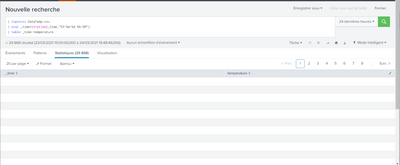
- Mark as New
- Bookmark Message
- Subscribe to Message
- Mute Message
- Subscribe to RSS Feed
- Permalink
- Report Inappropriate Content

Have you tried using the table command to specify the field order?
| inputcsv dataset.csv | table _time temperatureIf this reply helps you, Karma would be appreciated.
- Mark as New
- Bookmark Message
- Subscribe to Message
- Mute Message
- Subscribe to RSS Feed
- Permalink
- Report Inappropriate Content
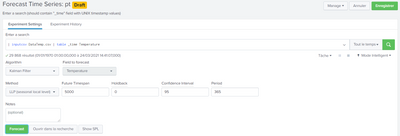
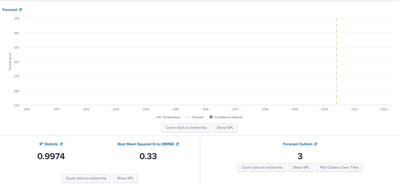
Yes i tried this and it's works , the visualization is good however when i'm trying to apply a filter kalman, it doesn't show anything:
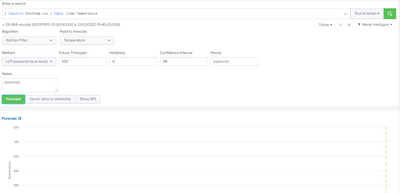
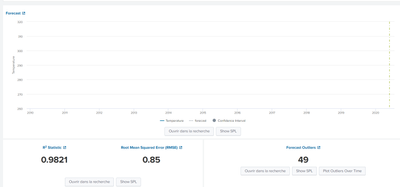
- Mark as New
- Bookmark Message
- Subscribe to Message
- Mute Message
- Subscribe to RSS Feed
- Permalink
- Report Inappropriate Content
The instructions at https://docs.splunk.com/Documentation/MLApp/5.2.1/User/FTSExperiment#Assistant_workflow say to specify a Period. Have you tried that?
If this reply helps you, Karma would be appreciated.
- Mark as New
- Bookmark Message
- Subscribe to Message
- Mute Message
- Subscribe to RSS Feed
- Permalink
- Report Inappropriate Content
I specify the period of 1 year (365) but the result is the same.
I tried many different configuration but Splunk doesn't plot anything.

Join the Splunk Community Slack to learn, troubleshoot, and make connections with fellow Splunk practitioners in real time!
Join Splunk User Groups to connect and learn in-person by region or remotely by topic or industry.
Index This | What travels the world but is also stuck in place?
Discover New Use Cases: Unlock Greater Value from Your Existing Splunk Data
Continue Your Journey: Join Session 2 of the Data Management and Federation Bootcamp ...
