
Join the Conversation
- Find Answers
- :
- Apps & Add-ons
- :
- Splunk Development
- :
- Splunk Dev
- :
- Re: logs not complete
- Subscribe to RSS Feed
- Mark Topic as New
- Mark Topic as Read
- Float this Topic for Current User
- Bookmark Topic
- Subscribe to Topic
- Mute Topic
- Printer Friendly Page
- Mark as New
- Bookmark Message
- Subscribe to Message
- Mute Message
- Subscribe to RSS Feed
- Permalink
- Report Inappropriate Content

Hi ,
I am having trouble right now on why does the splunk log is not complete/cut , in the past few months logs are coming consistently complete.
but now it is cut shows only the header and no information.
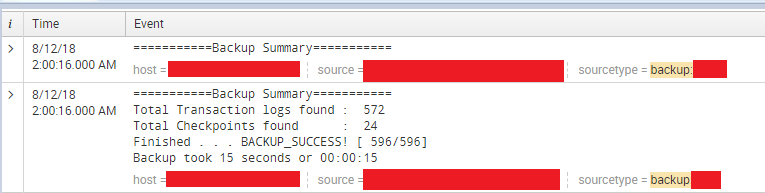
it came from a server that monitor the logs,
Can somebody tell me why this happens ?
what to investigate ?
Also what is the solution for this problem?
-thanks in advance
- Mark as New
- Bookmark Message
- Subscribe to Message
- Mute Message
- Subscribe to RSS Feed
- Permalink
- Report Inappropriate Content

Looks like the line breaking issue is because there are no settings defined in props.conf and the default settings are not working properly for your data. Can you provide sample events (at least 2) and tell me what the event boundaries are.
- Mark as New
- Bookmark Message
- Subscribe to Message
- Mute Message
- Subscribe to RSS Feed
- Permalink
- Report Inappropriate Content
Looks like the line breaking issue is because there are no settings defined in props.conf and the default settings are not working properly for your data. Can you provide sample events (at least 2) and tell me what the event boundaries are.
- Mark as New
- Bookmark Message
- Subscribe to Message
- Mute Message
- Subscribe to RSS Feed
- Permalink
- Report Inappropriate Content
Thanks all for the help, adding props.conf helps the data to be completed,
Still not sure on why does the logs have been cut, but thank's it's working now.
- Mark as New
- Bookmark Message
- Subscribe to Message
- Mute Message
- Subscribe to RSS Feed
- Permalink
- Report Inappropriate Content
1) here is my configuratoin file :
Inputs:
[monitor:///var/log/backup]

disabled = 0

sourcetype = backup:mtx
there are no props and transforms set on the whole process.
Server(log)-universal forwarder > indexer > search head
2)Are the logs getting truncated by any chance?
- The logs are being cut off in that specific part,
there are chances that it would gave as a whole, but most of the time it is missing parts after the
"============Backup Summary============"
45% of the log it sent are being cut.
Still can't figure this out.
- Mark as New
- Bookmark Message
- Subscribe to Message
- Mute Message
- Subscribe to RSS Feed
- Permalink
- Report Inappropriate Content

Does your data contain timestamps? I don't see any in your sample logs above, but I'm curious is there are timestamps in the missing portions of the data.
- Mark as New
- Bookmark Message
- Subscribe to Message
- Mute Message
- Subscribe to RSS Feed
- Permalink
- Report Inappropriate Content
I was under the impression that the logs are getting truncated after 10,000 character limit. But clearly thats not the case. Did you get a chance to look at the splunkd logs and see if you have any errors highlighted?
- Mark as New
- Bookmark Message
- Subscribe to Message
- Mute Message
- Subscribe to RSS Feed
- Permalink
- Report Inappropriate Content
I would need to see your inputs.conf, props.conf, and transforms.conf for your particular input, but my first guess would be to investigate your settings in props.conf for your sourcetype.
- Mark as New
- Bookmark Message
- Subscribe to Message
- Mute Message
- Subscribe to RSS Feed
- Permalink
- Report Inappropriate Content
Are the logs getting truncated by any chance?



Join the Splunk Community Slack to learn, troubleshoot, and make connections with fellow Splunk practitioners in real time!
Join Splunk User Groups to connect and learn in-person by region or remotely by topic or industry.
SOC4Kafka - New Kafka Connector Powered by OpenTelemetry
Rounding off the Splunk Dashboard Contest
A Four Part Event Series: AI + Observability: AI Agents, LLMs, Apps, & Infrastructure
