
Join the Conversation
- Find Answers
- :
- Apps & Add-ons
- :
- Splunk Development
- :
- Splunk Dev
- :
- Re: chart label
- Subscribe to RSS Feed
- Mark Topic as New
- Mark Topic as Read
- Float this Topic for Current User
- Bookmark Topic
- Subscribe to Topic
- Mute Topic
- Printer Friendly Page
- Mark as New
- Bookmark Message
- Subscribe to Message
- Mute Message
- Subscribe to RSS Feed
- Permalink
- Report Inappropriate Content

HI
i want to format my label charts but it dont works
do i have to add this code in a specific place??? beetween tags???hi
i put a css file in C:\Program Files\Splunk\etc\apps\Splunk_TA_windows\static
and i added this code in my html file but it doesn t works
here is the css file content:
text-label{
font-size: 20px !important;
fill: black !important;
font-weight: bold!important;
}
what is the problem please???
thanks
- Mark as New
- Bookmark Message
- Subscribe to Message
- Mute Message
- Subscribe to RSS Feed
- Permalink
- Report Inappropriate Content

@jip31, if you are using HTML Dashboard, chart title <h3> section can be selected .panel-head h3 selector. For the following example I have used chart with id="myPieChart" to apply CSS Style override only to that Chart. Also I have used a html panel (i.e. dashboard-element html in Splunk which is always hidden using tokenDependencies with $alwaysHideCSSStyleHTML$ which is never set
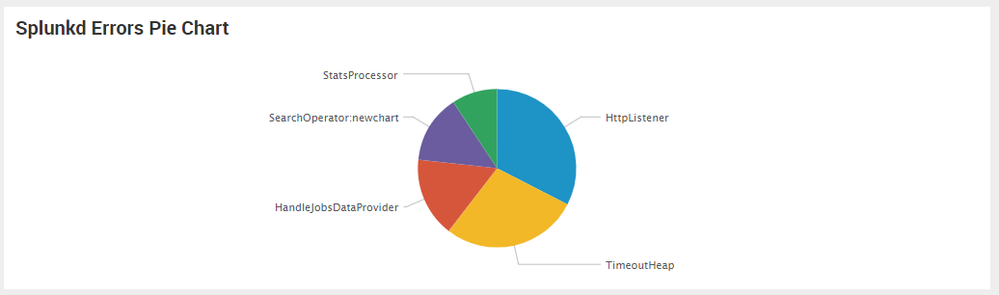
<div id="row1" class="dashboard-row dashboard-row1">
    <div id="panel1" class="dashboard-cell" style="width: 100%;">
        <div class="dashboard-panel clearfix">

            <div class="panel-element-row">
                <div id="element1" class="dashboard-element html" style="width: 100%">
                    <div class="panel-body html">
                            <style>
      #myPieChart .panel-head h3{
        font-size: 20px !important;
        fill: black !important;
        font-weight: bold!important;
      }
    </style>
                    </div>
                </div>
            </div>
            <div class="panel-element-row">
                <div id="myPieChart" class="dashboard-element chart" style="width: 100%">
                    <div class="panel-head">
                        <h3>Splunkd Errors Pie Chart</h3>
                    </div>
                    <div class="panel-body"></div>
                </div>
            </div>
        </div>
    </div>
</div>
Same approach for Simple XML would be to use .dashboard-element-title CSS Selector. You can use Browser Inspector Tool to find the DOM element (spath/selector) to override CSS.
  <row>
    <panel>
      <html depends="$alwaysHideCSSStyleHTML$">
        <style>
          #myPieChart .dashboard-element-title{
            font-size: 20px !important;
            fill: black !important;
            font-weight: bold!important;
          }
        </style>
      </html>
      <chart id="myPieChart">
        <title>Splunkd Errors Pie Chart</title>
        <search>
          <query>index=_internal sourcetype=splunkd log_level!="INFO" | top 5 component showperc=f</query>
          <earliest>-24h@h</earliest>
          <latest>now</latest>
        </search>
        <option name="charting.chart">pie</option>
        <option name="charting.drilldown">none</option>
      </chart>
    </panel>
  </row>
You should get Splunk Dashboard Examples app from Splunkbase to check out Custom Layout Dark Example to understand CSS override.
| makeresults | eval message= "Happy Splunking!!!"
- Mark as New
- Bookmark Message
- Subscribe to Message
- Mute Message
- Subscribe to RSS Feed
- Permalink
- Report Inappropriate Content
thanks a lot
- Mark as New
- Bookmark Message
- Subscribe to Message
- Mute Message
- Subscribe to RSS Feed
- Permalink
- Report Inappropriate Content
@jip31, if you are using HTML Dashboard, chart title <h3> section can be selected .panel-head h3 selector. For the following example I have used chart with id="myPieChart" to apply CSS Style override only to that Chart. Also I have used a html panel (i.e. dashboard-element html in Splunk which is always hidden using tokenDependencies with $alwaysHideCSSStyleHTML$ which is never set
<div id="row1" class="dashboard-row dashboard-row1">
    <div id="panel1" class="dashboard-cell" style="width: 100%;">
        <div class="dashboard-panel clearfix">

            <div class="panel-element-row">
                <div id="element1" class="dashboard-element html" style="width: 100%">
                    <div class="panel-body html">
                            <style>
      #myPieChart .panel-head h3{
        font-size: 20px !important;
        fill: black !important;
        font-weight: bold!important;
      }
    </style>
                    </div>
                </div>
            </div>
            <div class="panel-element-row">
                <div id="myPieChart" class="dashboard-element chart" style="width: 100%">
                    <div class="panel-head">
                        <h3>Splunkd Errors Pie Chart</h3>
                    </div>
                    <div class="panel-body"></div>
                </div>
            </div>
        </div>
    </div>
</div>
Same approach for Simple XML would be to use .dashboard-element-title CSS Selector. You can use Browser Inspector Tool to find the DOM element (spath/selector) to override CSS.
  <row>
    <panel>
      <html depends="$alwaysHideCSSStyleHTML$">
        <style>
          #myPieChart .dashboard-element-title{
            font-size: 20px !important;
            fill: black !important;
            font-weight: bold!important;
          }
        </style>
      </html>
      <chart id="myPieChart">
        <title>Splunkd Errors Pie Chart</title>
        <search>
          <query>index=_internal sourcetype=splunkd log_level!="INFO" | top 5 component showperc=f</query>
          <earliest>-24h@h</earliest>
          <latest>now</latest>
        </search>
        <option name="charting.chart">pie</option>
        <option name="charting.drilldown">none</option>
      </chart>
    </panel>
  </row>
You should get Splunk Dashboard Examples app from Splunkbase to check out Custom Layout Dark Example to understand CSS override.
| makeresults | eval message= "Happy Splunking!!!"



Join the Splunk Community Slack to learn, troubleshoot, and make connections with fellow Splunk practitioners in real time!
Join Splunk User Groups to connect and learn in-person by region or remotely by topic or industry.
Thanks for the Memories: .conf26 Took Learning to New Heights
Best Practices: Splunk auto adjust pipeline queue
Splunk Auto Ingestion Parallel Pipeline Scaling
