
Join the Conversation
- Find Answers
- :
- Apps & Add-ons
- :
- Splunk Development
- :
- Splunk Dev
- :
- Re: Will you help me extract rows which contain Re...
- Subscribe to RSS Feed
- Mark Topic as New
- Mark Topic as Read
- Float this Topic for Current User
- Bookmark Topic
- Subscribe to Topic
- Mute Topic
- Printer Friendly Page
- Mark as New
- Bookmark Message
- Subscribe to Message
- Mute Message
- Subscribe to RSS Feed
- Permalink
- Report Inappropriate Content

Hello,
Will you help me extract rows which contain Remote Desktop Users or Administrators field names?
"Server";"Local Group";"Name";"DisplayName";"Type";"Domain";"SID"
"server.peter.fd.com";"Remote Desktop Users";"S-1-5-21-1326131322-1829978501-250757269-1454717";"";"User";"EU1";"S-1-5-21-1326131322-1829978501-250757269-1454717"
"server.peter.fd.com";"";"$AT";"";"user";"domain";"S-1-5-21-1326131322-1829978501-250757269-1584230"
"server.peter.fd.com";"";"$OZ";"";"user";"domain";"S-1-5-21-1326131322-1829978501-250757269-1570766"
"server.peter.fd.com";"";"$TS";"";"user";"domain";"S-1-5-21-1326131322-1829978501-250757269-1505491"
"server.peter.fd.com";"";"$TH";"";"user";"domain";"S-1-5-21-1326131322-1829978501-250757269-1083479"
"server.peter.fd.com";"";"$SS";"";"user";"domain";"S-1-5-21-1326131322-1829978501-250757269-1528479"
- Mark as New
- Bookmark Message
- Subscribe to Message
- Mute Message
- Subscribe to RSS Feed
- Permalink
- Report Inappropriate Content


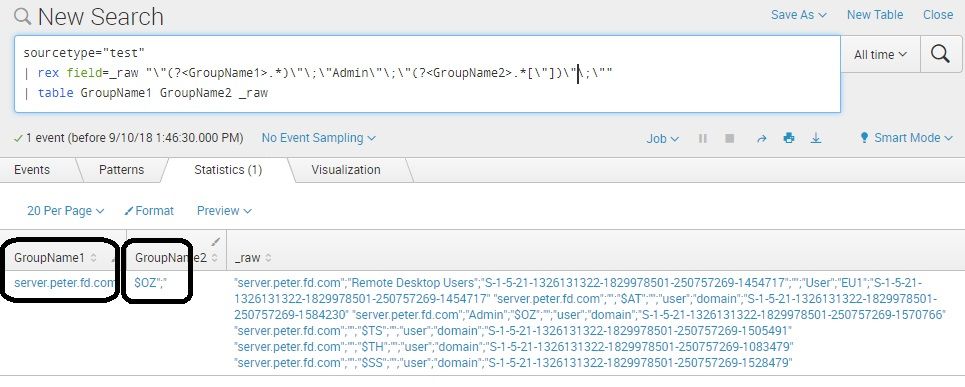
check this.. extracted approximately.. once you confirm/clearly update, then we can fine-tune the rex command..
sourcetype="test"
| rex field=_raw "\"(?<GroupName1>.*)\"\;\"Admin\"\;\"(?<GroupName2>.*[\"])\"\;\""
| table GroupName1 GroupName2 _raw

- Mark as New
- Bookmark Message
- Subscribe to Message
- Mute Message
- Subscribe to RSS Feed
- Permalink
- Report Inappropriate Content
- Mark as New
- Bookmark Message
- Subscribe to Message
- Mute Message
- Subscribe to RSS Feed
- Permalink
- Report Inappropriate Content
assuming each line as single event, maybe, check -
Yoursearch ("Remote Desktop Users" OR "Administrators") | table Server Local Group DisplayName Type
- Mark as New
- Bookmark Message
- Subscribe to Message
- Mute Message
- Subscribe to RSS Feed
- Permalink
- Report Inappropriate Content
It's solution doesn't work
- Mark as New
- Bookmark Message
- Subscribe to Message
- Mute Message
- Subscribe to RSS Feed
- Permalink
- Report Inappropriate Content
is every line is an event or the whole logs is a single event?
is the fields are already extracted?!?!
Yoursearch ("Local Group"="Remote Desktop Users" OR "Local Group"="Administrators") | table Server Local Group DisplayName Type
- Mark as New
- Bookmark Message
- Subscribe to Message
- Mute Message
- Subscribe to RSS Feed
- Permalink
- Report Inappropriate Content
Whole logs is a single event with more rows
One log contains rows:
"server.peter.fd.com";"Remote Desktop Users";"S-1-5-21-1326131322-1829978501-250757269-1454717";"";"User";"EU1";"S-1-5-21-1326131322-1829978501-250757269-1454717"
"server.peter.fd.com";"";"$AT";"";"user";"domain";"S-1-5-21-1326131322-1829978501-250757269-1584230"
"server.peter.fd.com";"";"$OZ";"";"user";"domain";"S-1-5-21-1326131322-1829978501-250757269-1570766"
"server.peter.fd.com";"";"$TS";"";"user";"domain";"S-1-5-21-1326131322-1829978501-250757269-1505491"
"server.peter.fd.com";"";"$TH";"";"user";"domain";"S-1-5-21-1326131322-1829978501-250757269-1083479"
"server.peter.fd.com";"";"$SS";"";"user";"domain";"S-1-5-21-1326131322-1829978501-250757269-1528479"
- Mark as New
- Bookmark Message
- Subscribe to Message
- Mute Message
- Subscribe to RSS Feed
- Permalink
- Report Inappropriate Content
ok, if the whole logs are a single event, then, you just like to "print" the lines or you want to do some other calculations?!?!
if just printing means, you can do some rex commands..
update us more info..
- Mark as New
- Bookmark Message
- Subscribe to Message
- Mute Message
- Subscribe to RSS Feed
- Permalink
- Report Inappropriate Content
Yeah,
you are right. I need use rex command for create a table or stats count
I tried this command:
index="srgp_members" host="*" | rex max_match=0 field=_raw "(?<GroupName1>\S+)Administrators(?<GroupName2>\S+)" | table GroupName1, GroupName2
But it seems it's incorrect work
- Mark as New
- Bookmark Message
- Subscribe to Message
- Mute Message
- Subscribe to RSS Feed
- Permalink
- Report Inappropriate Content
write your SPL query inside backticks (and) , so the full SPL command will be shown clearly
- Mark as New
- Bookmark Message
- Subscribe to Message
- Mute Message
- Subscribe to RSS Feed
- Permalink
- Report Inappropriate Content
I did it. CHeck please now

Join the Splunk Community Slack to learn, troubleshoot, and make connections with fellow Splunk practitioners in real time!
Join Splunk User Groups to connect and learn in-person by region or remotely by topic or industry.
Why Splunk Customers Should Attend Cisco Live 2026 Las Vegas
What Is the Name of the USB Key Inserted by Bob Smith? (BOTS Hint, Not the Answer)
Automating Threat Operations and Threat Hunting with Recorded Future
