
Join the Conversation
- Find Answers
- :
- Apps & Add-ons
- :
- Splunk Development
- :
- Splunk Dev
- :
- Prepopulate inputs in custom Splunk ES adaptive re...
- Subscribe to RSS Feed
- Mark Topic as New
- Mark Topic as Read
- Float this Topic for Current User
- Bookmark Topic
- Subscribe to Topic
- Mute Topic
- Printer Friendly Page
- Mark as New
- Bookmark Message
- Subscribe to Message
- Mute Message
- Subscribe to RSS Feed
- Permalink
- Report Inappropriate Content

I am currently in the process of building out a custom application which will include an adaptive response action that uses a python script to update a system's group based on events that come into our incident review page. I have all of the logic working (Correlation search identifies an event, creates a notable, from there I can select the AR action, input this systems GUID into the text box and it will go from there).
My issue is that I cannot get the correct configuration to have this field prepopulated when the menu is brought up based on the event in the notable. The configuration files I believe need to be updated are the alert_actions.conf, alert_actions.conf.spec, savedsearches.conf.spec, and <alert_action_name>.html files.
I have found some similar posts about this but nothing that gives details about the syntax needed for each file:
https://community.splunk.com/t5/Splunk-Enterprise-Security/Does-the-service-now-integration-work-as-...
https://community.splunk.com/t5/Splunk-Enterprise-Security/Splunk-Enterprise-Security-Is-it-possible...
In my various config files I have the following lines:
alert_actions.conf:
param.hostname = $result.hostname$
param.connector_guid =$result.connector_guid$
alert_actions.conf.spec
param.hostname = <string>
param.cguid = <string>
savedsearches.conf.spec
param.hostname = <string>
param.cguid = <string>
<alert_action_name>.html
<form class="form-horizontal form-complex">
<div class="control-group">
	<label class="control-label" for="custom_app_hostname">Hostname <span class="required">*</span> </label>
    <div class="controls">
	<input type="text" name="action.custom_app.param.hostname" value="$hostname$" id="custom_app_hostname"/>
                <span class="help-block">Verify this is the correct hostname, if not then input from the alert.</span>
    </div>
</div>
<div class="control-group">
	<label class="control-label" for="custom_app_cguid">Connector GUID <span class="required">*</span> </label>
    <div class="controls">
	<input type="text" name="action.custom_app.param.connector_guid" value="$connector_guid$" id="custom_app_cguid"/>
    </div>
</div>
</form>
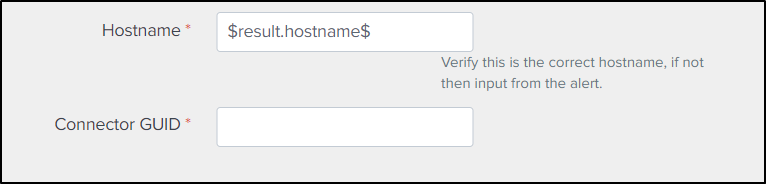
Below is the screenshot of the menu I am referring to needing to be prepopulated:
- Mark as New
- Bookmark Message
- Subscribe to Message
- Mute Message
- Subscribe to RSS Feed
- Permalink
- Report Inappropriate Content
Hello, update to this I as I figured out where I was going wrong. I had the idea that when I brought up the html page for the adaptive response that all the forms would fill in with their values from the event, instead copying from the Splunk example I configured my python script to instead pull the value of the field that I wanted (https://dev.splunk.com/enterprise/docs/devtools/enterprisesecurity/adaptiveresponseframework/example....
So instead of opening up that page to input values, the page now has the field name which would be static for this process always, then when I hit run the python script can pull the value of the field from my event using this function (with field being my parameter set in my config):
parameter = result[self.configuration.get("field")]
- Mark as New
- Bookmark Message
- Subscribe to Message
- Mute Message
- Subscribe to RSS Feed
- Permalink
- Report Inappropriate Content
Hello, update to this I as I figured out where I was going wrong. I had the idea that when I brought up the html page for the adaptive response that all the forms would fill in with their values from the event, instead copying from the Splunk example I configured my python script to instead pull the value of the field that I wanted (https://dev.splunk.com/enterprise/docs/devtools/enterprisesecurity/adaptiveresponseframework/example....
So instead of opening up that page to input values, the page now has the field name which would be static for this process always, then when I hit run the python script can pull the value of the field from my event using this function (with field being my parameter set in my config):
parameter = result[self.configuration.get("field")]


Join the Splunk Community Slack to learn, troubleshoot, and make connections with fellow Splunk practitioners in real time!
Join Splunk User Groups to connect and learn in-person by region or remotely by topic or industry.
SOC4Kafka - New Kafka Connector Powered by OpenTelemetry
Event Series: Level up your SOC: Advancing with Splunk Enterprise Security
Announcing Modern Navigation: A New Era of Splunk User Experience
