
Join the Conversation
- Find Answers
- :
- Apps & Add-ons
- :
- Splunk Development
- :
- Splunk Dev
- :
- Re: How to create a Windows event log input via Py...
- Subscribe to RSS Feed
- Mark Topic as New
- Mark Topic as Read
- Float this Topic for Current User
- Bookmark Topic
- Subscribe to Topic
- Mute Topic
- Printer Friendly Page
- Mark as New
- Bookmark Message
- Subscribe to Message
- Mute Message
- Subscribe to RSS Feed
- Permalink
- Report Inappropriate Content
How to create a Windows event log input via Python SDK?

Hello All!
When I create a Windows Event Logs input manually (via the GUI), I specify a Server Class, Event Logs, and the Index. How do I create it via the Python SDK?
I guess I need to specify:
"splunktcp" : 9997
"win-event-log-collections" : ['System', 'Application', 'Security']
But I don't see how to specify the index and the Windows server that runs a forwarder.
Thanks
- Mark as New
- Bookmark Message
- Subscribe to Message
- Mute Message
- Subscribe to RSS Feed
- Permalink
- Report Inappropriate Content

You can use the REST endpoint data/inputs/win-event-log-collections documented here
Note that you will need to use the management port (default 8089), not 9997.
I am not sure what you are trying to achieve. I would just use the deployment server to push out forwarder configuration and edit config files in .../etc/deployment-apps/...
- Mark as New
- Bookmark Message
- Subscribe to Message
- Mute Message
- Subscribe to RSS Feed
- Permalink
- Report Inappropriate Content
Thanks for your reply. I have review the REST API. Unfortunately, I have missing how to define the input for win-event-log-collections from multiple remote Windows Splunk Forwarders.
The steps I perform via the user interface are:
- Data Inputs -> Windows Events Log (Forwarded Inputs)
- Select Forwarders:
- Select a host from available hosts
- Specify a new class name
- Select Source (what kind of events to collect)
- Select Index
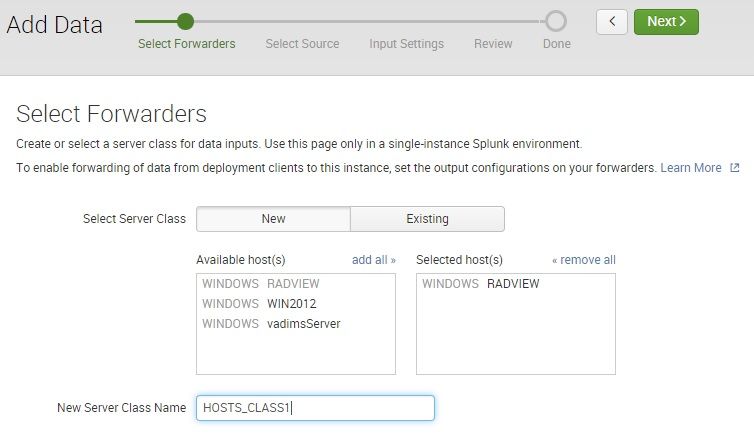
I need a way to do the same with the SDK (or REST API). However, the specification of
data/inputs/win-event-log-collections POST
states only for WMI collection and not for remote Forwarders.
I see that browser uses the URL /data/inputs/remote_eventlogs, but cannot find its specification
- Mark as New
- Bookmark Message
- Subscribe to Message
- Mute Message
- Subscribe to RSS Feed
- Permalink
- Report Inappropriate Content
Can you explain what you are trying to do in general? Why do you need to configure your Windows forwarders using your own custom code vs. using the Splunk-supplied configuration mechanism known as the Deployment server?
The DS allows you to group similar forwarder hosts together into what's called a server class, and ensure that all machines in a given server class get the same Splunk configuration applied to them. On the forwarder side, you define the deployment server address once (in deploymentclient.conf) and from there on, the forwarders will keep there configuration in synch with what is specified on the deployment server.
The link above documents the REST API call you can use for BOTH, local as well as WMI-based inputs, depending on the lookup_host and name attributes.
Understanding your requirements better would help in guiding you down the best path.


Join the Splunk Community Slack to learn, troubleshoot, and make connections with fellow Splunk practitioners in real time!
Join Splunk User Groups to connect and learn in-person by region or remotely by topic or industry.
Cisco Data Fabric from Architecture to Investigation, Better SOC Visibility, and More ...
The Trust Gap: Why a Data Foundation is Fundamental to an Agentic Enterprise
Data Management Digest – September 2026
