
Join the Conversation
- Find Answers
- :
- Apps & Add-ons
- :
- Splunk Development
- :
- Splunk Dev
- :
- Re: How many indexer needed for my setup
- Subscribe to RSS Feed
- Mark Topic as New
- Mark Topic as Read
- Float this Topic for Current User
- Bookmark Topic
- Subscribe to Topic
- Mute Topic
- Printer Friendly Page
- Mark as New
- Bookmark Message
- Subscribe to Message
- Mute Message
- Subscribe to RSS Feed
- Permalink
- Report Inappropriate Content
How many indexer needed for my setup

Hello ,
I have one setup one indexer and one splunk search head.
Indexer has 64 RAM and 16 CPU core and SH as 128 CPU and 32 core.
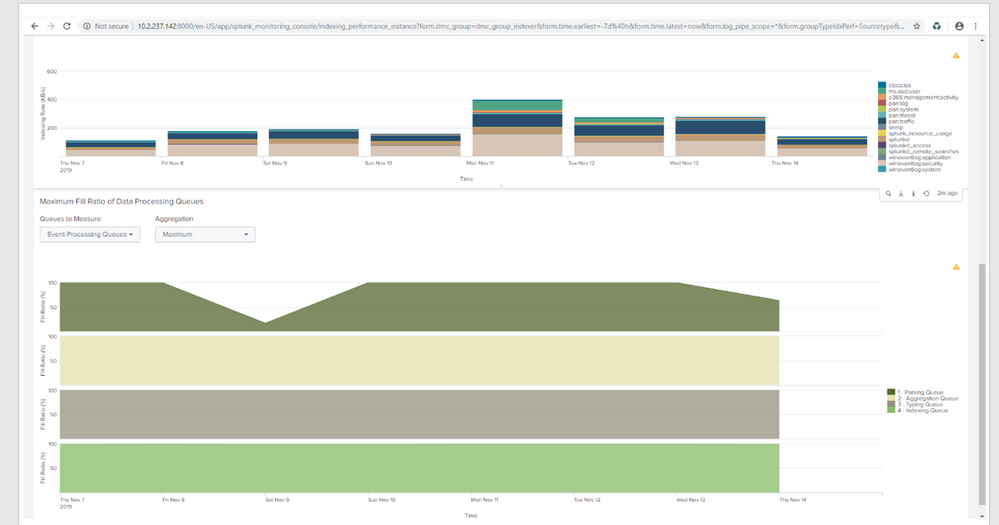
Indexing per day 25 to 30 GB only. On investigation found all queues for fill ration are full .
What should i do.
Thanks
Lalit
- Mark as New
- Bookmark Message
- Subscribe to Message
- Mute Message
- Subscribe to RSS Feed
- Permalink
- Report Inappropriate Content


Hi @lmjoin,
RAM and CPUs are OK for your needs, probably the problem is related to the usual bottleneck in Splunk: storage.
As you can read Splunk refence hardware requires at least 800 IOPS (see at https://docs.splunk.com/Documentation/Splunk/8.0.0/Capacity/Referencehardware#Disk_subsystem ), you can measure IOPS using a tool like Bonnie++ ( sourceforge.net/projects/bonnie/ ).
Then you could check the load of your indexer using the monitoring console that can give you useful information.
Ciao.
Giuseppe
- Mark as New
- Bookmark Message
- Subscribe to Message
- Mute Message
- Subscribe to RSS Feed
- Permalink
- Report Inappropriate Content

The processing capacity of the indexer is 300GB / Day.
https://docs.splunk.com/Documentation/Splunk/8.0.0/Capacity/Summaryofperformancerecommendations
Assuming that there is no problem with the performance of the hard disk,
The cause of queue clogging may take a long time to process one index.
server.conf
parallelIngestionPipelines = 2
The workaround is to do multiple processes. However, PS is required for more than 3 multiplexes.
https://docs.splunk.com/Documentation/Splunk/8.0.0/Indexer/Pipelinesets
※Run a health check to check for problems.
- Mark as New
- Bookmark Message
- Subscribe to Message
- Mute Message
- Subscribe to RSS Feed
- Permalink
- Report Inappropriate Content

An indexer should be able to process way more data before any queues fill up. Take a look into the MC > Indexing > Data Quality dashboard. Do you see timestamping, line breaking or any other issues? You might want to look for any errors and warnings regarding getting your data in and go from there fixing the issues.
Also check whether your server got enough IOPS. Maybe do a test with bonnie++ to see whether you're meeting the 800+ minimum requirements.
Skalli



Join the Splunk Community Slack to learn, troubleshoot, and make connections with fellow Splunk practitioners in real time!
Join Splunk User Groups to connect and learn in-person by region or remotely by topic or industry.
A Four-Part Event Series: Full Stack Observability For the AI Era
SOC4Kafka - New Kafka Connector Powered by OpenTelemetry
Event Series: Level up your SOC: Advancing with Splunk Enterprise Security
