
Turn on suggestions
Auto-suggest helps you quickly narrow down your search results by suggesting possible matches as you type.
Splunk Dev
×
Join the Conversation
Without signing in, you're just watching from the sidelines. Sign in or Register to connect, share, and be part of the Splunk Community.
- Find Answers
- :
- Apps & Add-ons
- :
- Splunk Development
- :
- Splunk Dev
- :
- Re: Getting field and value count in the same form...
Options
- Subscribe to RSS Feed
- Mark Topic as New
- Mark Topic as Read
- Float this Topic for Current User
- Bookmark Topic
- Subscribe to Topic
- Mute Topic
- Printer Friendly Page
- Mark as New
- Bookmark Message
- Subscribe to Message
- Mute Message
- Subscribe to RSS Feed
- Permalink
- Report Inappropriate Content
Getting field and value count in the same format

Atchyuth_P
Path Finder
09-25-2021
07:51 PM
Hi,
I have two values in a field named (Online Booking) and want to display the same in tabular format and I tried eval, stats command but not giving the expected result.
Question : Total count to find out the option to book table
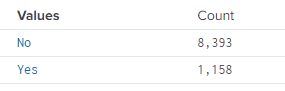
and the output that i am expecting is
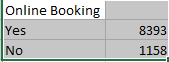
Please let me know which command needs to be used and also reference books for learning development, I am completely new to Splunk
- Mark as New
- Bookmark Message
- Subscribe to Message
- Mute Message
- Subscribe to RSS Feed
- Permalink
- Report Inappropriate Content

ITWhisperer

SplunkTrust
09-26-2021
02:19 AM
For SimpleXML dashboards, add a format block to the table with the useThousandSeparators option
https://docs.splunk.com/Documentation/Splunk/8.2.2/Viz/TableFormatsXML
        <format type="number" field="count">
          <option name="useThousandSeparators">true</option>
        </format>
- Mark as New
- Bookmark Message
- Subscribe to Message
- Mute Message
- Subscribe to RSS Feed
- Permalink
- Report Inappropriate Content
Atchyuth_P
Path Finder
09-26-2021
04:34 AM
Thank you @ITWhisperer for suggesting the method of using XML .
I have tried with the command (chart count by "Online Booking") gives me the accurate search result and also tried with XML and my dashboard looks quite good.

Got questions? Get answers!
Join the Splunk Community Slack to learn, troubleshoot, and make connections with fellow Splunk practitioners in real time!
Meet up IRL or virtually!
Join Splunk User Groups to connect and learn in-person by region or remotely by topic or industry.
Get Updates on the Splunk Community!
Splunk Enterprise Security: An Automated Phishing Response Workflow
Originally posted on Splunk.com.
Key takeaways
The volume of phishing emails can overwhelm even the most ...
Sharper ES Detections, Agentic AI Integrations, Smarter Workload Management, and More ...
Splunk Lantern is Splunk’s customer success center that provides practical guidance from Splunk experts on key ...
Data Outage Monitoring and Reporting
We’ve all been there, right? Living our best life, working on our Splunk environment, when out of nowhere a ...
