
Join the Conversation
- Find Answers
- :
- Apps & Add-ons
- :
- Splunk Development
- :
- Splunk Dev
- :
- Re: Create Missing Records of a Timechart
- Subscribe to RSS Feed
- Mark Topic as New
- Mark Topic as Read
- Float this Topic for Current User
- Bookmark Topic
- Subscribe to Topic
- Mute Topic
- Printer Friendly Page
- Mark as New
- Bookmark Message
- Subscribe to Message
- Mute Message
- Subscribe to RSS Feed
- Permalink
- Report Inappropriate Content

given the below input (4 mins of sample access log data):
_time,URI,Bytes
2021-05-18 02:01:00,a,1
2021-05-18 02:01:00,a,1
2021-05-18 02:02:00,a,1
2021-05-18 02:03:00,b,1
2021-05-18 02:03:00,b,1
2021-05-18 02:04:00,a,1
source="ds1.csv" host="vgspl11hr" index="sfp" sourcetype="csv"
| table _time,URI,Bytes
| timechart span=1m  avg(Bytes) AS avg_bytes, stdev(Bytes) AS std_bytes by URI limit=0
| fillnull value=""
| untable _time Measure Value
| eval Metric=mvindex(split(Measure,": "),0),uri=mvindex(split(Measure,": "),1)
| fields - Measure
| eval time_uri=_time."__".uri
| fields - uri - _time
| xyseries time_uri Metric Value
| eval _time=mvindex(split(time_uri,"__"),0),uri=mvindex(split(time_uri,"__"),1)
| fields - time_uri
_time	            uri	avg_bytes	std_bytes
2021-05-18 02:01:00	a	1			0
2021-05-18 02:02:00	a	1			0
However, i want the timechart to consider the existence of the URI = b.
Is there a way to have the timechart consider all the values of the URI in the computation, even if not all of the URIs existing in that time window?
I need the output to be as below in the first 2 mins time window:
_time	            uri	avg_bytes	std_bytes
2021-05-18 02:01:00	a	1			0
2021-05-18 02:01:00	b
2021-05-18 02:02:00	a	1			0
2021-05-18 02:02:00	b
I would really appreciate if you helped me.
- Mark as New
- Bookmark Message
- Subscribe to Message
- Mute Message
- Subscribe to RSS Feed
- Permalink
- Report Inappropriate Content
When i specify a time window of 4 mins (5/18/21 2:01:00.000 AM to 5/18/21 2:05:00.000 AM), the query returns all URIs .
when i specify a time window of 2 mins (5/18/21 2:01:00.000 AM to 5/18/21 2:03:00.000 AM), the query returns the records for the existing URIs in that time window, in my case URI=a.
So the issue occurs when the time window in which i am running the search is not having events with URI=b.
However, i was able to sort this out by using:
| sort _time
| append
[| inputlookup uri.csv
| table uri]
| rename _time AS t
| filldown t
| rename t AS _time
| dedup _time uri
This way a record will be created for URI=b in the last bucket in the time window.
- Mark as New
- Bookmark Message
- Subscribe to Message
- Mute Message
- Subscribe to RSS Feed
- Permalink
- Report Inappropriate Content


Try this.
source="ds1.csv" host="vgspl11hr" index="sfp" sourcetype="csv"
| fields _time,URI,Bytes
| append [| inputlookup uri.csv | table URI ]
| timechart span=1m  avg(Bytes) AS avg_bytes, stdev(Bytes) AS std_bytes by URI limit=0
| fillnull value=""
| untable _time Measure Value
| eval Metric=mvindex(split(Measure,": "),0),uri=mvindex(split(Measure,": "),1)
| fields - Measure
| eval time_uri=_time."__".uri
| fields - uri - _time
| xyseries time_uri Metric Value
| eval _time=mvindex(split(time_uri,"__"),0),uri=mvindex(split(time_uri,"__"),1)
| fields - time_uri
Thanks
KV
▄︻̷̿┻̿═━一
If this reply helps you, an upvote would be appreciated.
- Mark as New
- Bookmark Message
- Subscribe to Message
- Mute Message
- Subscribe to RSS Feed
- Permalink
- Report Inappropriate Content
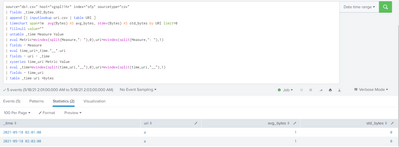
this is not helping, i got the same output as attached
- Mark as New
- Bookmark Message
- Subscribe to Message
- Mute Message
- Subscribe to RSS Feed
- Permalink
- Report Inappropriate Content
Are getting other URI in below search?
source="ds1.csv" host="vgspl11hr" index="sfp" sourcetype="csv"
| fields _time,URI,Bytes
| append [| inputlookup uri.csv | table URI ]
| timechart span=1m avg(Bytes) AS avg_bytes, stdev(Bytes) AS std_bytes by URI limit=0- Mark as New
- Bookmark Message
- Subscribe to Message
- Mute Message
- Subscribe to RSS Feed
- Permalink
- Report Inappropriate Content
When i specify a time window of 4 mins (5/18/21 2:01:00.000 AM to 5/18/21 2:05:00.000 AM), the query returns all URIs .
when i specify a time window of 2 mins (5/18/21 2:01:00.000 AM to 5/18/21 2:03:00.000 AM), the query returns the records for the existing URIs in that time window, in my case URI=a.
So the issue occurs when the time window in which i am running the search is not having events with URI=b.
However, i was able to sort this out by using:
| sort _time
| append
[| inputlookup uri.csv
| table uri]
| rename _time AS t
| filldown t
| rename t AS _time
| dedup _time uri
This way a record will be created for URI=b in the last bucket in the time window.


Join the Splunk Community Slack to learn, troubleshoot, and make connections with fellow Splunk practitioners in real time!
Join Splunk User Groups to connect and learn in-person by region or remotely by topic or industry.
Where Innovation Takes Flight: The Splunk4Aviation Flight Sim Lands at .conf26
Turn Cisco Telemetry Into Action with Cisco Data Fabric, powered by the Splunk ...
Persistent Queue at TcpOut — One of Splunk's Most Practical Features
