
Join the Conversation
- Find Answers
- :
- Apps & Add-ons
- :
- Splunk Development
- :
- Splunk Dev
- :
- Can I select specified fields with the Python SDK?
- Subscribe to RSS Feed
- Mark Topic as New
- Mark Topic as Read
- Float this Topic for Current User
- Bookmark Topic
- Subscribe to Topic
- Mute Topic
- Printer Friendly Page
- Mark as New
- Bookmark Message
- Subscribe to Message
- Mute Message
- Subscribe to RSS Feed
- Permalink
- Report Inappropriate Content

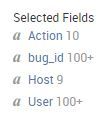
I'd like to write a python script to select only certain fields such as the UI does (example below) and load them into a pandas dataframe.
- Mark as New
- Bookmark Message
- Subscribe to Message
- Mute Message
- Subscribe to RSS Feed
- Permalink
- Report Inappropriate Content


Yes, just use the fields command in your search string:
...|fields Action bug_id Host User
- Mark as New
- Bookmark Message
- Subscribe to Message
- Mute Message
- Subscribe to RSS Feed
- Permalink
- Report Inappropriate Content
Yes, just use the fields command in your search string:
...|fields Action bug_id Host User
- Mark as New
- Bookmark Message
- Subscribe to Message
- Mute Message
- Subscribe to RSS Feed
- Permalink
- Report Inappropriate Content
Awesome, thank you so much! I wasn't able to find this in the documentation.
EDIT: is there away to get rid of the extra garbage too, I am presuming something like ...|exclude fields yada yada?
Action,User,"b_Project",Host,"_bkt","_cd","_indextime","_kv","_raw","_serial","_si","_sourcetype","_subsecond","_time"
- Mark as New
- Bookmark Message
- Subscribe to Message
- Mute Message
- Subscribe to RSS Feed
- Permalink
- Report Inappropriate Content
It's ... | fields - thisOne thatOne
minus removes... plus adds / technically works too if you need to add a blank field, or if you just want to be verbose
... | fields + Action bug_id Host User
is same as
... | fields Action bug_id Host User



Join the Splunk Community Slack to learn, troubleshoot, and make connections with fellow Splunk practitioners in real time!
Join Splunk User Groups to connect and learn in-person by region or remotely by topic or industry.
Meet Splunk Observability Studio: AI-Assisted OpenTelemetry Instrumentation Without ...
Federated Search for Cisco Security and Analytics Logging (SAL) is now GA on Splunk ...
Your Path to AgenticOps: AI Experiences for Every Splunk Practitioner
