
Join the Conversation
- Find Answers
- :
- Splunk Products
- :
- Splunk Cloud Platform
- :
- Re: jQuery Upgrade Readiness Scan Notification
- Subscribe to RSS Feed
- Mark Topic as New
- Mark Topic as Read
- Float this Topic for Current User
- Bookmark Topic
- Subscribe to Topic
- Mute Topic
- Printer Friendly Page
- Mark as New
- Bookmark Message
- Subscribe to Message
- Mute Message
- Subscribe to RSS Feed
- Permalink
- Report Inappropriate Content

Hello everyone,
I am again asking for your valuable help.
I received this notification by mail, which I do not understand at all.
I refer to the link you share for documentation and I am still lost.
I don't know if I don't know anything or if Splunk assumes that everyone knows the tool from top to bottom.
Hello Splunk Admin,

The Upgrade Readiness App detected 2 apps with deprecated jQuery on the https://xxxxxx.splunkcloud.com:443 instance. The Upgrade Readiness App detects apps with outdated Python or jQuery to help Splunk admins and app developers prepare for new releases of Splunk in which lower versions of Python and jQuery are removed. For more details about your outdated apps, see the Upgrade Readiness App on your Splunk instance listed above.

To address the issues detected by the Upgrade Readiness App, work with app developers to update their apps to use only Python 3 or higher and jQuery 3.5 or higher.

For more information about addressing issues with outdated apps, removing lower versions of Python or jQuery, and how to manage these emails, see
https://docs.splunk.com/Documentation/URA.
- Mark as New
- Bookmark Message
- Subscribe to Message
- Mute Message
- Subscribe to RSS Feed
- Permalink
- Report Inappropriate Content


Open the "Upgrade Readiness App" app on your Splunk Cloud search head and click on the "jQuery Scan" tab. There you will find a list of apps that failed the jQuesy checks. Click on each app to see the details. For private apps, the dashboard will give the exact file containing the error. The docs page referenced in email should provide enough information to correct the problem. If it doesn't then post a more specific question.
If this reply helps you, Karma would be appreciated.
- Mark as New
- Bookmark Message
- Subscribe to Message
- Mute Message
- Subscribe to RSS Feed
- Permalink
- Report Inappropriate Content
Open the "Upgrade Readiness App" app on your Splunk Cloud search head and click on the "jQuery Scan" tab. There you will find a list of apps that failed the jQuesy checks. Click on each app to see the details. For private apps, the dashboard will give the exact file containing the error. The docs page referenced in email should provide enough information to correct the problem. If it doesn't then post a more specific question.
If this reply helps you, Karma would be appreciated.
- Mark as New
- Bookmark Message
- Subscribe to Message
- Mute Message
- Subscribe to RSS Feed
- Permalink
- Report Inappropriate Content
Hello, thank you very much for replying

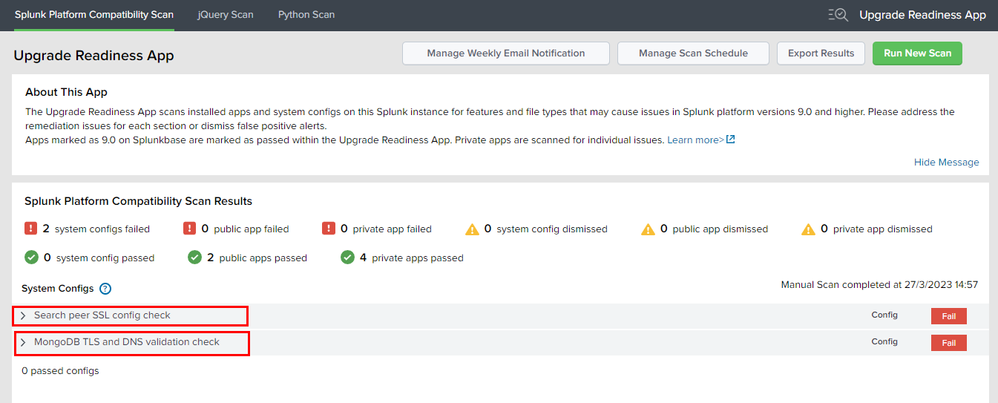
Do you know what "Search peer SSL config check" and "MongoDB TLS and DNS validation check" refers to?
- Mark as New
- Bookmark Message
- Subscribe to Message
- Mute Message
- Subscribe to RSS Feed
- Permalink
- Report Inappropriate Content
Yes, both refer to settings we have no control over as Splunk Cloud users. Submit a Support Request then click on each entry and click the "Dismiss Config" button to stop getting emails about them.
If this reply helps you, Karma would be appreciated.
- Mark as New
- Bookmark Message
- Subscribe to Message
- Mute Message
- Subscribe to RSS Feed
- Permalink
- Report Inappropriate Content
Could you please assist me , on what could be the workaround for the same for Splunk on premise setup ?


Join the Splunk Community Slack to learn, troubleshoot, and make connections with fellow Splunk practitioners in real time!
Join Splunk User Groups to connect and learn in-person by region or remotely by topic or industry.
Agentic SOC Triage: Investigating Splunk ES Notables with MCP Server and a Local LLM
All Work and No Play? Not at .conf26! Unwind at These Evening Events
Join the Hackathon at .conf26 and build a No-Code AI agent
