
Join the Conversation
- Find Answers
- :
- Splunk Products
- :
- Splunk Cloud Platform
- :
- Splunk cloud app loading issue
- Subscribe to RSS Feed
- Mark Topic as New
- Mark Topic as Read
- Float this Topic for Current User
- Bookmark Topic
- Subscribe to Topic
- Mute Topic
- Printer Friendly Page
- Mark as New
- Bookmark Message
- Subscribe to Message
- Mute Message
- Subscribe to RSS Feed
- Permalink
- Report Inappropriate Content
Splunk cloud app loading issue

Hi
I have installed new app from splunkbase on splunkcloud trial platform. After successful installation app is showing continuous loading message. When checked using splunk search = _internal for error following details are shown Can anyone guide me on how to proceed with resolving this issue?
https://splunkbase.splunk.com/app/4486/
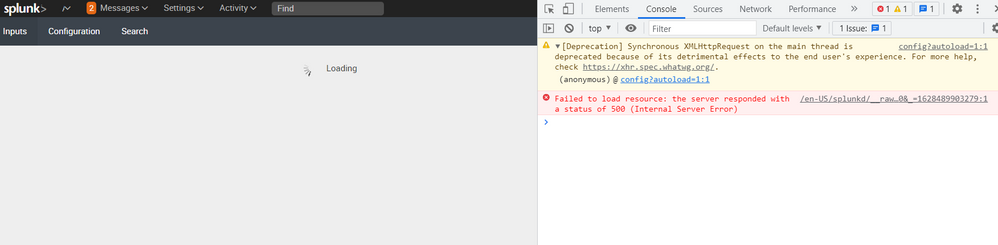
08-07-2021 11:40:08.253 +0000 ERROR AdminManagerExternal [5376 TcpChannelThread] - Stack trace from python handler:\nTraceback (most recent call last):\n File "/opt/splunk/lib/python3.7/site-packages/splunk/admin.py", line 154, in init\n hand = handler(mode, ctxInfo)\n File "/opt/splunk/etc/apps/TA-securityscorecard/bin/ta_securityscorecard/aob_py3/splunktaucclib/rest_handler/admin_external.py", line 67, in __init__\n get_splunkd_uri(),\n File "/opt/splunk/etc/apps/TA-securityscorecard/bin/ta_securityscorecard/aob_py3/solnlib/splunkenv.py", line 210, in get_splunkd_uri\n scheme, host, port = get_splunkd_access_info()\n File "/opt/splunk/etc/apps/TA-securityscorecard/bin/ta_securityscorecard/aob_py3/solnlib/splunkenv.py", line 182, in get_splunkd_access_info\n 'server', 'sslConfig', 'enableSplunkdSSL')):\n File "/opt/splunk/etc/apps/TA-securityscorecard/bin/ta_securityscorecard/aob_py3/solnlib/splunkenv.py", line 230, in get_conf_key_value\n stanzas = get_conf_stanzas(conf_name)\n File "/opt/splunk/etc/apps/TA-securityscorecard/bin/ta_securityscorecard/aob_py3/solnlib/splunkenv.py", line 284, in get_conf_stanzas\n out[section] = {item[0]: item[1] for item in parser.items(section)}\n File "/opt/splunk/etc/apps/TA-securityscorecard/bin/ta_securityscorecard/aob_py3/backports/configparser/__init__.py", line 870, in items\n return [(option, value_getter(option)) for option in d.keys()]\n File "/opt/splunk/etc/apps/TA-securityscorecard/bin/ta_securityscorecard/aob_py3/backports/configparser/__init__.py", line 870, in <listcomp>\n return [(option, value_getter(option)) for option in d.keys()]\n File "/opt/splunk/etc/apps/TA-securityscorecard/bin/ta_securityscorecard/aob_py3/backports/configparser/__init__.py", line 867, in <lambda>\n section, option, d[option], d)\n File "/opt/splunk/etc/apps/TA-securityscorecard/bin/ta_securityscorecard/aob_py3/backports/configparser/__init__.py", line 387, in before_get\n self._interpolate_some(parser, option, L, value, section, defaults, 1)\n File "/opt/splunk/etc/apps/TA-securityscorecard/bin/ta_securityscorecard/aob_py3/backports/configparser/__init__.py", line 437, in _interpolate_some\n "found: %r" % (rest,))\nbackports.configparser.InterpolationSyntaxError: '%' must be followed by '%' or '(', found: '%'\n
Thanks &Regards
Raghavendra
- Mark as New
- Bookmark Message
- Subscribe to Message
- Mute Message
- Subscribe to RSS Feed
- Permalink
- Report Inappropriate Content

@raghavendrakb Do you by chance have a custom login_content in your web.conf file? If not, I would check all your conf files for multi-line entries and make sure that your multi-lines have a space in them.
We just encountered a similar issue where we had a multi-line login banner and the last line was in column 1. Moving the last line to column 2 resolved this issue.
- Mark as New
- Bookmark Message
- Subscribe to Message
- Mute Message
- Subscribe to RSS Feed
- Permalink
- Report Inappropriate Content


Contact the developer of the app using the link on the app's splunkbase page.
If this reply helps you, Karma would be appreciated.


Join the Splunk Community Slack to learn, troubleshoot, and make connections with fellow Splunk practitioners in real time!
Join Splunk User Groups to connect and learn in-person by region or remotely by topic or industry.
SOC4Kafka - New Kafka Connector Powered by OpenTelemetry
Rounding off the Splunk Dashboard Contest
A Four Part Event Series: AI + Observability: AI Agents, LLMs, Apps, & Infrastructure
