
Join the Conversation
- Find Answers
- :
- Splunk Products
- :
- Splunk Cloud Platform
- :
- Receiving a Splunk app permission issue?
- Subscribe to RSS Feed
- Mark Topic as New
- Mark Topic as Read
- Float this Topic for Current User
- Bookmark Topic
- Subscribe to Topic
- Mute Topic
- Printer Friendly Page
- Mark as New
- Bookmark Message
- Subscribe to Message
- Mute Message
- Subscribe to RSS Feed
- Permalink
- Report Inappropriate Content
Receiving a Splunk app permission issue?

We have an custom app which contains just props and transforms configs...
When we try to upload app.tgz file. it throws below failures
Need some insights on this.
Source code and binaries standards
[ failure ] Check that files outside of the bin/ and appserver/controllers directory do not have execute permissions and are not .exe files. On Unix platform, Splunk recommends 644 for all app files outside of the bin/ directory, 644 for scripts within the bin/ directory that are invoked using an interpreter (e.g. python my_script.py or sh my_script.sh), and 755 for scripts within the bin/ directory that are invoked directly (e.g. ./my_script.sh or ./my_script). On Windows platform, Splunk recommends removing user's FILE_GENERIC_EXECUTE for all app files outside of the bin/ directory except users in ['Administrators', 'SYSTEM', 'Authenticated Users', 'Administrator'].
-
This file has execute permissions for owners, groups, or others. File: default/transforms.conf
-
This file has execute permissions for owners, groups, or others. File: metadata/default.meta
-
This file has execute permissions for owners, groups, or others. File: default/props.conf
-
This file has execute permissions for owners, groups, or others. File: default/app.conf
- Mark as New
- Bookmark Message
- Subscribe to Message
- Mute Message
- Subscribe to RSS Feed
- Permalink
- Report Inappropriate Content
I could resolve this issue following package app method explained in this link.
Package apps | Documentation | Splunk Developer Program
- Mark as New
- Bookmark Message
- Subscribe to Message
- Mute Message
- Subscribe to RSS Feed
- Permalink
- Report Inappropriate Content
@richgalloway thanks for the solution..
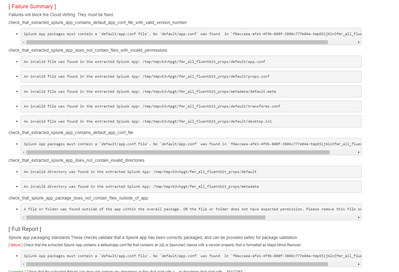
I tried to change the mode in linux box. I see these failures. Any idea on this?
- Mark as New
- Bookmark Message
- Subscribe to Message
- Mute Message
- Subscribe to RSS Feed
- Permalink
- Report Inappropriate Content


It looks like the app was not re-packaged properly on the Linux box. Perhaps an extra directory level was added.
If this reply helps you, Karma would be appreciated.
- Mark as New
- Bookmark Message
- Subscribe to Message
- Mute Message
- Subscribe to RSS Feed
- Permalink
- Report Inappropriate Content
Vetting apps is an iterative process. You fix errors, re-package and re-submit then see what new errors are reported. Repeat the process until the app passes.
Most error messages are fairly self-explanatory. You can find some helpful information about them at https://dev.splunk.com/enterprise/reference/appinspect/appinspectcheck/
As for file permissions, directories should be set to 644 and other files to 600.
If this reply helps you, Karma would be appreciated.
- Mark as New
- Bookmark Message
- Subscribe to Message
- Mute Message
- Subscribe to RSS Feed
- Permalink
- Report Inappropriate Content
Don't use Windows to package apps for Splunk Cloud. This will happen every time. The only workaround is to package on a Linux box or a Mac. You don't have to have Splunk installed on it. Just transfer the .tgz file, explode it, fix the permissions, and re-tar it.
If this reply helps you, Karma would be appreciated.
- Mark as New
- Bookmark Message
- Subscribe to Message
- Mute Message
- Subscribe to RSS Feed
- Permalink
- Report Inappropriate Content
I had to set 744 permissions for folders, that solved my issue


Join the Splunk Community Slack to learn, troubleshoot, and make connections with fellow Splunk practitioners in real time!
Join Splunk User Groups to connect and learn in-person by region or remotely by topic or industry.
Free Professional Services for .conf26 Attendees
Defend at Machine Speed: Your Guide to Security Sessions at .conf26
Where Innovation Takes Flight: The Splunk4Aviation Flight Sim Lands at .conf26
