
Join the Conversation
- Find Answers
- :
- Splunk Administration
- :
- Admin Other
- :
- Security
- :
- How do I reset license expired warnings on Splunk ...
- Subscribe to RSS Feed
- Mark Topic as New
- Mark Topic as Read
- Float this Topic for Current User
- Bookmark Topic
- Subscribe to Topic
- Mute Topic
- Printer Friendly Page
- Mark as New
- Bookmark Message
- Subscribe to Message
- Mute Message
- Subscribe to RSS Feed
- Permalink
- Report Inappropriate Content
How do I reset license expired warnings on Splunk Enterprise?

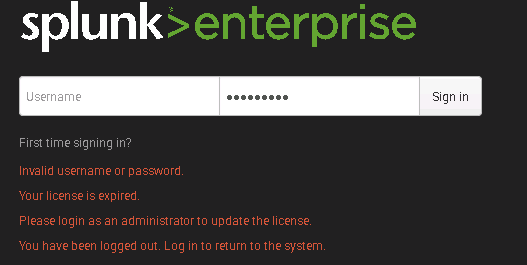
I am getting the following licensing errors. It requires me to login as admin, and does not allow any queries.
I am relatively new to Splunk, but I did search on the Splunk Enterprise Reset Warnings but got no matches, just general licensing errors.
How do I eliminate this so I can login Normally?
Thank you



- Mark as New
- Bookmark Message
- Subscribe to Message
- Mute Message
- Subscribe to RSS Feed
- Permalink
- Report Inappropriate Content


What version are you running?
Did your enterprise licenses expire or did you go over the limit 5 days within a one month period? You need to contact support so they can reset it or provide you with new license files
- Mark as New
- Bookmark Message
- Subscribe to Message
- Mute Message
- Subscribe to RSS Feed
- Permalink
- Report Inappropriate Content
Thanks for the response
Splunk 6.3.2
Enterprise license is good until 2038.
It is just the Splunk Enterprise Reset Warnings that expired
- Mark as New
- Bookmark Message
- Subscribe to Message
- Mute Message
- Subscribe to RSS Feed
- Permalink
- Report Inappropriate Content


Did you try deleting that expired license and leaving just the valid one?
- Mark as New
- Bookmark Message
- Subscribe to Message
- Mute Message
- Subscribe to RSS Feed
- Permalink
- Report Inappropriate Content
I bit the bullet and deleted that license - I can log in now as a normal user and run queries. It still yells about a licensing error, but I think that is part of another issue we are fighting.
Thank you
- Mark as New
- Bookmark Message
- Subscribe to Message
- Mute Message
- Subscribe to RSS Feed
- Permalink
- Report Inappropriate Content
Thanks for the reply,
Splunk 6.3.2
I did not want to delete that expired license until I at least figured out if/how I would replace it
Enterprise license is good until 2038

New Year, New Changes for Splunk Certifications
Stay Connected: Your Guide to January Tech Talks, Office Hours, and Webinars!
[Puzzles] Solve, Learn, Repeat: Reprocessing XML into Fixed-Length Events
