
Turn on suggestions
Auto-suggest helps you quickly narrow down your search results by suggesting possible matches as you type.
Reporting
×
Join the Conversation
Without signing in, you're just watching from the sidelines. Sign in or Register to connect, share, and be part of the Splunk Community.
- Find Answers
- :
- Using Splunk
- :
- Other Using Splunk
- :
- Reporting
- :
- Re: VIEW n events pear second
Options
- Subscribe to RSS Feed
- Mark Topic as New
- Mark Topic as Read
- Float this Topic for Current User
- Bookmark Topic
- Subscribe to Topic
- Mute Topic
- Printer Friendly Page
- Mark as New
- Bookmark Message
- Subscribe to Message
- Mute Message
- Subscribe to RSS Feed
- Permalink
- Report Inappropriate Content

gbriones
Engager
04-14-2021
08:51 AM
I need to show first 40 events pear seconds in the range 15 minutes.
1 Solution
- Mark as New
- Bookmark Message
- Subscribe to Message
- Mute Message
- Subscribe to RSS Feed
- Permalink
- Report Inappropriate Content

ITWhisperer

SplunkTrust
04-14-2021
09:48 AM
... | sort _time
| eval seconds=floor(_time)
| streamstats count by seconds
| where count <= 40- Mark as New
- Bookmark Message
- Subscribe to Message
- Mute Message
- Subscribe to RSS Feed
- Permalink
- Report Inappropriate Content
gbriones
Engager
04-14-2021
09:45 AM
For example, if 100 events fell in one second, I need to only take the first 40 and continue with the next second
- Mark as New
- Bookmark Message
- Subscribe to Message
- Mute Message
- Subscribe to RSS Feed
- Permalink
- Report Inappropriate Content
ITWhisperer
SplunkTrust
04-14-2021
08:59 AM
Assuming your search is over a 15 minute period, round time to seconds, and count events by second, then only keep the first 40 per second
... | eval seconds=round(_time,0)
| streamstats count by seconds
| where count <= 40- Mark as New
- Bookmark Message
- Subscribe to Message
- Mute Message
- Subscribe to RSS Feed
- Permalink
- Report Inappropriate Content
gbriones
Engager
04-14-2021
09:11 AM
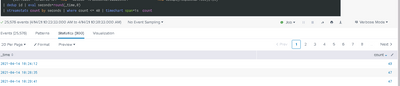
Thanks for respond but I see to look more 40 events pear second:
| dedup id | eval seconds=round(_time,0)
| streamstats count by seconds | where count <= 40 | timechart span=1s count
- Mark as New
- Bookmark Message
- Subscribe to Message
- Mute Message
- Subscribe to RSS Feed
- Permalink
- Report Inappropriate Content
ITWhisperer
SplunkTrust
04-14-2021
09:17 AM
Does sorting by time first help?
... | sort _time
| eval seconds=round(_time,0)
| streamstats count by seconds
| where count <= 40- Mark as New
- Bookmark Message
- Subscribe to Message
- Mute Message
- Subscribe to RSS Feed
- Permalink
- Report Inappropriate Content
gbriones
Engager
04-14-2021
09:30 AM
keeps showing results greater than 40 😞
- Mark as New
- Bookmark Message
- Subscribe to Message
- Mute Message
- Subscribe to RSS Feed
- Permalink
- Report Inappropriate Content
ITWhisperer
SplunkTrust
04-14-2021
09:48 AM
... | sort _time
| eval seconds=floor(_time)
| streamstats count by seconds
| where count <= 40

Got questions? Get answers!
Join the Splunk Community Slack to learn, troubleshoot, and make connections with fellow Splunk practitioners in real time!
Meet up IRL or virtually!
Join Splunk User Groups to connect and learn in-person by region or remotely by topic or industry.
Get Updates on the Splunk Community!
Your Feedback. Our Roadmap. Visit the PX Feedback Booth at .conf26
You use Splunk every day, come and help shape what's next.
Save Your Seat: Product-Focused Sessions at ...
Agentic SOC Triage: Investigating Splunk ES Notables with MCP Server and a Local LLM
The Problem: Too Many Alerts, Too Little Context Security operations teams running Splunk Enterprise Security ...
Painting a Clearer Picture: Creating Cross-Domain Visibility with AI Canvas
Watch Now
Painting a Clearer Picture: Creating Cross-Domain Visibility with AI Canvas
Do you ever feel ...
